
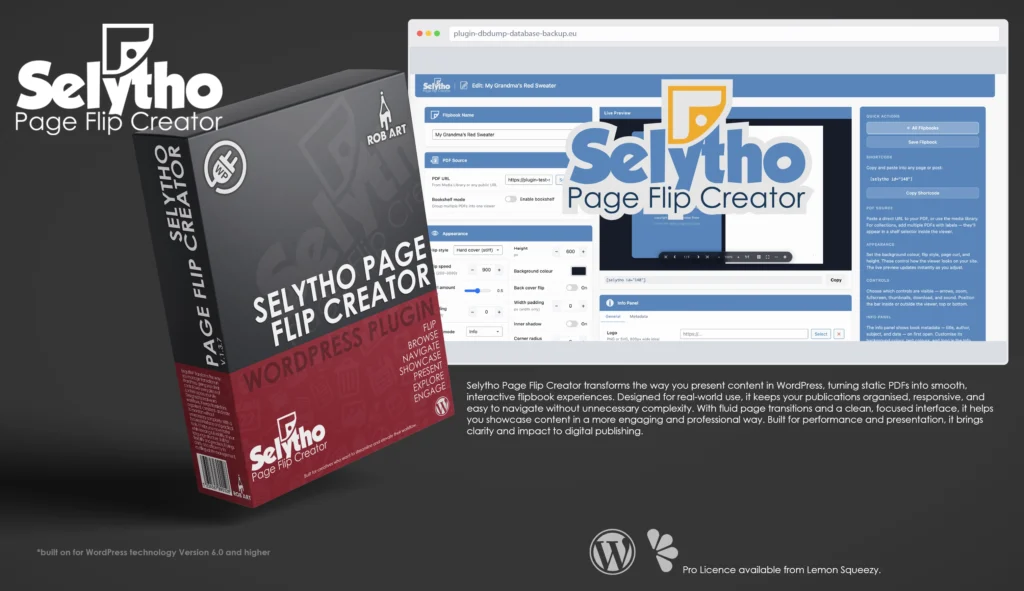
Selytho Page Flip Creator
Your WordPress content—interactive flipbooks from one simple interface.
Selytho Page Flip Creator is a professional flipbook plugin built specifically for WordPress, designed to transform static PDFs into smooth, interactive reading experiences. It gives site owners, developers, and agencies a clear, engaging way to present publications without relying on external viewers or clunky embeds. Instead of treating documents as flat files, Selytho Page Flip Creator brings them into the WordPress admin as a structured, accessible publishing tool.
Designed for real-world use, Selytho Page Flip Creator focuses on clarity and presentation. The interface keeps your flipbooks organised and easy to manage, while delivering fluid page transitions and responsive layouts that feel natural across devices. Content remains the focus, with clean visuals and intuitive navigation that enhance readability without distraction.
At its core, Selytho Page Flip Creator delivers a seamless viewing experience. Pages turn smoothly, layouts adapt to screen size, and documents load efficiently to maintain performance. Whether you’re showcasing brochures, catalogues, or reports, it provides a polished way to present content that feels modern and professional.
Beyond presentation, Selytho Page Flip Creator is built for control. You can manage multiple publications, update content easily, and integrate flipbooks directly into your pages without complex setup. The system is designed to fit naturally into existing workflows, making it simple to maintain and expand your content library.
Selytho Page Flip Creator is built for those who want their content to do more than just display. Whether you’re publishing marketing materials or internal documents, it provides a reliable, structured way to present information with clarity and impact. With a clean interface and smooth performance, it turns static documents into engaging, interactive experiences.
Key Features
- Flipbook Dashboard – Manage and organise your publications in a clean, card-based interface.
- PDF to Flipbook – Instantly convert static PDFs into smooth, interactive reading experiences.
- Responsive Viewing – Seamless performance across desktop, tablet, and mobile devices.
- Smooth Page Transitions – Natural page-flip animations for a polished, realistic feel.
Content Navigation – Easy browsing with intuitive controls and structured page flow. - Multiple Publications – Handle brochures, catalogues, and documents in one place.
- Embed Anywhere – Insert flipbooks into pages and posts with simple integration.
- Performance Optimised – Efficient loading for fast, fluid viewing experiences.
Customisation Options (Pro) – Adjust display, behaviour, and presentation to suit your content. - Clean Interface – Distraction-free design that keeps focus on your publication.
- Lightweight & Efficient – Built to run smoothly without slowing your site.
- Professional Workflow Focus – Designed for creators, agencies, and site owners who value presentation and control.
Requirements:
- Minimum WP Version: 6.0
- Minimum PHP Version: 7.4
- Internet Connection
- Free Version or Valid Licence for Pro Version
*Please note this plugin has the following built in languages: English
Plugin News
Happy to say we are in the process of making and deploying a dedicated support hub. Stay tuned for more details. Their will be links posted in the plugin as well as any known locations.
Changelog/Bugs
Changelog
Selytho Page Flip Creator - Version History
Version 1.4.0 Minor
2026-07-22- ### Added
- - Shoppable Catalog (Pro): map the products shown on each catalog page and readers see them as clickable pills in panels beside the flipbook, with a per-flipbook choice of panel position — automatic, pinned to the sides, or below the book
- - Catalog bookmarks (Pro): a bookmark button beside each product lets readers save items while flipping instead of leaving the catalog; saved items are listed in the site menu, so opening one never loses the rest
- - Collapsible settings cards in the flipbook editor, with the open or closed state remembered between visits
- - A page-change event in the viewer engine, so other code can react when the reader turns to a new spread
- ### Changed
- - The flipbook editor\\\'s live preview now stays in view while the settings below it are scrolled
- - Success notices in the editor clear themselves after a few seconds instead of remaining on screen
- - The out-of-office notice now says that auto-replies are switched off, rather than implying the whole module is inactive
- ### Fixed
- - Metadata overrides were never saved: two form fields shared one name, so everything typed was replaced by the previously stored values
- - The copyright override was dropped by the save routine even when the other metadata fields saved correctly
- - Saved metadata vanished from the editor on load, because the panel was rebuilt empty after the stored values had been rendered
- - Special characters such as the copyright symbol were corrupted on save by an extra unescaping step
- - Jumping to the first page, last page or a thumbnail did not record a page view, under-counting those readers in the statistics
- - In centre-cover mode, jumping to the last page left the sideways cover offset in place, so every following spread was off-centre
Version 1.3.15 Patch
2026-07-01- ### Changed
- - Pointed the Pro upgrade link at the live checkout ahead of the first public
- release.
Version 1.3.14 Patch
2026-07-01- ### Changed
- - Renamed the internal admin menu identifiers and the public shortcode to use
- the plugin\\\'s unique prefix, removing the last non-prefixed names and avoiding
- any possible clash with other plugins.
- ### Removed
- - Dropped the legacy unprefixed shortcode alias; the prefixed shortcode is now
- the single registered tag.
Version 1.3.13 Patch
2026-06-30- ### Added
- - Control bar position, mode and distance are now available to all users in the
- free editor\\\'s Controls panel.
- ### Changed
- - Soft page-curl is now supplied solely by the Pro add-on. The free build no
- longer contains any disabled or restricted soft-curl code, bringing it into
- full trialware compliance.
- - The primary shortcode is now the prefixed form; the original shortcode is kept
- as a working alias so existing embeds continue to render unchanged.
- ### Security
- - All admin-screen request reads are now explicitly sanitised, and request data
- passed to extension hooks is sanitised before dispatch.
Version 1.3.12 Patch
2026-06-29- ### Security
- - Updated the bundled PDF rendering library off a version carrying a known
- security advisory to the current release.
- ### Changed
- - Updated the bundled 3D engine library to its current release.
- - The custom info-panel logo is now exclusively a paid-tier feature — the free
- build contains none of its handling (no field, no save, no default, no
- output); the free viewer shows the bundled logo and the add-on injects a
- custom one. Completes the trialware-removal pass.
- - Raised page-texture resolution for sharper on-screen text, automatically
- using a lighter resolution for very large documents to cap memory.
- ### Fixed
- - Page rendering after the engine/library updates: pages render as crisp white
- paper instead of a grey-tinted, soft-text appearance.
- - The viewer no longer stalls if a single page fails to render; the remaining
- pages continue loading.
- > Addresses the review feedback (trialware + out-of-date libraries). No paid
- > features ship in the free build.
Version 1.3.11 Security
2026-06-28- ### Security
- - Completed the editor output-escaping pass: the remaining conditional style
- attributes and numeric input bounds are now escaped at the point of output
- (restructured so each attribute value passes through an escaping helper).
- Clears the stricter no-bare-echo scan. No change to behaviour or appearance.
Version 1.3.10 Security
2026-06-28- ### Security
- - Output escaping hardened across the admin screens and the front-end viewer
- template. Every dynamic value is now escaped at the point of output (numbers,
- attributes, and intentional markup using the appropriate escaping helper),
- satisfying the WordPress.org review standard with annotations disabled. No
- change to behaviour or appearance.
Version 1.3.9 Patch
2026-06-28- ### Changed
- - Raised the minimum supported WordPress version to 6.2, matching the secure
- identifier placeholder used in the view-statistics queries.
- ### Fixed
- - Output escaping on the editor Pro upgrade advert (logo image and purchase
- link) is now applied at the point of output, satisfying the WordPress.org
- review standard for escaped output.
Version 1.3.8 Patch
2026-06-28- ### Added
- - Reader keyboard and mouse shortcut reference in the editor\\\'s Controls help
- sidebar (page turn, flip, zoom, pan, and touch gestures).
- ### Changed
- - Info-panel book tabs now switch the displayed book in the viewer, not just
- its metadata.
- - Tidied a stray product label so the branding reads consistently as \\\"Selytho\\\".
- ### Fixed
- - Collections (multi-PDF bookshelves) no longer fail with a \\\"no PDF URL
- provided\\\" message; a shelf with one or more books renders correctly.
- - The editor live preview no longer overflows its frame when padding is
- increased — it now scales the viewer to fit the preview box.
Version 1.3.7 Minor
2026-07-12- ### Added
- - Free-build upgrade advert that takes the place of the editor Pro Features
- panel, listing what the Pro add-on unlocks with a direct purchase link.
- ### Changed
- - The editor Pro Features panel now renders the real, enabled controls only
- for active Pro licences. Without Pro it is replaced by the upgrade advert, so
- no disabled or locked feature controls are ever shown in the free build.
- - Completed the free/Pro split: all Pro feature defaults, field saving, viewer
- output attributes, the per-flipbook sound picker, and the global Pro settings
- are now supplied exclusively by the Pro add-on through injection hooks.
- - Updated the bundled 3D engine library to a current maintained release.
- ### Fixed
- - The flipbook editor no longer errors when the Pro add-on is absent; the
- sound-picker wiring now bails cleanly when its Pro markup is not present.
- > Trialware-removal completion for WordPress.org compliance — the free build is
- > fully functional on its own and contains no present-but-locked Pro features.
Version 1.3.6 Security
2026-06-20- ### Security
- - View-tracking AJAX endpoint (`slyth_track`, public/nopriv) now verifies a
- request-origin nonce issued to the viewer. The endpoint stays anonymous
- (it must accept logged-out traffic) but no longer accepts requests without
- a valid nonce, guarding against off-site spam.
- ### Fixed
- - All view-statistics queries (`slyth_views` table) now use `$wpdb->prepare()`
- with the `%i` identifier placeholder instead of interpolating the table name.
- - Admin sidebar and Pro-promo output now pass through `wp_kses_post()` instead
- of being echoed raw with suppression comments.
- > No change to viewer behaviour, tracking, or statistics — review-compliance
- > hardening only.
Version 1.3.5 Minor
2026-06-01- ### Added
- - \\\"Get Pro\\\" link on the plugins-list row, shown on the free tier only
- - Upsell-only Pro Features presentation in the free build, with clear benefit bullets and no locked controls
- - Product-page link on the \\\"Created with\\\" credit, consistent across the editor preview and the front end
- - Plugin menu now stays open with all items visible while editing a flipbook
- ### Changed
- - Renamed the plugin to \\\"Selytho Page Flip Creator\\\", removing the restricted \\\"WP\\\" term from the name, slug and text domain
- - Soft page-curl is now a genuine Pro-only feature: no soft-cover rendering code ships in the free build
- - Licence activation, status and details now come entirely from the Pro add-on; the free upgrade screen is advert-only
- - Redesigned the upgrade overlay with a taller hero image and added custom-logo and remove-branding selling points
- ### Removed
- - In-plugin Pro auto-installer and the free-build licence-key entry
- - Unused bundled legacy viewer and the StPageFlip library
- ### Fixed
- - Flipbooks rendered as a tall, letter-boxed sliver inside block themes; constrained-layout width is now respected
Version 1.3.4
2026-05-27- ### Fixed
- - Select dropdowns: `min-width` bumped to 110px so the selected option text no longer crowds the chevron arrow
Version 1.3.3
2026-05-27- ## Fixed
- - Native colour pickers (`<input type=\\\"color\\\">`) were rendered as a thin line under WordPress 7.0 — restored to the proper 48×30 swatch chip
- - Select dropdowns: added a custom chevron arrow and right padding so the WP 7.0 native arrow no longer overlaps the option text
Version 1.3.2
2026-05-27- ### Fixed
- - Pro Features card \\\"Upgrade\\\" button and Licence card \\\"Get Pro\\\" button — both now open the in-plugin upgrade modal instead of navigating to robsnow.eu (previous markup used `slyth-upgrade-trigger` class with `href=\\\"#\\\"`, which navigated away)
Version 1.3.0 Minor
2026-04-29- ### RTL Mode
- - Full RTL rework — replaced `bookGroup.scale.x = -1` mirror hack with proper page-order reversal, correct hinge direction, and correct flip animations
- - RTL sheets now hinge on the right; rotation goes 0 → +π (forward) matching physical right-to-left book behaviour
- - Textures assigned in reverse order for RTL; spine shadow baked on correct (odd) pages
- - `deformPage` curl formula uses per-sheet `rtl` flag so curl arcs in the right direction
- - `raycastSheet` NDC x threshold inverted for RTL — unflipped pages sit on the left side of screen
- - Drag direction corrected for RTL (`dragDir = +1`) — drag right to advance, drag left to reverse
- - Corner click detection uses RTL-aware flipped threshold and world corner positions
- - `onPointerUp` snap target `t` uses correct sign for RTL rotation
- ### Controls & Layout
- - Outside-mode controls bar height included in `syncPadding` — wrap expands to fit controls below book
- - Outside controls centred via flex column on wrap; no longer left-aligns after fullscreen exit
- - Fullscreen exit handler restores flex layout for outside-mode wraps
- - All popup panels (shelf, thumbnails, more, settings) open downward when controls are positioned at top
- ### Info Panel
- - Tab switch now does a full HTML rebuild — show/hide field flags applied correctly for each book
- - Logo and credit line preserved correctly after tab switch
- ### Admin — General Book Info
- - Logo media picker now filters to images (PNG/SVG) not PDFs
- - Logo preview updates immediately in the info panel preview on select or clear
- - Logo hint updated: \\\"PNG or SVG, 800px wide ideal\\\"
- ### Collections (Bookshelf)
- - Separate `flwp_collection` CPT registered alongside `flwp_flipbook`
- - Switching to shelf mode when a book title/PDF is already set prompts for confirmation before discarding
- - Save button label updates to \\\"Save Collection\\\" in shelf mode
- - Shortcode and list page accept both post types
- ### Engine
- - Spine shadow CSS overlay now tracks the book correctly when panned or zoomed
Version 1.2.2 Minor
2026-04-18- ### Changed
- - Languages folder added; `fliipsterwp_backend.pot` and `fliipsterwp_frontend.pot` created covering all admin and visitor-facing strings
- - `pro/` folder structure confirmed at plugin root; loader path verified consistent with suite convention
Version 1.2.1 Minor
2026-04-13- ### Viewer
- - Spine shadow restored — CSS gradient overlay, ramps in at 25% turn, peaks at 50%, fades to ~10% on land, hidden on cover page
- - Spine shadow hidden on cover/first page, fades in smoothly on first flip
- - Info panel now dismisses immediately on drag start (previously only on click)
- - Settings/dev panel disabled in admin preview mode — button hidden, blur overlay removed
- ### Admin Preview
- - Preview well height fixed — no longer grows when book height setting is changed
- - Preview always renders at fixed internal height (600px) regardless of height setting
- - Outside controls mode no longer inflates the preview well
- - Popup panels (thumbnails, more menu) now position correctly inside the scaled preview
- - All popup open functions corrected for CSS transform scale factor
- ### Statistics
- - Per-book colour palette — each fliipbook assigned a consistent colour across all charts
- - Views bar chart and avg time bar chart now use per-book colour instead of global accent
- - Scatter chart dots now use per-book colour for consistency
- - Styled hover tooltips on scatter dots, views bars, and time bars — show book name + metric
- ### Edit Page
- - Sidebar expanded with descriptions for PDF Source, Appearance, Controls, Info Panel, and Auto Flip sections
Version 1.2.0 Major
2026-04-13- ### Admin / Dashboard
- - Statistics page (`admin.php?page=fliipsterwp-stats`) — all-time totals + per-flipbook breakdown with inline bar charts and colour-coded read depth
- - Dashboard stats overview simplified to 4 headline numbers with \\\"Full Report\\\" link
- - Dashboard \\\"Your Fliipbooks\\\" table — added Author and Pages columns, sourced from PDF metadata saved at edit time
- - Quick Actions sidebar — added \\\"Create Fliipbook\\\" and \\\"View Statistics\\\" buttons
- - About sidebar — expanded with feature highlights and inline User Manual · README · Licence links
- - Statistics submenu added to admin navigation
- ### Viewer Settings panel (replaces Dev Settings)
- - Clean user-facing panel: Flip Speed, Curl Amount, Interaction mode, Pan Direction
- - Pro section: Auto Flip toggle, Controls Position, Controls Mode
- - Panel tracks scroll position; backdrop blur overlay closes panel on click
- - Segmented controls and toggle switch theme-proofed with `!important` overrides
- ### RTL support
- - `bookGroup.scale.x = -1` mirrors entire Three.js book geometry for right-to-left page order
- - Arrow key and drag direction inverted for RTL
- - Info panel repositions to opposite side in RTL mode
- - `dir=\\\"auto\\\"` on all text inputs in admin (excluding URL fields)
- - `data-rtl` attribute wired through shortcode and admin preview
- ### Auto-flip
- - `startAutoFlip()` / `stopAutoFlip()` functions in engine; loops back to start at end
- - Wired to settings panel toggle and `data-autoflip` / `data-autoflip-delay` attributes
- - Saved as Pro meta fields `auto_flip` and `auto_flip_delay`
- ### Share overlay
- - Social icons replaced with custom `_white` SVG image files
- - WhatsApp replaced with BlueSky (`bsky.app/intent/compose`)
- - Copy button replaced with clickable clipboard SVG icon
- ### Bug fixes
- - `shadowRight` div removed — was rendering a rectangle shadow over pages during flip
- - Shelf mode → single mode toggle now repopulates the name field from the PDF filename
- - Settings panel close button duplicate listener removed
- - `flwp_rtl` added to `rebuildFields` selector so RTL toggle updates admin preview live
- ### Branding
- - \\\"Flipbook\\\" → \\\"Fliipbook\\\" throughout all user-facing admin UI strings
- - Code identifiers, slugs, and post types unchanged
- ### PDF metadata
- - `pdf_author` and `pdf_pages` saved as post meta when flipbook is opened and saved in editor
- - Sourced from PDF.js `getDocument` / `getMetadata` — no server-side processing
Version 1.1.0 Major
2026-04-12- WebGL engine integrated as the primary rendering backend, replacing the CSS-based StPageFlip engine.
- See **WebGL Engine Development** section below for the full engine history.
- ### Admin / Settings
- - **Flipbook editor** — full settings page per flipbook with live admin preview
- - **Appearance card** — flip style, speed, curl amount, cover mode, padding (global +
- width-only), height, background colour, drop shadow, corner radius, RTL
- - **Controls card** — arrows toggle, interaction mode (click/drag/both), download button,
- page numbers, pan direction
- - **Pro Features card** — auto-flip + delay, zoom, pan, controls position/mode/distance,
- fullscreen, thumbnails, sound + sound file, hide credit
- - Admin preview reflects all setting changes live
- - Outside controls mode expands preview container height accordingly
- - WP admin sidebar kept expanded on flipbook edit and flipbooks list pages
- ### New features
- - **Bookshelf mode** — group multiple PDFs into a single flipbook with a shelf selector
- - **Info panel per-book overrides** — title, author, subject, keywords, date with
- optional per-book override toggle; info logo (Pro); custom background, title, and text colours
- - **Sound effects** — page-turn sounds with selectable sound file (Pro)
- - **View tracking** — records views, pages seen, and read-depth per flipbook session
- with cookie-based deduplication (2-hour window)
- - **Stats helpers** — `flwp_stats_totals()`, `flwp_stats_per_flipbook()`,
- `flwp_stats_for_flipbook()` for analytics dashboard (dashboard UI planned)
- - **Dev bypass** — `FLWP_DEV_KEY` / `FLWP_DEV_TIER` constants in `wp-config.php`
- for local development without a live licence key
- ### Licensing
- - Lemon Squeezy licence activation and deactivation via REST API
- - Pro-only fields gated server-side in `flwp_flipbook_save()`
Version 0.2.0 Major
2026-04-12- #### Added
- - **Config snapshot & reset** — `FlwpWebGL._configDefaults` stores a snapshot of all
- per-instance config values at load time; `init()` resets before applying data-attribute
- overrides, preventing singleton pollution across admin preview rebuilds
- - **Cover mode: centre** — `data-cover-mode=\\\"centre\\\"` shifts the book left so a single
- cover page is centred on load; `requestAnimationFrame` initial `clampPan()` ensures
- position applied before first interaction
- - **Cover centre tween** — `animateCoverShift()` smoothly tweens `coverOffsetX` from
- centred to spread on first flip, and reverses when flipping back to cover
- - **Visibility flags** — `SHOW_ARROWS`, `SHOW_PAGENUMS`, `SHOW_DOWNLOAD`, `SHOW_ZOOM`,
- `SHOW_PAN`, `SHOW_FULLSCREEN`, `SHOW_THUMBNAILS`, `SHOW_SOUND` read from data attributes;
- buttons hidden and interactions gated accordingly
- - **Container appearance** — `data-drop-shadow`, `data-corner-radius` applied to wrap
- element in `init()`
- - **Controls layout from data attributes** — `buildDevPanel` returns `{ applyLayout }`;
- `init()` calls it with `data-ctrl-pos`, `data-ctrl-mode`, `data-ctrl-dist` for initial
- controls position/mode without dev panel interaction
- - **Credit line** — \\\"Created by FliipsterWP WordPress plugin [year]\\\" in info panel footer;
- suppressed when `HIDE_CREDIT = true` (`data-hide-credit=\\\"true\\\"`)
- - **Corner radius dev panel slider** — applies `borderRadius` to wrap element
- - **`shadowRight` div** — was missing from scene setup, causing `ReferenceError` in render loop
- #### Changed
- - `buildDevPanel` returns `{ applyLayout(pos, mode, dist) }` for external initialisation
- - `init()` resets all per-instance Config fields before reading dataset overrides
- - `onPointerMove` pan handler early-exits if `C.SHOW_PAN === false`
- - Wheel zoom gated by `C.SHOW_ZOOM`, wheel pan gated by `C.SHOW_PAN`
- - `soundEngine.enabled` set to `false` when `C.SHOW_SOUND === false`
- #### Fixed
- - Cover mode centre not applying on load — `bookGroup.position` was never set until
- first user interaction; fixed by calling `clampPan()` on init via `requestAnimationFrame`
- - Config singleton pollution — switching cover mode in admin preview left `COVER_MODE`
- set for subsequent rebuilds
- - `shadowRight is not defined` ReferenceError — element was never created in scene setup
Version 0.1.3 Minor
2026-04-11- #### Fixed
- - Z-order during forward flip — active sheet always renders on top via `activeSheet`
- index tracked separately from `currentFlip`
- - UV coordinates flipped on back geometry — left-side pages no longer mirrored
- - `polygonOffset` added to all materials to reduce z-fighting between stacked sheets
- - Page number display correct from first load (was showing \\\"2–3/5\\\" on cover)
- - Page count no longer overshoots total (was showing \\\"6/5\\\" on last page)
- - Poll loop now checks `pdfjsLib` instead of removed MOD3 library
- #### Changed
- - `updateZOrder()` now accepts `activeSheet` parameter instead of inferring from rotation
- - `updatePageNum()` rewritten — shows spread format \\\"2–3 / 5\\\", handles odd page counts
- - `updateZOrder()` only called per-frame while a flip is active (performance)
Version 0.1.2 Minor
2026-04-11- #### Fixed
- - Camera now correctly fits the open book spread (2×pW wide, pH tall) using proper
- vertical/horizontal FOV calculation — tightest axis wins
- - Book centred in viewport (was offset to right)
- - `renderer.setPixelRatio(1)` — DPR scaling was making canvas 2× container size
- - `THREE.PlaneGeometry attributes.position undefined` — fixed by switching to three.r128.min.js
- - Texture resize to 512×512 eliminated (workaround no longer needed with r128)
- #### Changed
- - Replaced old bundled Three.js with `three.r128.min.js` (r128 PlaneGeometry IS a BufferGeometry)
- - `TEX_SCALE` reverted to 1.5 (was reduced to 0.6 as workaround for 512px limit)
- - Front and back meshes now use separate cloned geometries
- - `deformPage()` deforms both `geoFront` and `geoBack`
- #### Removed
- - MOD3 library entirely — its Three.js adapter uses the legacy `geometry.vertices` API,
- incompatible with r128 BufferGeometry
Version 0.1.1 Minor
2026-04-11- #### Added
- - WordPress admin menu page (dashicons-book-alt)
- - PDF selection via WP Media Library picker (`wp_enqueue_media`)
- - Poll loop waits for `FlwpWebGL` + `THREE` + `pdfjsLib` before init
- - Inline POST save in page callback (avoids headers-already-sent on redirect)
- - First / Last page jump buttons
- - Keyboard arrow key navigation
- #### Fixed
- - Scripts moved to `admin_enqueue_scripts` hook (were inside page callback — too late)
- - Controls direction corrected (next/prev were reversed)
- - Cover pages now use higher segment count (COVER_SEG=20) and higher hardness (COVER_HARD=10)
Version 0.1.0 Major
2026-04-10- #### Added
- - Initial plugin scaffold
- - Three.js WebGL renderer with PDF.js texture pipeline
- - `PlaneGeometry` cylindrical curl via BufferGeometry vertex deformation
- - Bend force formula: `1.35 × sin(angle/2) / hardness^1.5`
- - `easeInOutCubic` flip animation (FLIP_MS=900)
- - Front/back mesh per sheet with FrontSide/BackSide materials
- - Drag-to-flip (both directions, raycasted hit detection, 35% threshold commit/snap-back)
- - Corner click-to-flip (bottom outer corners, NDC world-projection detection)
- - Grab/pointer cursor feedback
- - Spine shadow — gradient baked into back-face textures at load time
- - Thumbnail panel — lazy-rendered grid, click to jump, spring open/close animation
- - Zoom — scroll wheel, pinch-to-zoom, +/- buttons, 1:1 reset
- - Pan — Alt/Cmd + drag or scroll, clamped to book extents
- - Floating controls bar — transparent pill, configurable position (top/bottom, over/outside)
- - Book-bound sizing — width always derived from height × spread aspect ratio, never full-width
- - No first-load flash — `visibility:hidden` until JS sets correct width
- - Info panel — PDF metadata (title, author, subject) positioned in left slot using
- camera world→pixel projection
- - Z-order management for stacked sheets (`renderOrder`, `depthTest`)
- - Resize handler
- - Modularised into 5 JS files: `flwp-config.js`, `flwp-geometry.js`, `flwp-textures.js`,
- `flwp-ui.js`, `flwp-book.js`
Version 1.0.0 Major
2026-04-08- - Beautiful page-turning PDF viewer via `[fliipsterwp]` shortcode
- - Custom post type (`flwp_flipbook`) for managing flipbooks
- - Hard and soft page-turn styles (soft = Pro)
- - Auto-flip with configurable delay (Pro)
- - Zoom, fullscreen, and thumbnail strip (Pro)
- - Download button, RTL support, page numbers, arrow controls
- - Global default settings with per-flipbook overrides
- - Lemon Squeezy licence activation / deactivation
- - Activation splash / setup screen
- - Background colour and height controls
Bugs
Selytho Page Flip Creator - Known Issues
- Shoppable Catalog Panels – Shoppable Catalog side panels are not aligning properly.
Updates
Selytho Page Flip Creator - Latest Update
Release Notes:
- ### Added
- - Shoppable Catalog (Pro): map the products shown on each catalog page and readers see them as clickable pills in panels beside the flipbook, with a per-flipbook choice of panel position — automatic, pinned to the sides, or below the book
- - Catalog bookmarks (Pro): a bookmark button beside each product lets readers save items while flipping instead of leaving the catalog; saved items are listed in the site menu, so opening one never loses the rest
- - Collapsible settings cards in the flipbook editor, with the open or closed state remembered between visits
- - A page-change event in the viewer engine, so other code can react when the reader turns to a new spread
- ### Changed
- - The flipbook editor\\\'s live preview now stays in view while the settings below it are scrolled
- - Success notices in the editor clear themselves after a few seconds instead of remaining on screen
- - The out-of-office notice now says that auto-replies are switched off, rather than implying the whole module is inactive
- ### Fixed
- - Metadata overrides were never saved: two form fields shared one name, so everything typed was replaced by the previously stored values
- - The copyright override was dropped by the save routine even when the other metadata fields saved correctly
- - Saved metadata vanished from the editor on load, because the panel was rebuilt empty after the stored values had been rendered
- - Special characters such as the copyright symbol were corrupted on save by an extra unescaping step
- - Jumping to the first page, last page or a thumbnail did not record a page view, under-counting those readers in the statistics
- - In centre-cover mode, jumping to the last page left the sideways cover offset in place, so every following spread was off-centre
Download:
Requires: WordPress 6.0+ · PHP 8.0+
Documentation and Tutorials
Additional Learning Resources
For Plugin specific Help & Documentation visit this page.
A detailed PDF User Guide is available for download using the link provided below. This document explains all key features and functions of the plugin, helping you become familiar with its tools and workflow so you can make the most of your creative process.
For hands-on demonstrations and walkthroughs, visit our YouTube channel, where a full series of video tutorials cover everything you need to get started with the app. These videos provide visual guidance, practical examples, and helpful tips to ensure a smooth and productive learning experience.
To stay updated with new tutorials, feature overviews, and upcoming releases, subscribe to the channel here: RobArt Illustration
PDF User Manual Link(s) English