
RobArt Text Collector
Your WordPress text workspace—capturing, organising, and reusing words and snippets from one simple interface.
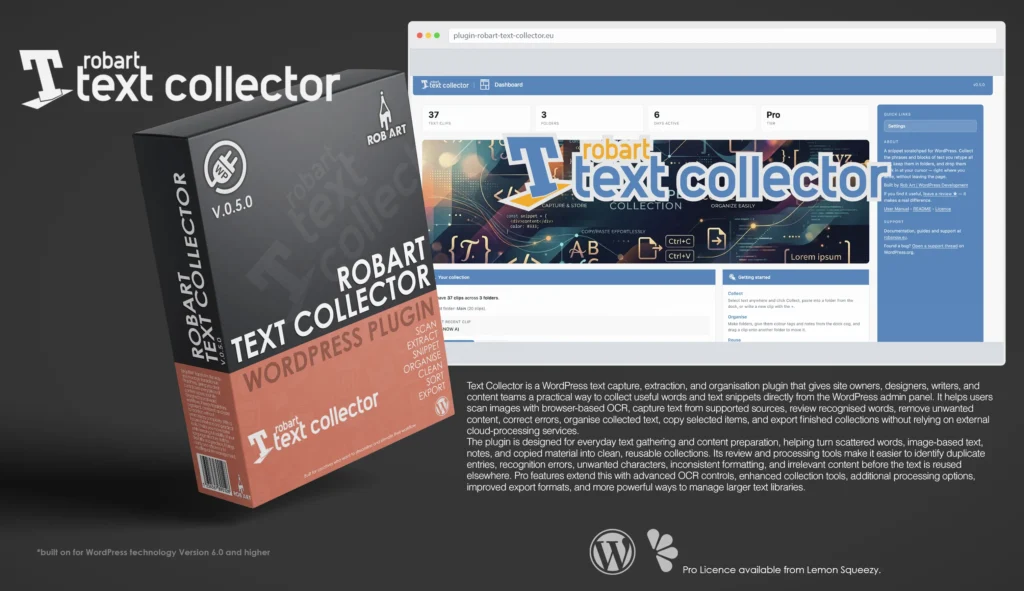
RobArt Text Collector is a practical WordPress text capture, organisation, and reuse tool built for people who regularly work with written content. It gives site owners, designers, writers, marketers, and content teams a simple way to collect useful phrases, paragraphs, product descriptions, addresses, disclaimers, notes, and other frequently reused text directly within WordPress. Instead of repeatedly searching through documents or retyping the same material, Text Collector keeps everything organised and immediately accessible from the editing screen.
Designed around the simple workflow of Collect, Organise, and Reuse, Text Collector follows you throughout WordPress as a compact floating dock. It works within the Block Editor, Classic Editor, ordinary admin fields, and the front end for logged-in users with editing access. Highlighted text can be captured with a single click, pasted directly into a snippet tray, or written manually as a new clip. Collected text can then be inserted at the active cursor or copied automatically to the clipboard whenever no editable field is selected.
RobArt Text Collector keeps reusable content structured through personal folders, colour tags, notes, and straightforward clip-management tools. Users can create separate collections for projects, clients, products, websites, legal text, marketing phrases, or any other workflow. Clips can be edited, copied, printed, deleted, moved between folders, or downloaded as plain-text files from a dedicated Text Clips page. Optional automatic cleaning can remove repeated spaces, unnecessary blank lines, invisible characters, and unwanted spacing as content is collected.
The Pro version extends the collection process with Live Text, a private browser-based image recognition tool that reads words contained inside screenshots, scanned notes, photographs, labels, documents, and graphics. Users can select recognised words directly on an image and save only the text they need. The recognition process runs entirely within the browser using an engine included with the plugin, meaning images are never uploaded to a server, added to the WordPress Media Library, or passed to an external recognition service.
Beyond collection, RobArt Text Collector provides powerful tools for finding, arranging, and exporting stored content. Pro users can search clips instantly, manually reorder folders and snippets, increase folder capacity, create unlimited folders, and export collections as TXT, CSV, or RTF files. Whether managing a handful of frequently used phrases or building a larger library of reusable content, Text Collector turns scattered text into an organised, private, and efficient part of the WordPress workflow.
Key Features
- Floating Text Collector dock across supported WordPress editing screens
- Works with the Block Editor, Classic Editor, admin fields, and front end
- Capture highlighted text using the selection Collect button
- Paste clipboard content directly into a folder tray
- Write and save new clips manually
- Insert saved clips directly at the active editing cursor
- Automatically copy clips when no editable cursor is active
- Personal clip collections stored separately for each WordPress user
- Create, rename, colour-code, merge, empty, and delete folders
- Add descriptive notes to individual folders
- Drag clips between folders from the floating dock
- Edit, copy, print, and delete clips from the Text Clips page
- Print or download complete folder collections
- Automatic capitalisation of newly collected clips
- Automatic removal of repeated spaces and blank lines
- Strips invisible characters and trims unwanted spacing
- Dashboard showing folder totals, clip totals, recent activity, and account tier
- Optional front-end dock for logged-in content editors
- Free plain-text TXT exports
- Private storage within the website’s own WordPress database
- No external network calls from the free plugin
Pro Features
- Read and collect text contained inside images with Live Text
- Browser-based OCR with no image uploads or external processing
- Dedicated Scan an Image workspace
- Drag-and-drop, file selection, and clipboard image input
- Support for PNG, JPG, GIF, and WebP images
- Image preview with zoom and fit controls
- Search and instantly filter clips within folders
- Manually reorder clips and folders using Alt-drag
- Export collections as CSV spreadsheets
- Export collections as RTF rich-text documents
- Configure the information included in CSV exports
- Export only clips matching the current search filter
- Increase capacity to 20 clips per folder
- Create an unlimited number of folders
- One-time licence covering all version 1.x updates
Requirements:
- Minimum WP Version: 6.0
- Minimum PHP Version: 7.4
- Internet Connection
- Free Version or Valid Licence for Pro Version
*Please note this plugin has the following built in languages: English
Plugin News
Plugin is now live on both sites!! Go get it!!
Happy to say we are in the process of making and deploying a dedicated support hub. Stay tuned for more details. Their will be links posted in the plugin as well as any known locations.
Changelog/Bugs
Changelog
RobArt Text Collector - Version History
Version 0.5.7
2026-08-06- ### Fixed
- - Adding a clip through a folder\'s compose box no longer freezes on \"Saving…\". A click inside the new-clip modal was read as a click away from the tray, closing it mid-save so the clip saved against no folder.
- > The compose modal is appended to the document body, not inside the dock, so the tray\'s own click-outside-to-close handler counted a click on the modal as \"outside\" — closed the tray, cleared the active folder, and the in-flight save then had no folder to write to. A floating panel that mounts its sub-modals outside its own root must exempt those modals from its click-outside test, or it treats its own UI as foreign.
Version 0.5.6
2026-08-05- ### Changed
- - After activating the plugin you now land on its Dashboard (the welcome overview) rather than a separate onboarding screen — a clearer first-run destination.
- ### Fixed
- - The floating dock now repositions correctly when the WordPress admin menu is collapsed or expanded; it previously stayed at the wide-menu offset and drifted out over the page content.
- > The dock already measured the content area\'s real left edge, so it was correct on load and on window resize — but folding the admin menu shifts that edge via a CSS transition and fires no resize event, so the dock never re-measured. Hook the platform\'s own collapse signal, not just resize, when a floating element tracks a container that can move without the window changing size.
Version 0.5.5
2026-08-02- ### Fixed
- - Dock now stacks cleanly above the Colour Collector and folder docks instead of overlapping when all are on screen.
Version 0.5.4 Patch
2026-07-29- ### Changed
- - Refreshed the plugin listing icon for a bolder, clearer mark.
- ### Fixed
- - The \"Read text in an image\" (Live Text) button appeared in the floating panel on the free plugin, even though the feature belongs to the Pro add-on. Its click handler ships only with the add-on, so on the free plugin the button did nothing. The button is now rendered only when the add-on is active, so free users no longer see a dead control.
- > The button markup lived in a file that loads on every tier, while the behaviour lived in the add-on — a locked control leaking into free. Gate the markup on the same tier check the behaviour uses, so a paid-only affordance never renders where it cannot work.
Version 0.5.3 Patch
2026-07-15- ### Removed
- - The folder and clip ordering helpers. They were fully working but unreachable — nothing in this plugin called them; they existed only for the add-on to drive. Manual ordering now lives entirely in the add-on: storage writes, endpoints and drag UI together.
- - The setup wizard\'s Licence step. The free plugin has no licence mechanism, so the step only pointed at an unlock path; the add-on now inserts the step itself via the onboarding config filter.
- - The export-format and CSV-column preferences. Nothing in the free plugin read them; they existed only for the add-on\'s export card to write to. The add-on now declares and sanitises its own settings through two new seams (`settings_defaults` / `settings_sanitise`), so the free plugin stores no key it does not use.
- - The licence-key field styling, which sat in the free stylesheet with no markup to style. Moved beside the add-on\'s key form.
- ### Fixed
- - The setup wizard header rendered the scaffold\'s placeholder mark instead of the plugin\'s own logo.
- > Second review flagged the ordering helpers as trialware under Guideline 5. The rule to hold: if the free plugin cannot reach a feature, its code must not ship in the free plugin at all — a data helper kept \"in core for the add-on to call\" is still a locked feature.
Version 0.5.2 Patch
2026-07-14- ### Changed
- - Renamed the internal prefix to a four-plus-character namespace, so the plugin\'s own identifiers can no longer collide with another author\'s.
- ### Fixed
- - Corrected the capacity filter names in the readme and manual, which documented the old names and so would not have fired.
- > Never published, so the rename is applied directly with no data migration. Deleting the plugin still clears every earlier name.
Version 0.5.1 Patch
2026-07-14- ### Changed
- - Capacity is no longer tier-dependent. The per-folder clip capacity is a plain default applied to every install alike, and the number of folders is unlimited by default. Both sit behind the existing public filters, so a site or an add-on can raise or remove either without touching the plugin. The free build now contains no tier check, and no knowledge of paid tiers, anywhere in the capacity path.
- - Upsell copy across every surface — the upgrade page, the upgrade dialog, the sidebar promo, the dashboard hints, the onboarding slide, the readme and the manual — no longer advertises capacity as a paid benefit; the paid add-on is described purely by the features it adds.
- - The capacity error messages are plain statements of the limit, with no upgrade prompt.
- ### Security
- - Wizard form fields posted to the onboarding endpoint are now sanitised at the request boundary, before they reach any step handler, rather than relying on each handler to sanitise what it uses.
Version 0.5.0 Major
2026-07-13- ### Added
- - Scan an Image page (Pro): a dedicated admin page to drop, choose or paste an image, read its text, select words on the picture and collect them to a folder. Built on the standard plugin shell with a right sidebar; two-column layout with the drop zone and results on the left and a framed preview on the right. The preview has fit-to-frame plus zoom controls, and the text overlay stays aligned as you zoom. Image handling is entirely in-browser via an in-memory object — never uploaded, never saved, discarded on leave.
- - Purpose-built sidebar context for the scan page (what it does, in-browser privacy note, and usage tips).
- - A near-horizontal recognition hint beneath the drop zone.
- ### Changed
- - Live Text recognition now auto-deskews a tilted image before reading it (edge-based angle detection with a confidence gate that leaves already-level images untouched), then re-sorts recognised words into natural reading order (row clustering, then left-to-right) and filters stray punctuation-only tokens. Selecting a whole block now reads top-to-bottom and comes back clean.
- - Redesigned the scan drop zone: larger target with an upload icon, bold prompt, accepted file types, whole-zone click and keyboard support.
- - Free upsell surfaces now feature the image feature and were made consistent: the Upgrade page, the sidebar upgrade card (moved to a boxed promo, anchored at the foot of the sidebar so page help leads), the upgrade dialog, and the dashboard and onboarding copy.
- ### Fixed
- - A broken icon on the Settings Capture card (referenced a file that did not exist; pointed at the correct existing icon).
- - Regenerated the translation template so it reflects the current strings and version, and excludes Pro-only strings.
- - Onboarding welcome screen: progress dots were laid out as a flex sibling beside the card (a stray dot floated off the card\'s right edge). The takeover is now a column flex, so the dots sit centred beneath the card.
Version 0.4.0 Patch
2026-07-13- ### Added
- - Live Text (Pro): read text from images, wired into the dock. A scan button arms the mode and places a \"Read text\" pill on each page image; clicking a pill OCRs that one image on demand (three merged passes — clean, high-contrast, and sparse for widely-spaced titles), lays a selectable text layer on the picture, and a \"Collect\" action saves the selection to the active folder. Runs entirely in-browser with a self-hosted engine; no upload, no external service.
- - Documentation for Live Text in the manual, plus a responsible-use section on copyright and trademark.
- ### Changed
- - Live Text collects to the currently active folder, read live at collect time, so switching folders after a scan takes effect without re-scanning.
Version 0.3.1 Patch
2026-07-12- ### Added
- - Live Text (Pro, in development, not enabled): working feature-flow prototype — a trigger button arms the mode and places a \"Read text\" pill on each image on the page; clicking a pill scans that one image on demand and lays a selectable overlay on it, with per-image independent selection and a shared recognition worker reused across images.
- - Multi-pass recognition: each image is read twice — once clean, once high-contrast — and the results merged, so both normal text and bold text over photos are caught with no user settings.
- - Proven that the overlay attaches correctly to images the plugin does not own (inside links and cards, cropped or letterboxed), positioned in page coordinates so it stays glued on scroll.
Version 0.3.0 Patch
2026-07-12- ### Added
- - Live Text (Pro, in development, not enabled): image OCR proven end to end, then a proper selection overlay — the highlight is drawn from the recognised text boxes rather than the browser\'s own selection, mapped precisely over the image at any scale, with click-and-drag word selection that copies the recognised text.
- - Dev tuning workbench for the Live Text engine, with controls for upscale, contrast, black/white threshold, minimum confidence and segmentation, used to find good defaults for different kinds of images.
- ### Changed
- - Live Text stays fully self-hosted and private: recognition runs entirely in the browser, no image or text ever leaves the site. Cloud recognition services were evaluated and rejected because they would break that privacy promise.
- ### Fixed
- - Live Text highlight alignment: the selection now sits exactly on the words instead of drifting, and image upscaling no longer offsets it.
Version 0.2.0 Patch
2026-07-12- ### Added
- - Themed in-page dialog for adding a folder, replacing the browser prompt; a reusable prompt and alert dialog to match the existing themed confirm.
- - Vanilla themed confirm dialog for the floating panel, so delete, merge, and empty confirmations on the dock match the admin dialogs.
- - Groundwork for a forthcoming Pro Live Text feature that selects and collects text from inside images: a self-hosted browser OCR engine proven end to end, and a positioned selectable text overlay demo. Not yet enabled.
- ### Changed
- - Every confirmation and message across the folder page and the floating panel now uses the plugin\'s own themed dialog instead of the browser\'s native pop-ups.
- - The selection Collect bubble now appears only while its own dock context is relevant and stays clear of sibling plugin screens.
- ### Fixed
- - Clicking the add-folder control no longer blanks the active folder\'s list behind the dialog.
Version 0.1.0 Minor
2026-07-09- ### Added
- - Clip search and filter on the Text Clips page (Pro): a search box in the folder\'s header bar, before the action icons, with a live match count and a clear button.
- - Folder export to CSV and RTF (Pro): a hover menu on the folder save button offers plain text, spreadsheet, or rich text; files are built in the browser and respect the active search filter. Plain-text export stays free.
- - Export card in Settings (Pro): choose the default export format and which columns the CSV includes; the Free build shows a locked card with an upgrade link.
- - Folder cap on the Free tier (three folders; unlimited on Pro), grandfathered so existing folders are always kept.
- ### Changed
- - Licence handling now follows the shared range model exactly: the Free build ships no licence-key field, activation controls, or downloader; the Licence card shows only the current plan and an upgrade link, and all licence entry lives in the paid add-on.
- - Upgrade screen rebuilt to match the range: one-time pricing with a clear note that a purchase includes every version 1 update, plus a per-site seat choice.
- - Licence verification hardened: site binding now ignores http versus https and trailing-slash differences, with an end-of-day grace on expiry, so a valid licence is no longer dropped by a harmless URL change.
- ### Removed
- - The download-on-activate installer from the Free build, along with its licence endpoints, so the free package can never unlock or fetch paid features.
- ### Fixed
- - Clip search showed a duplicate clear button and its placeholder crowded the magnifier icon.
- - The folder settings modal could show a stale folder list and cap note until reloaded.
Version 0.0.4 Patch
2026-07-08- ### Added
- - Text Clips page management surface: add-snippet compose row, add-folder tab, per-clip mini-widget actions (copy, edit-in-place, print, delete) in the row\'s last fifth, folder actions on the blue title bar (print, download, delete), and a sidebar icon key.
- - Snippet tray \"new clip\" compose button (a small overlay) beside the clipboard paste.
- - Move a clip to another folder by press-and-hold then drag onto a folder chip.
- - Pro Alt-drag reorder extended to clips (within a folder, on the Text Clips page) alongside folders (dock chips, overlay rows, page tabs); Main pinned first, both endpoints Pro-only by residence.
- - Per-folder snippet capacity knob (5 Free / 20 Pro), enforced on create, move and merge.
- - Merge-into-folder and empty-folder actions with cap-aware guards.
- - Capture filters: auto-capitalise and auto-clean new clips, applied on creation.
- - Dock proximity check: glides above foreign fixed chrome (cookie banners, chat bars) and back home when clear.
- - Settings page: System Info, Capture, Display and Licence cards on one page; full house sidebar.
- ### Changed
- - Folder-settings overlay reworked to a per-row accordion with the Taksa control grid; rename and delete moved off the row.
- - Front-end dock and Collect bubble are now Settings toggles; the capability gate stays unconditional.
- - New base64 plugin menu icon.
- - Reorder module renamed to cover folders and clips together.
- ### Fixed
- - Deleting a folder moves its clips to Main; over-cap merges refuse whole rather than partially moving.
Version 0.0.3 Patch
2026-07-07- ### Added
- - Insert-at-cursor: a tray clip click pastes the clip at the live editing cursor (plain fields, contenteditables, TinyMCE, block-editor canvas), with copy-to-clipboard as the no-cursor fallback; the dock, folder chips and tray controls no longer steal focus so the caret survives dock interaction.
- - Collect bubble captures selections inside same-origin editor frames (Classic editor visual mode), with bubble positioning translated into page coordinates.
- - Text Clips page live refresh: captures landing while the page is open re-render the clip list and tab count badges without a reload.
- ### Changed
- - Refreshed the plugin icon artwork across the dock, settings overlay and Collect bubble.
- - Clip deletion and creation responses carry the fresh folder list so all surfaces stay in sync in one round trip.
- ### Fixed
- - Collect bubble reliably hides on deselection and one second after a capture (a style rule was overriding the hidden state, and event-order races could re-show it).
- - Collect bubble no longer refuses to reappear after a capture.
Version 0.0.2 Patch
2026-07-07- ### Added
- - Floating collector dock: round blob that expands into a folder bar which grows with the folder chips; floats over the content area, icon and cog swap light grey to blue on rollover and while active.
- - Default Main folder per user, auto-created, delete-protected, always first in the bar.
- - Folder Settings overlay modal (blue-branded, blurred backdrop): create, rename and delete folders; per-row gear opens a per-folder settings panel with a ten-colour tag palette, a note field and a delete-with-clips danger zone.
- - Snippet tray anchored above the active folder chip: clipboard icon pastes the OS clipboard in as a clip (with an inline paste-box fallback), rows show abbreviated clips newest-first with copy-on-click and a delete bin.
- - Collect bubble: selecting text anywhere in the admin or logged-in front end offers a one-click save into the active folder, including selections inside form fields.
- - Text Clips admin page with one live tab per folder, colour dots, count badges, folder note line and read-only clip rows.
- - Per-user custom tables for folders and snippets with ownership guards and derived word and character counts.
- ### Changed
- - Panel configuration ships as an inert markup attribute rather than an inline script, immune to script optimisers.
- - Snippet responses include the fresh folder list so chip counts stay live in one round-trip.
- ### Fixed
- - Deleting a folder now moves its clips to Main instead of an invisible orphan state.
- - Database schema changes now reach existing installs (table-diff migration was being silently skipped).
- - Text Clips page footer nesting (the page shell sidebar call was missing).
- - Snippet tray no longer closes itself when opened from a freshly re-rendered chip.
Version 0.0.1 Major
2026-07-01- ### Added
- - Initial scaffold from the Rob Art plugin skeleton.
Bugs
RobArt Text Collector - Known Issues
No known issues at this time.
Updates
RobArt Text Collector - Latest Update
Release Notes:
- ### Fixed
- - Adding a clip through a folder\'s compose box no longer freezes on \"Saving…\". A click inside the new-clip modal was read as a click away from the tray, closing it mid-save so the clip saved against no folder.
- > The compose modal is appended to the document body, not inside the dock, so the tray\'s own click-outside-to-close handler counted a click on the modal as \"outside\" — closed the tray, cleared the active folder, and the in-flight save then had no folder to write to. A floating panel that mounts its sub-modals outside its own root must exempt those modals from its click-outside test, or it treats its own UI as foreign.
Download:
Requires: WordPress 6.0+ · PHP 8.0+
Documentation and Tutorials
Additional Learning Resources
For Plugin specific Help & Documentation visit this page.
A detailed PDF User Guide is available for download using the link provided below. This document explains all key features and functions of the plugin, helping you become familiar with its tools and workflow so you can make the most of your creative process.
For hands-on demonstrations and walkthroughs, visit our YouTube channel, where a full series of video tutorials cover everything you need to get started with the app. These videos provide visual guidance, practical examples, and helpful tips to ensure a smooth and productive learning experience.
To stay updated with new tutorials, feature overviews, and upcoming releases, subscribe to the channel here: RobArt Illustration
PDF User Manual Link(s) English