
RobArt Colour Collector
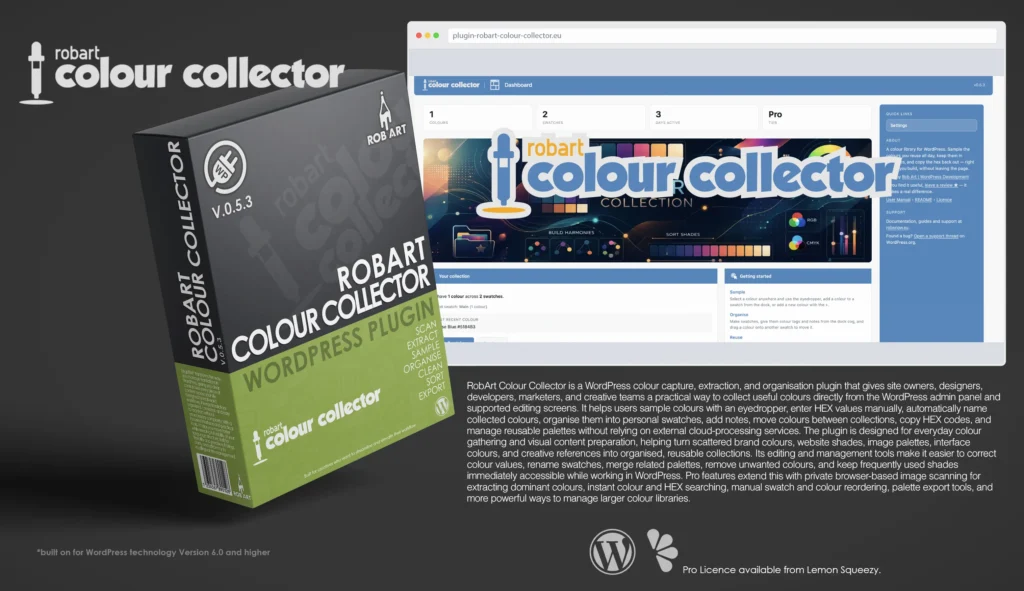
RobArt Colour Collector is a practical WordPress colour capture, organisation, and reuse tool built for people who regularly work with websites, graphics, branding, products, and visual content. It gives site owners, designers, developers, marketers, and creative teams a simple way to collect useful colours from webpages, images, interface elements, logos, product photography, and other visual sources directly within WordPress. Instead of repeatedly searching through design files, opening separate colour-picking applications, or manually recording colour values, Colour Collector keeps important swatches organised and immediately accessible from the editing screen.
Designed around the simple workflow of Collect, Organise, and Reuse, Colour Collector follows you throughout WordPress as a compact floating dock. It can be used within the Block Editor, Classic Editor, ordinary admin screens, and the front end by logged-in users with editing access. Colours can be captured using the browser colour picker, entered manually as a colour value, or added directly to a palette for later use. Collected colours can then be copied with a single click and reused in page builders, editor controls, custom CSS, design software, product artwork, or any other colour-based workflow.
RobArt Colour Collector keeps reusable colours structured through personal folders, named swatches, notes, and straightforward palette-management tools. Users can create separate collections for brands, clients, websites, campaigns, products, themes, interface components, or individual design projects. Colours can be renamed, edited, duplicated, copied, deleted, moved between folders, or grouped into organised palettes. Clear previews make it easy to recognise each colour visually, while stored colour values provide the accuracy needed when applying the same shade across different pages, platforms, and creative applications.
The Pro version extends the collection process with advanced image-based colour extraction tools. Users can load screenshots, photographs, illustrations, interface designs, logos, and other graphics into a private browser-based workspace, then select colours directly from the image. This makes it possible to identify exact shades, build palettes from existing artwork, compare related colours, and save only the swatches needed for a particular project. Image processing takes place entirely within the browser, meaning source images do not need to be uploaded to a remote colour-analysis service or permanently added to the WordPress Media Library.
Beyond collection, RobArt Colour Collector provides powerful tools for finding, arranging, and exporting stored colour libraries. Pro users can search colours instantly, manually reorder folders and swatches, increase collection capacity, create unlimited folders, and export palettes in useful formats for use outside WordPress. Whether maintaining a handful of essential brand colours or building a larger reference library for multiple clients and projects, Colour Collector turns scattered colour values into an organised, private, and efficient part of the WordPress creative workflow.
Designed around the simple workflow of Collect, Organise, and Reuse, Text Collector follows you throughout WordPress as a compact floating dock. It works within the Block Editor, Classic Editor, ordinary admin fields, and the front end for logged-in users with editing access. Highlighted text can be captured with a single click, pasted directly into a snippet tray, or written manually as a new clip. Collected text can then be inserted at the active cursor or copied automatically to the clipboard whenever no editable field is selected.
Key Features
- Floating Colour Collector dock across supported WordPress editing screens
- Works with the Block Editor, Classic Editor, ordinary admin screens, and front end
- Optional front-end dock for logged-in users with content-editing access
- Drag and reposition the dock anywhere on the screen
- Remembers the dock position separately for each editor
- Automatically moves aside when fixed interface elements block its position
- Sample visible colours using the built-in eyedropper
- Sample any pixel across the entire computer screen in Chrome and Edge
- System colour-picker support for Safari and other browsers
- Sticky sampling mode for collecting several colours in succession
- Stop continuous sampling using the eyedropper button or Escape key
- Automatically assign friendly names to newly collected colours
- Display a confirmation chip whenever a colour is captured
- Add colours manually by entering a HEX value
- Live colour preview while entering or editing a HEX code
- Select colours using the operating system colour picker
- Personal colour collections stored separately for each WordPress user
- Organise colours into named swatches
- Create, rename, merge, empty, and delete swatches
- Add descriptive notes to individual swatches
- Move colours between different swatches
- Add colours directly from the dock or dedicated Swatches page
- Paste copied HEX values directly into the swatch tray
- Copy any stored HEX value to the clipboard with one click
- Reuse colours in editor controls, plugin settings, theme options, or CSS
- Automatically use readable light or dark text over each colour preview
- Edit colour names and HEX values directly within the Swatches page
- Print or delete individual stored colours
- Print complete swatch collections
- Unlimited colour swatches
- Store up to 60 colours within each swatch
- Dashboard showing colour totals, swatch totals, recent colours, and account tier
- Live dashboard statistics that update as the library changes
- Main swatch automatically created and permanently available
- Private storage within the website’s own WordPress database
- No external network calls from the free plugin
Pro Features
- Scan images and automatically extract their dominant colours
- Scan eligible images directly from WordPress pages using the floating dock
- Display colour-extraction controls over images only when scan mode is active
- Review extracted colours in strength order with their HEX values
- Add individual extracted colours or the complete generated palette
- Dedicated Scan an Image workspace within the WordPress dashboard
- Drag-and-drop, file-selection, and clipboard image input
- Support for PNG, JPG, GIF, and WebP images
- Image preview with zoom and fit controls
- Choose the destination swatch before adding extracted colours
- Browser-based colour analysis with no external processing service
- Images are never uploaded to the website or saved in the Media Library
- Source images are discarded after leaving the scan workspace
- Search colours instantly within the currently selected swatch
- Filter stored colours by colour name or HEX value
- Display a live count of matching search results
- Search without reloading the WordPress page
- Manually reorder swatches using Alt-drag
- Manually reorder colours within individual swatches
- Export complete swatch collections for use outside WordPress
- One-site licence that can be deactivated and transferred
- One-time purchase covering all version 1.x updates
Requirements:
- Minimum WP Version: 6.0
- Minimum PHP Version: 7.4
- Internet Connection
- Free Version or Valid Licence for Pro Version
*Please note this plugin has the following built in languages: English
Plugin News
Plugin is now live on both sites!! Go get it!!
Happy to say we are in the process of making and deploying a dedicated support hub. Stay tuned for more details. Their will be links posted in the plugin as well as any known locations.
Changelog/Bugs
Changelog
RobArt Colour Collector - Version History
Version 0.5.7 Patch
2026-08-06- ### Fixed
- - The floating dock now repositions correctly when the WordPress admin menu is collapsed or expanded; it previously stayed at the wide-menu offset and drifted out over the page content.
- > The dock already measured the content area\'s real left edge, so it was correct on load and on window resize — but folding the admin menu shifts that edge via a CSS transition and fires no resize event, so the dock never re-measured. Hook the platform\'s own collapse signal, not just resize, when a floating element tracks a container that can move without the window changing size.
Version 0.5.6 Patch
2026-08-03- ### Added
- - Collected colours are now auto-named from a library of over 31,000 colour names — a captured colour arrives already labelled, and can still be renamed.
- ### Fixed
- - Pro customers can always reach the licence key field on a fresh install; the entry form is no longer gated behind activation.
- ### Changed
- - After activation the plugin opens on its Dashboard.
Version 0.5.5
2026-08-02- ### Fixed
- - Dock now stacks cleanly above the Text Collector and folder docks instead of overlapping when all are on screen.
- ### Changed
- - In browsers without a built-in screen eyedropper, a one-time note explains the system colour picker will open.
- - Settings cards share consistent rounded corners.
Version 0.5.4 Patch
2026-07-15- ### Changed
- - Table names are resolved from a fixed allow-list instead of being assembled from an argument, so a query can only ever address this plugin\'s own two tables. A table identifier cannot be bound with a prepare() placeholder, so this is the correct answer to the reviewer\'s point rather than a literal one.
- - The whole settings submission is sanitised at the boundary before anything reads it — keys reduced, arrays recursed, objects dropped. It previously reached a public filter raw, so an add-on could receive unsanitised input.
- - Capability and nonce are now repeated inline in all fourteen request handlers, not only inside the shared guard. The guard already did both and the code was correct, but reviewers read each handler in isolation and do not follow the wrapper.
- ### Removed
- - An onboarding database check that ran DESCRIBE against a table named by a filter, and then wrote to it. The probe now only ever touches this plugin\'s own table.
- > First WP.org review, approved on resubmission. The reviewer cited one nonce handler; a sweep found fourteen. Fixing only what is cited is what earns a second round — see the scanner\'s new wrapper check.
Version 0.5.3 Patch
2026-07-15- ### Removed
- - The swatch and colour ordering helpers. They were fully working but unreachable — nothing in this plugin called them; they existed only for the add-on to drive. Manual ordering now lives entirely in the add-on: storage writes, endpoints and drag UI together.
- - The setup wizard\'s Licence step. The free plugin has no licence mechanism, so the step only pointed at an unlock path; the add-on now inserts the step itself via the onboarding config filter.
- - The export-format and column preferences. Nothing in the free plugin read them; they existed only for the add-on\'s export card to write to. The add-on now declares and sanitises its own settings through two new seams (`settings_defaults` / `settings_sanitise`), so the free plugin stores no key it does not use.
- - The licence-key field styling, which sat in the free stylesheet with no markup to style. Moved beside the add-on\'s key form.
- ### Fixed
- - The setup wizard header rendered the scaffold\'s placeholder mark instead of the plugin\'s own logo.
- > Same Guideline 5 trialware pattern the sibling plugin was rejected for, found by checking here before submission rather than after.
Version 0.5.2 Patch
2026-07-14- ### Changed
- - Renamed the internal prefix to a four-plus-character namespace, so the plugin\'s own identifiers can no longer collide with another author\'s.
- - Renamed the collection container from \"folder\" to \"swatch\" throughout: the storage table, the request and response fields, the page address, the stylesheet class names and the developer filters. The wording in the interface already said swatch; the code now matches it.
- - Renamed the management page and its stylesheet, script and sidebar files from the wording inherited when this plugin was forked from its sibling, so nothing refers to text clips any more.
- - Collapsed the changelog to a single first-release entry. The earlier entries were inherited verbatim from the sibling plugin and described text collection, a feature set this plugin has never had, alongside release numbers it has never published under.
- ### Fixed
- - Corrected the developer filter names in the readme and manual, which documented the old names and so would not have fired.
- > Never published, so the container rename is applied directly with no data migration. Deleting the plugin still clears every earlier name.
Version 0.5.1 Patch
2026-07-14- ### Changed
- - Capacity is no longer tier-dependent. The per-swatch colour capacity is a plain default applied to every install alike, and the number of swatches is unlimited by default. Both sit behind the existing public filters, so a site or an add-on can raise or remove either without touching the plugin. The free build now contains no tier check, and no knowledge of paid tiers, anywhere in the capacity path.
- - Upsell copy across every surface — the upgrade page, the upgrade dialog, the sidebar promo, the dashboard hints, the onboarding slide, the readme and the manual — no longer advertises capacity as a paid benefit; the paid add-on is described purely by the features it adds.
- - The capacity error messages are plain statements of the limit, with no upgrade prompt.
- ### Security
- - Wizard form fields posted to the onboarding endpoint are now sanitised at the request boundary, before they reach any step handler, rather than relying on each handler to sanitise what it uses.
Version 0.5.0 Minor
2026-07-13- ### Added
- - Scan an Image page (Pro): a dedicated admin page to drop, choose or paste an image and extract its dominant colours (median-cut quantisation, in-browser), then add chosen colours — or the whole palette — to a swatch. Built on the standard plugin shell with a right sidebar; two-column layout with the drop zone and palette results on the left and a framed preview on the right, with fit-to-frame plus zoom controls. Image handling is entirely in-browser via an in-memory object — never uploaded, never saved, discarded on leave.
- - Purpose-built sidebar context for the scan page (what it does, in-browser privacy note, and usage tips).
- ### Changed
- - Redesigned the scan drop zone: larger target with an upload icon, bold prompt, accepted file types, whole-zone click and keyboard support.
- - Free upsell surfaces now feature the image feature and were made consistent: the Upgrade page, the sidebar upgrade card (moved to a boxed promo, anchored at the foot of the sidebar so page help leads), the upgrade dialog, and the dashboard and onboarding copy.
- ### Fixed
- - Upgrade copy stated the wrong per-swatch cap for Pro (it showed the Free figure); it now correctly reads sixty colours per swatch across every upsell surface.
- - A broken icon on the Settings Capture card (referenced a file that did not exist; pointed at the correct existing icon).
- ### Removed
- - Legacy table-cleanup from activation (a leftover drop of the old pre-fork item table). Activation now performs no schema drops; the equivalent cleanup remains on uninstall, which is the correct place for it. Clears a Plugin Check warning about a schema change on activation.
- ### Fixed (uninstall + i18n)
- - Uninstall now drops the colours table too (it previously dropped only folders and the obsolete pre-fork item table, orphaning the colours table on delete). Deleting the plugin now leaves no data behind.
- - Regenerated the translation template so it reflects the current strings and version, and excludes Pro-only strings.
- - Onboarding welcome screen: progress dots were laid out as a flex sibling beside the card (a stray dot floated off the card\'s right edge). The takeover is now a column flex, so the dots sit centred beneath the card.
Version 0.4.0 Minor
2026-07-13- ### Added
- - Scan an image for its colours (Pro): a dock scan tool arms a mode that places a pill on every page image; clicking a pill extracts that image\'s dominant colours (median-cut, in-browser, no upload) and offers them as swatches saved to the active swatch, with an add-all option and auto-close when the palette is collected.
- - Swatches page: RGB and CMYK (approximate) value columns and a date-added column alongside each colour\'s hex.
- - Cross-plugin stacking coordinator so a drawer opened in Colour Collector floats above Text Collector\'s panel (and vice versa) when both are installed.
- ### Changed
- - Pro search now matches hex and RGB values as well as names, and the search field was widened for the full placeholder.
- - Printing a colour or a whole swatch now includes the colour block and full details; the plain-text download stays hex-only.
- - Pro export (CSV, RTF, plain text) now exports complete colour data — name, hex and the chosen extra columns.
- - Add-swatch and every confirmation and message across the Swatches page and the floating panel now use the plugin\'s own themed dialogs instead of browser pop-ups.
- - Removed an orphaned pre-rename capture icon pair.
- ### Fixed
- - Clicking the add-swatch control no longer briefly blanks the list behind the dialog.
Version 0.3.0 Minor
2026-07-11- ### Added
- - Hex colour entry: the Add-colour and inline-edit forms gained a hex field, a live preview block, and a system colour-picker block that stay in sync; inline edit also updates the colour\'s name.
- - Sticky picking: the dock eyedropper stays armed after each sample so several colours can be collected in a row, ending on toggle-off or Escape.
- - A confirmation chip near the dock when the panel is closed, so a captured colour is visible without the list open.
- - A bundled colour-name list with nearest-match naming, plus a per-swatch colour cap and hex normalisation helpers.
- ### Changed
- - Live cross-surface sync: adding or removing a colour in the dock panel or on the Swatches page updates the other view and all counts immediately.
- - Swatch Settings, page header and swatch title-bar icons refreshed to the new colour artwork.
- - Narrower floating colour panel suited to colour rows.
- ### Removed
- - The text-selection Collect bubble, carried over from the text version, which does not belong in a colour tool.
- ### Fixed
- - Saving a captured colour no longer hangs.
- - The system colour-picker block renders its colour correctly instead of appearing blank.
- - Adding a colour from the dock panel no longer reported \"open a swatch first\" (the panel closing mid-save nulled its context).
- - Hex fields self-correct stray characters and seed a valid starting colour so a fresh form saves immediately.
Version 0.2.0 Minor
2026-07-11- ### Added
- - Colour picker on the floating dock: an eyedropper toggle that samples a colour from anywhere on screen on supported browsers, with a system-picker fallback elsewhere, saving each colour to the active swatch.
- - Automatic colour naming from a bundled name list, so every captured colour arrives with a readable label.
- - Sticky picking mode: the picker re-opens after each sample so several colours can be collected in a row until you stop.
- - A confirmation chip near the dock when the panel is closed, so a captured colour is visible even without the list open.
- - Admin bypass constants for development tier testing.
- ### Changed
- - Reworked the plugin from collecting text to collecting colours: the stored item is now a colour with a hex value and a name, in place of a text clip.
- - Renamed folders to swatches, and clips to colours, throughout the interface.
- - Swatches page rows now show a rounded colour square with the name and hex; the floating panel shows a full-colour row with luminance-aware text.
- - Totals and lists update live across the dashboard, the Swatches page and the floating panel on any add or remove, wherever it happens.
- - New plugin logo and menu icon; narrower floating panel suited to colour rows.
Version 0.1.0 Minor
2026-07-09- ### Added
- - Clip search and filter on the Colour Clips page (Pro): a search box in the folder\'s header bar, before the action icons, with a live match count and a clear button.
- - Folder export to CSV and RTF (Pro): a hover menu on the folder save button offers plain text, spreadsheet, or rich text; files are built in the browser and respect the active search filter. Plain-text export stays free.
- - Export card in Settings (Pro): choose the default export format and which columns the CSV includes; the Free build shows a locked card with an upgrade link.
- - Folder cap on the Free tier (three folders; unlimited on Pro), grandfathered so existing folders are always kept.
- ### Changed
- - Licence handling now follows the shared range model exactly: the Free build ships no licence-key field, activation controls, or downloader; the Licence card shows only the current plan and an upgrade link, and all licence entry lives in the paid add-on.
- - Upgrade screen rebuilt to match the range: one-time pricing with a clear note that a purchase includes every version 1 update, plus a per-site seat choice.
- - Licence verification hardened: site binding now ignores http versus https and trailing-slash differences, with an end-of-day grace on expiry, so a valid licence is no longer dropped by a harmless URL change.
- ### Removed
- - The download-on-activate installer from the Free build, along with its licence endpoints, so the free package can never unlock or fetch paid features.
- ### Fixed
- - Clip search showed a duplicate clear button and its placeholder crowded the magnifier icon.
- - The folder settings modal could show a stale folder list and cap note until reloaded.
Version 0.0.5 Patch
2026-07-08- ### Added
- - Dashboard rebuilt Allaxi-style: real stat strip (clips, folders, days active, tier) with clips + folders updating live via rtc:folders; optional hero banner (banner.webp, graceful if absent); first-run \"Start collecting\" welcome vs a returning at-a-glance summary (biggest folder, most-recent-clip preview); sticky Getting Started card (Collect / Organise / Reuse).
- - Editor menu visibility: the parent menu opens at edit_posts so pure editors can reach their clips; role-aware parent callback (Dashboard for admins, Colour Clips for editors) with Dashboard leading the admin submenu.
- - Brand logos: white wordmark (logo_sm_white.svg) in the admin header bar; colour logo.svg on the onboarding splash.
- ### Changed
- - Plugin menu label renamed \"RobArt TC\" -> \"Colour Collector\" (page title unchanged).
- ### Fixed
- - Free-tier \"folder is full\" rejection now holds ~5s as a readable amber warning instead of a sub-second flash (the error state had no guard class, so the debounced selection sync hid it early).
Version 0.0.4 Patch
2026-07-08- ### Added
- - Colour Clips page management surface: add-snippet compose row, add-folder tab, per-clip mini-widget actions (copy, edit-in-place, print, delete) in the row\'s last fifth, folder actions on the blue title bar (print, download, delete), and a sidebar icon key.
- - Snippet tray \"new clip\" compose button (a small overlay) beside the clipboard paste.
- - Move a clip to another folder by press-and-hold then drag onto a folder chip.
- - Pro Alt-drag reorder extended to clips (within a folder, on the Colour Clips page) alongside folders (dock chips, overlay rows, page tabs); Main pinned first, both endpoints Pro-only by residence.
- - Per-folder snippet capacity knob (5 Free / 20 Pro), enforced on create, move and merge.
- - Merge-into-folder and empty-folder actions with cap-aware guards.
- - Capture filters: auto-capitalise and auto-clean new clips, applied on creation.
- - Dock proximity check: glides above foreign fixed chrome (cookie banners, chat bars) and back home when clear.
- - Settings page: System Info, Capture, Display and Licence cards on one page; full house sidebar.
- ### Changed
- - Folder-settings overlay reworked to a per-row accordion with the Taksa control grid; rename and delete moved off the row.
- - Front-end dock and Collect bubble are now Settings toggles; the capability gate stays unconditional.
- - New base64 plugin menu icon.
- - Reorder module renamed to cover folders and clips together.
- ### Fixed
- - Deleting a folder moves its clips to Main; over-cap merges refuse whole rather than partially moving.
Version 0.0.3 Patch
2026-07-07- ### Added
- - Insert-at-cursor: a tray clip click pastes the clip at the live editing cursor (plain fields, contenteditables, TinyMCE, block-editor canvas), with copy-to-clipboard as the no-cursor fallback; the dock, folder chips and tray controls no longer steal focus so the caret survives dock interaction.
- - Collect bubble captures selections inside same-origin editor frames (Classic editor visual mode), with bubble positioning translated into page coordinates.
- - Colour Clips page live refresh: captures landing while the page is open re-render the clip list and tab count badges without a reload.
- ### Changed
- - Refreshed the plugin icon artwork across the dock, settings overlay and Collect bubble.
- - Clip deletion and creation responses carry the fresh folder list so all surfaces stay in sync in one round trip.
- ### Fixed
- - Collect bubble reliably hides on deselection and one second after a capture (a style rule was overriding the hidden state, and event-order races could re-show it).
- - Collect bubble no longer refuses to reappear after a capture.
Version 0.0.2 Minor
2026-07-07- ### Added
- - Floating collector dock: round blob that expands into a folder bar which grows with the folder chips; floats over the content area, icon and cog swap light grey to blue on rollover and while active.
- - Default Main folder per user, auto-created, delete-protected, always first in the bar.
- - Folder Settings overlay modal (blue-branded, blurred backdrop): create, rename and delete folders; per-row gear opens a per-folder settings panel with a ten-colour tag palette, a note field and a delete-with-clips danger zone.
- - Snippet tray anchored above the active folder chip: clipboard icon pastes the OS clipboard in as a clip (with an inline paste-box fallback), rows show abbreviated clips newest-first with copy-on-click and a delete bin.
- - Collect bubble: selecting text anywhere in the admin or logged-in front end offers a one-click save into the active folder, including selections inside form fields.
- - Colour Clips admin page with one live tab per folder, colour dots, count badges, folder note line and read-only clip rows.
- - Per-user custom tables for folders and snippets with ownership guards and derived word and character counts.
- ### Changed
- - Panel configuration ships as an inert markup attribute rather than an inline script, immune to script optimisers.
- - Snippet responses include the fresh folder list so chip counts stay live in one round-trip.
- ### Fixed
- - Deleting a folder now moves its clips to Main instead of an invisible orphan state.
- - Database schema changes now reach existing installs (table-diff migration was being silently skipped).
- - Colour Clips page footer nesting (the page shell sidebar call was missing).
- - Snippet tray no longer closes itself when opened from a freshly re-rendered chip.
Version 0.0.1 Major
2026-06-01- ### Added
- - Initial scaffold from the Rob Art plugin skeleton.
Bugs
RobArt Colour Collector - Known Issues
No known issues at this time.
Updates
RobArt Colour Collector - Latest Update
Release Notes:
- ### Fixed
- - The floating dock now repositions correctly when the WordPress admin menu is collapsed or expanded; it previously stayed at the wide-menu offset and drifted out over the page content.
- > The dock already measured the content area\'s real left edge, so it was correct on load and on window resize — but folding the admin menu shifts that edge via a CSS transition and fires no resize event, so the dock never re-measured. Hook the platform\'s own collapse signal, not just resize, when a floating element tracks a container that can move without the window changing size.
Download:
Requires: WordPress 6.5+ · PHP 8.0+
Documentation and Tutorials
Additional Learning Resources
For Plugin specific Help & Documentation visit this page.
A detailed PDF User Guide is available for download using the link provided below. This document explains all key features and functions of the plugin, helping you become familiar with its tools and workflow so you can make the most of your creative process.
For hands-on demonstrations and walkthroughs, visit our YouTube channel, where a full series of video tutorials cover everything you need to get started with the app. These videos provide visual guidance, practical examples, and helpful tips to ensure a smooth and productive learning experience.
To stay updated with new tutorials, feature overviews, and upcoming releases, subscribe to the channel here: RobArt Illustration
PDF User Manual Link(s) English