
LinguifiWP
Take full control of your WordPress translations with flexible APIs, accurate results, and a workflow built for real-world use.
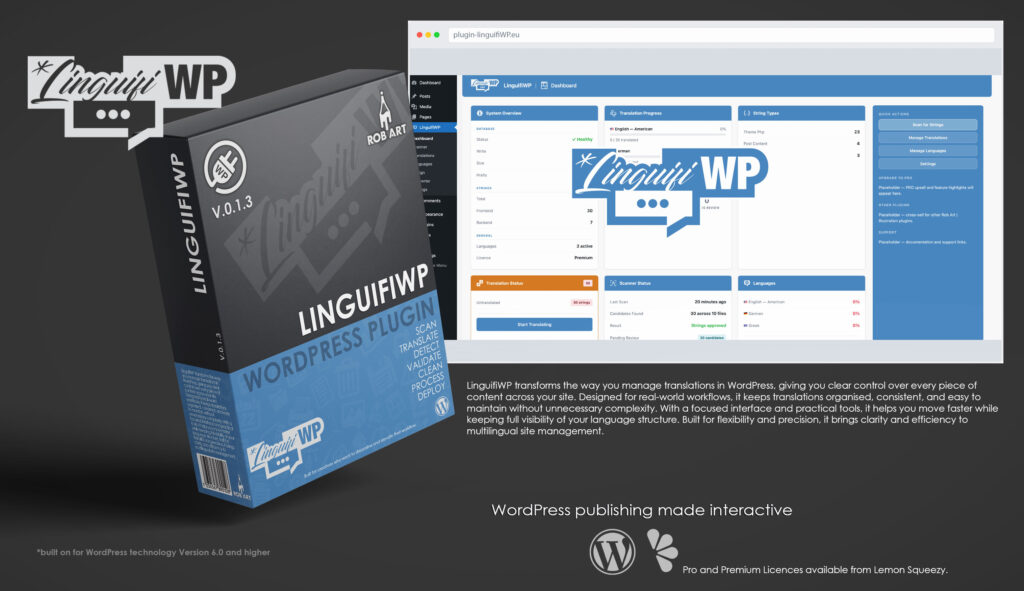
LinguifiWP is a professional translation management plugin built specifically for WordPress, designed to give you full control over multilingual content. It provides site owners, developers, and agencies with a clear, structured way to manage translations without relying on fragmented tools or manual workflows. Instead of treating translations as scattered elements, LinguifiWP brings them into the WordPress admin as an organised, accessible workspace.
Designed for real-world use, LinguifiWP focuses on clarity and control. The interface presents translations in a clean, structured format, allowing you to quickly view, edit, and manage content across multiple languages. Each entry is handled with precision, supported by clear context and guidance so you always understand what’s being translated and where it appears.
At its core, LinguifiWP connects to leading translation APIs, enabling fast and accurate translations while keeping you in control of the process. Whether you’re translating individual strings or larger content sets, it provides a flexible workflow that adapts to your needs. With support for multiple languages and structured handling, it becomes easy to maintain consistency across your site.
Beyond translation, LinguifiWP is built to streamline ongoing content management. You can organise language sets, update translations efficiently, and ensure everything stays aligned as your site evolves. The system reduces repetition and removes friction, making multilingual management far more approachable.
LinguifiWP is built for those who need clarity and flexibility in multilingual workflows. Whether you’re running a single site or managing multiple projects, it provides a reliable, structured way to handle translations with confidence. With a clean interface and practical tooling, it transforms translation management into a clear and manageable part of your workflow.
Key Features
- Translation Dashboard – Manage all your site translations in a clean, structured interface.
- API Integration – Connect to leading translation services for fast, accurate results.
- String Management – Edit and organise individual text strings with full control.
- Multi-Language Support – Handle multiple languages with clear structure and consistency.
- Bulk Translation (Pro) – Translate large sets of content quickly and efficiently.
- Context-Aware Editing – Understand where content appears for accurate translation.
- Language Switching – Seamlessly manage and preview different language versions.
- Translation Sync – Keep content aligned as your site updates and evolves.
- Custom Overrides – Fine-tune translations beyond automated results.
- Workflow Optimised – Designed for real-world translation management processes.
- Lightweight & Efficient – Runs smoothly without unnecessary overhead.
- Professional Workflow Focus – Built for developers, agencies, and site owners who need clarity and control.
Requirements:
- Minimum WP Version: 6.0
- Minimum PHP Version: 7.4
- Internet Connection
- Free Version or Valid Licence for Pro Version
*Please note this plugin has the following built in languages: English
Plugin News
Happy to say we are in the process of making and deploying a dedicated support hub. Stay tuned for more details. Their will be links posted in the plugin as well as any known locations.
Changelog/Bugs
Changelog
LinguifiWP - Version History
Version 0.3.1 Minor
2026-04-19- ### Changed
- - Languages folder added; `linguifiwp_backend.pot` and `linguifiwp_frontend.pot` created covering all admin and visitor-facing strings
- - `pro/` folder structure confirmed at plugin root; loader path verified consistent with suite convention
Version 0.3.0 Major
2026-04-17- - Added Dashboard doc modals — User Manual, README, and Licence open in scrollable in-panel readers
- - Added free-tier language enforcement — on licence expiry, excess target languages are deactivated (data preserved, re-enabled on PRO restore)
- - Added free-tier design enforcement — switcher style resets to Dropdown on licence expiry
- - Added amber notice in Languages panel when languages have been deactivated due to tier change
- - Added full WP.org-format readme.txt, README.md, GPL v2 licence, and docs/manual.md
- - Fixed toggle AJAX to block re-enabling a second language on free tier
Version 0.2.0 Major
2026-04-17- - Added AI auto-translation with DeepL, Google Translate, and OpenAI provider chain with automatic fallback
- - Added AI usage tracking with per-provider progress bars (lifetime / monthly / running total)
- - Added Side Tab switcher type — tab docked to left or right viewport edge (PRO)
- - Added Flags Expand mode — single flag expands to full list on click
- - Added Custom CSS editor with CodeMirror and live preview (PRO)
- - Added Google Sheets GOOGLETRANSLATE workflow tutorial in Converter (PRO)
- - Added theme-aware nav menu placement — detects footer menu support automatically
- - Fixed inline switcher separator — now renders as real HTML element (CSS content: var() limitation)
- - Wired flag size CSS variable to frontend switcher output
- - Added full theme reset CSS across all switcher types
Version 0.1.3 Major
2026-03-30- ### Added
- - Dashboard fully built — 9 cards with live DB queries: System Overview (DB health/write/size/prefix, string totals, licence), Translation Progress (per-language bars + totals row), String Types, Translation Status, Scanner Status, Languages, Needs Review, Orphaned Strings, Recent Activity
- - Quick Actions moved from card to sidebar — reversed-out buttons on brand blue background
- - Brand blue card headers across all dashboard cards — alert cards use amber
- - Sidebar `align-items: stretch` — full height on all panels
- - Upgrade button in all admin page headers — tier-aware (Free → PRO, Pro → Premium, Premium → hidden)
- - `admin/partials/header-upgrade.php` — shared partial for header upgrade button
- - Review notice (`admin/review-notice.php`) — 30-day trigger, \"Already did\", \"Remind me later\" (14-day snooze), permanent dismiss
- - System compatibility check in Wizard Step 8 — PHP, WP, MySQL, mbstring, DOM, SimpleXML, OpenSSL, php-parser, DB writeable, theme writeable. Collapsible, auto-expands on failure
- - Settings sidebar: Author & Licence, Credits & Thanks (nikic/php-parser, Claude/Anthropic, WordPress community), Support placeholder, Debug Information block with copy-to-clipboard button
- - `.lfi-body` / `.lfi-main` / `.lfi-sidebar` layout system replacing `.lfi-content` — consistent across all 7 panels
- - `.lfi-btn` button system — primary, secondary, full-width variants
- - Badge system — warn (amber), alert (red), info (blue)
- - Dashboard stat group labels — brand blue section dividers within cards
- ### Decisions Made
- - Converter must support translation import: JSON, PO/POT, CSV — critical for migration from WPML/Loco/TranslatePress. Imported translations always saved as draft. See planning-log.md Converter section.
- - Quick Actions belongs in sidebar not as a card — it\'s navigation, not data
- - Debug info in Settings sidebar — users copy-paste for support requests
- - Credits include Claude (Anthropic AI) as co-author
Version 0.1.2 Major
2026-03-29- ### Added
- - Plugin scaffold built and activated on Local test site
- - Full admin menu registered: Dashboard, Scanner, Translations, Languages, Design, Converter, Settings
- - Splash screen — dual purpose (first-install welcome + post-update what\'s new), no header/footer chrome, centred card layout, JS panel swap (intro → wizard setup), copyright footer
- - Setup Wizard — 8 steps, fully wired with AJAX, step indicator, PRO gate
- - Step 2: DB creation with backup warning overlay, live table preview, one-way confirmed state
- - Step 3: Source language — searchable list, saves to settings + `wp_lfi_languages`
- - Step 4: Translation languages — Free tier enforces single selection with notice, Pro allows multi-select
- - Step 5: Wrapper function — live preview, saves to settings
- - Step 6: Scanner scope — frontend/backend toggle, PRO-locked items greyed out
- - Step 7: Licence activation — real AJAX to licence server, back button locked during install
- - Step 8: Ready screen — live DB health check, full config summary, fires `lfi_wizard_complete` hook
- - `admin/wizard-ajax.php` — all AJAX handlers with nonce validation and capability checks
- - `admin/design.php` — Design page with Language Switcher and Custom CSS tabs (stub)
- - `admin/wizard-ajax.php` — `lfi_available_languages()` helper, `lfi_check_db_writeable()` helper
- - Tier state (`lfiData`) passed to all admin JS via `wp_localize_script`
- - Composer installed, `nikic/php-parser` v5.7.0 added as dependency
- - `.gitignore` created — vendor/ excluded
- - Tab CSS component added to `admin.css`
- - Overlay CSS component added to `admin.css`
- - DB tables confirmed created and writeable on test site
- ### Fixed
- - Language codes lowercased throughout to survive `sanitize_key()` in AJAX handlers
- - Menu icon now uses base64 inline SVG to render correctly at 20px in WP admin sidebar
- - Header/footer constrained to 95% width to prevent overflow
- ### Decisions Made
- - Menu order locked: Dashboard → Scanner → Translations → Languages → Design → Converter → Settings (Settings always last)
- - \"Manage Translations\" shortened to \"Translations\" in menu
- - Design panel created for Language Switcher and Custom CSS — separate from Settings (config vs presentation)
- - Wizard icons in brand blue — separate `_blue` SVG exports per icon
- - Language codes stored lowercase internally (`en_gb` not `en_GB`) to avoid sanitize_key conflicts
- - Backup warning overlay required before any DB write operation — Rob Art | Illustration not liable for data loss
Version 0.1.1 Major
2026-03-29- ### Added
- - Language switcher spec (`/spec/language-switcher.md`)
- - AI auto-translate spec (`/spec/ai-auto-translate.md`)
- - Positioning & marketing notes (`/notes/positioning.md`)
- ### Decisions Made
- - Test site content spec written (`/spec/test-site-content.md`)
- - Splash screen confirmed as separate from wizard — dual purpose: first-install welcome + post-update what\'s new
- - UI philosophy defined: Apple-influenced simplicity, whitespace, restraint, the screenshot test
- - Wizard Step 1 (Welcome) simplified — splash now handles first-run orientation
- - Backend string translation made opt-in — frontend-only is the default, admin stays clean
- - Scanner architecture researched and specced (`/spec/scanner-architecture.md`)
- - Tier model revised: Free / Pro / Premium (was Free / Starter / Pro)
- - AI auto-translate is Premium-only — requires API key setup, not casual feature
- - Auto browser language detection added — Free tier
- - SEO meta translation (title, description, slug) added — Pro tier
- - AI auto-translate always saves as draft — human review before publish, non-negotiable
- - OpenAI (Priority 1, Rob has account) and Google Translate (Priority 2) as initial providers
- - Core tagline confirmed: \"Built for people who actually manage translations, not for people who want to install and forget\"
- - Strategic position: target users burned by complexity of WPML / TranslatePress / Weglot
Version 0.1.0 Major
2026-03-28- ### Added
- - Project folder structure created
- - Planning log started (`/notes/planning-log.md`)
- - Setup Wizard spec (`/spec/wizard.md`)
- - Database schema spec (`/spec/database-schema.md`)
- - Page builder compatibility spec (`/spec/builder-compatibility.md`)
- - Licensing and distribution spec (`/spec/licensing-and-distribution.md`)
- ### Decisions Made
- - Plugin name confirmed: LinguifiWP
- - Single database architecture — no legacy options-based system
- - Modular extension architecture for free/PRO split
- - Auto-generated scoped string keys (origin-aware dot notation)
- - Two translation mechanisms: PHP wrapper + content map swap for builders
- - Tier system: Free, Starter, Pro, Agency, Lifetime with colour-coded SVG badges
- - Distribution: Lemon Squeezy (phase 1), EDD (phase 2)
- - Minimum requirements: WordPress 6.0+, PHP 8.0+, MySQL 5.7+
- - Admin panel chrome: header flush to top edge (rounded bottom corners), footer bar (rounded top corners)
- - Header/footer colours: `#5184b3` background, `#f5f7f9` text — confirmed from Refuge Translations
- - Curated UI theme choices in settings (WCAG AA compliant, no free colour picker)
- - File header comments on all files — templates in BRAND.md
- - Versioning: strict v{MAJOR}.{MINOR}.{PATCH}, PATCH 0–100
- - Session start prompt system in place — START-HERE.md at plugin and Commercial Plugins level
Bugs
LinguifiWP - Known Issues
No known issues at this time.
Updates
LinguifiWP - Latest Update
Release Notes:
- ### Changed
- - Languages folder added; `linguifiwp_backend.pot` and `linguifiwp_frontend.pot` created covering all admin and visitor-facing strings
- - `pro/` folder structure confirmed at plugin root; loader path verified consistent with suite convention
Download:
Requires: WordPress 6.0+ · PHP 8.0+
Documentation and Tutorials
Additional Learning Resources
For Plugin specific Help & Documentation visit this page.
A detailed PDF User Guide is available for download using the link provided below. This document explains all key features and functions of the plugin, helping you become familiar with its tools and workflow so you can make the most of your creative process.
For hands-on demonstrations and walkthroughs, visit our YouTube channel, where a full series of video tutorials cover everything you need to get started with the app. These videos provide visual guidance, practical examples, and helpful tips to ensure a smooth and productive learning experience.
To stay updated with new tutorials, feature overviews, and upcoming releases, subscribe to the channel here: RobArt Illustration
PDF User Manual Link(s) English