
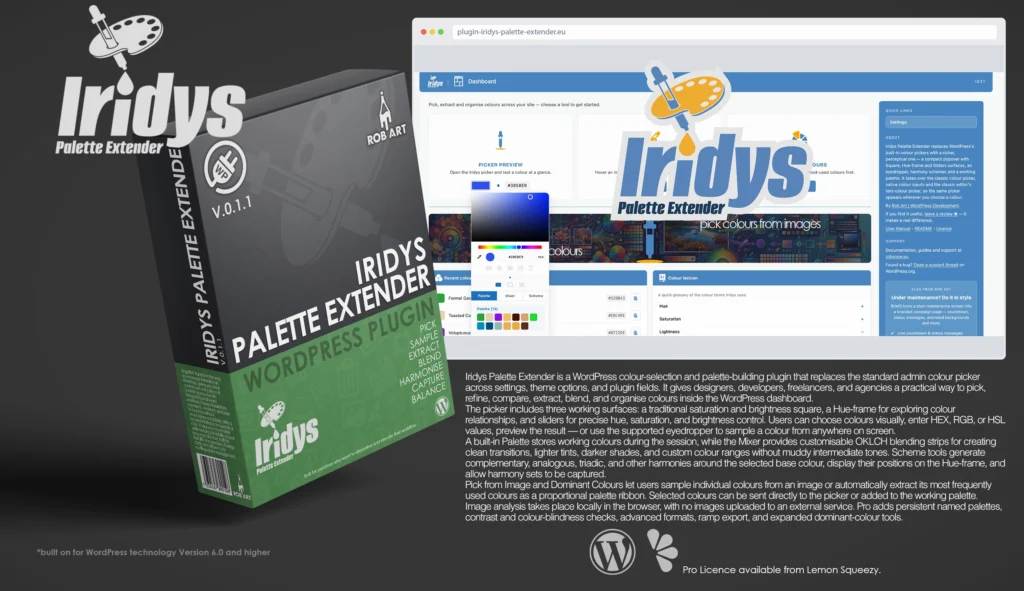
Iridys Palette Extender
Your WordPress colour workspace—selecting, mixing, extracting, and balancing every shade from one powerful interface.
Iridys Palette Extender is an advanced WordPress colour picker and palette-building plugin for site owners, designers, developers, agencies, and creative teams who need greater control over colour selection inside the dashboard. It replaces the standard WordPress colour picker with a richer interface across compatible theme settings, plugin options, editor controls, and other admin fields.
Rather than relying on a basic colour square and HEX field, Iridys provides several ways to select, adjust, compare, mix, and reuse colours without interrupting the normal WordPress workflow. The picker opens automatically whenever a supported colour field is selected.
Three interchangeable colour-selection surfaces are included. The Square combines saturation and brightness controls with a separate hue strip. The Hue-frame places the spectrum around a rectangular frame, making colour relationships and harmony positions easier to explore. The Sliders surface provides separate hue, saturation, and brightness controls for more precise adjustment.
Users can switch between these surfaces without changing the selected colour. The picker also includes a live preview, direct value entry, and support for HEX, RGB, and HSL formats. Colours can be typed manually, copied from another source, adjusted visually, or sampled from anywhere visible on screen using the browser-supported eyedropper.
Iridys performs its colour calculations in OKLCH, a modern colour space designed to create cleaner transitions and more visually balanced results. This helps prevent the dull or muddy intermediate colours that can appear when blending between different hues using less perceptually consistent colour systems.
The built-in Palette tab provides a temporary workspace for the current session. Users can add the active colour, collect colours from the image tools, select stored swatches, compare alternatives, and remove colours that are no longer required.
The Mixer contains two customisable colour strips. Each strip blends between a selected start and end colour, displaying the complete range between them. The first begins with the current colour blending towards white, making it useful for lighter tints. The second begins with black blending towards the current colour, providing darker shades and tones.
Either endpoint can be replaced with any selected colour, allowing users to create custom transitions such as grey to white, blue to green, or teal to orange. Each strip can be reset independently, and its default current-colour endpoint continues to follow the active picker colour until it is manually replaced.
The Scheme tools generate balanced harmonies from the selected base colour. Complementary, analogous, triadic, and other schemes can be displayed directly on the Hue-frame as positioned colour markers. The base colour remains visually distinct, while the related colours appear around it according to their hue relationships.
Complete harmony sets can be captured into the Scheme tab, where each colour can be selected and used in the picker. This makes it easier to build coordinated groups for backgrounds, buttons, headings, accents, illustrations, charts, product graphics, and wider brand systems.
Iridys also includes tools for extracting colours from images. Pick from Image lets users load an image into a private browser-based workspace and inspect it with a magnifier. The colour beneath the cursor updates live, and clicking captures it for use in the picker or session palette.
Dominant Colours analyses an image and identifies the colours contributing most strongly to its appearance. Results are shown as a proportional palette ribbon, with the most frequently used colours presented first. Users can choose how many colours to extract, select individual results, or add the complete palette.
These tools can be used with photographs, illustrations, screenshots, logos, interface designs, product images, packaging, and other visual references. Image analysis takes place locally in the browser, so source images are not uploaded to an external processing service.
Settings allow users to customise how Iridys appears throughout WordPress. An optional active indicator can be shown beside enhanced colour fields, with several marker styles available. The picker interface can also use rounded or square corners.
The free version includes the enhanced picker, all three surfaces, HEX, RGB and HSL input, the eyedropper, OKLCH colour handling, Mixer tools, balanced harmonies, Pick from Image, basic Dominant Colours extraction, session palettes, and nearest colour-name identification.
Iridys Palette Extender Pro adds persistent named palettes for reusable client, brand, website, campaign, product, and project collections. It also includes contrast and colour-blindness checks, advanced LAB and CMYK formats, colour-ramp export, and expanded Dominant Colours extraction and export tools. Pro is available as a one-time purchase for each major version.
Key Features
- Enhanced colour picker across compatible WordPress admin colour fields
- Works with theme options, plugin settings, and other supported controls
- Traditional saturation and brightness Square surface
- Hue-frame surface for visual colour relationships and harmony markers
- Precise hue, saturation, and brightness Sliders surface
- Switch between surfaces without changing the selected colour
- Direct HEX, RGB, and HSL colour-value entry
- Live preview of the currently selected colour
- Browser-supported eyedropper for sampling colours from the screen
- OKLCH colour calculations for cleaner and more balanced results
- Temporary session Palette for collecting and comparing working colours
- Add the active colour to the Palette with one click
- Select stored swatches to return them to the picker
- Remove unwanted colours using Shift-click
- Two customisable OKLCH Mixer strips
- Create lighter tints by blending towards white
- Create darker shades and tones by blending from black
- Replace either Mixer endpoint with any selected colour
- Build smooth custom transitions between different colours
- Reset each Mixer strip independently
- Complementary, analogous, triadic, and other harmony schemes
- Display harmony colours directly around the Hue-frame
- Clearly identify the base colour within each scheme
- Capture complete harmony sets for later selection
- Pick individual colours directly from uploaded images
- Magnified image sampling with live colour feedback
- Extract the most frequently used colours from an image
- Display extracted colours as a proportional palette ribbon
- Choose between 5 and 20 dominant colours
- Add individual extracted colours or the complete palette
- Send sampled colours directly to the picker
- Add sampled colours to the session Palette
- Local browser-based image processing
- No external image-analysis service
- Optional active indicator beside enhanced colour fields
- Multiple indicator styles
- Rounded or square picker interface options
- Nearest colour-name identification
- Pro Features
- Save persistent named palettes between sessions
- Create reusable colour collections for clients and projects
- Contrast checking for text and background combinations
- Colour-blindness evaluation tools
- Advanced LAB colour support
- Advanced CMYK colour support
- Export generated colour ramps
- Expanded Dominant Colours extraction options
- Additional image-palette export tools
- One-time purchase covering the current major version
Requirements:
- Minimum WP Version: 6.0
- Minimum PHP Version: 7.4
- Internet Connection
- Free Version or Valid Licence for Pro Version
*Please note this plugin has the following built in languages: English (UK), English (US), French, German, Spanish, Greek
Plugin News
Happy to say we are in the process of making and deploying a dedicated support hub. Stay tuned for more details. Their will be links posted in the plugin as well as any known locations.
Changelog/Bugs
Changelog
Iridys Palette Extender - Version History
Version 0.1.2 Patch
2026-08-17- ### Changed
- - Free-build compliance rework after the first review: all licence-key entry, activation and installer code now lives only in the separate paid add-on. The free Settings screen shows the current plan and an upgrade link through a neutral seam, with no key field. Picker save and folder tools, plus the whole save/load engine, are attached by the add-on via a new neutral picker extension hook; the free picker exposes only a fixed capture cap.
- - Translations are now delivered through the directory\'s language service; the compiled translation files are no longer bundled (the template and the picker\'s JavaScript catalogues remain).
- ### Added
- - Palette saving and organising (folders) as genuine paid-tier features, backed by a permanent per-user store.
- ### Fixed
- - Palette swatches lay out a deterministic eight per row.
Version 0.1.1 Minor
2026-07-30- ### Added
- - Complete readme: full Description, Installation, Uninstall, External services, FAQ and Screenshots sections; donate link.
- ### Changed
- - Renamed the internal dashboard menu/page slug for consistency (menu registration, submenu parents, admin links, the asset-enqueue page gate and the hidden-page menu map all updated together).
- ### Security
- - WordPress.org readiness pass: escaped every admin echo, sanitised posted fields through a dedicated helper, added inline nonce + capability checks to AJAX handlers, moved an inline SVG echo to wp_kses, and added the bundled colour library\'s MIT licence header.
- ### Fixed
- - Corrected the plugin homepage URL in the header so it resolves.
- > Passed both the WordPress.org Plugin Check and the in-house prep scanner clean. The prep tool itself gained a Prefix field so the declared code prefix persists across saves.
Version 0.1.0 Minor
2026-07-28- ### Added
- - Dashboard rebuilt: three tool cards (Picker Preview, Pick from Image, Dominant Colours), an examples banner, a Recent Colours list, and a multi-paragraph Colour Lexicon accordion (single-open).
- - \"Colour of the Day\" panel on the main WordPress dashboard — date-seeded named colour from the bundled colour-name list, with copy-to-clipboard and quick links to the image tools.
- - Recent-colours engine: a per-user, capped log written on every palette save, surfaced on the dashboard; gated by a Settings toggle and a keep-count.
- - Settings: new options for default surface, default colour format, per-target takeover toggles (classic picker / native inputs / classic-editor text colour), and recent-colours controls — all wired to real behaviour.
- - Upgrade experience: a Text Collector–style modal with a site-count selector and pricing, and a rebuilt full Upgrade page with real copy and preview images.
- - Per-screen sidebars (about, support, tool explainers, credits) plus a cross-promo card.
- - Full internationalisation, including the picker panel itself via wp.i18n and script translations; French and German catalogues (.po/.mo + JS .json) included. A standalone browser-based WP translation editor tool was built alongside.
- ### Changed
- - Settings redesigned into a single-screen card grid; licence folded into the same screen.
- - Naming and admin icons made consistent across the plugin (\"Iridys Palette Extender\" titles; per-page header and card icons).
- - Iridys follows the WordPress site/profile language the standard way (a per-plugin locale override was trialled and removed after it caused a recursion with other plugins\' just-in-time translation loading).
- ### Fixed
- - Replaced placeholder Lorem-ipsum copy on the Upgrade page with real content.
Version 0.0.8 Patch
2026-07-27- ### Added
- - An Apply (tick) button in the picker toolbar for the classic-editor colour flow, so the colour is confirmed deliberately on click rather than committing on close/click-away. The tick sits at the start of the toolbar with a trailing separator, and is present only in the classic-editor bridge; the drawer\'s other tools appear after it when the drawer is open.
- ### Changed
- - The classic-editor bridge now commits the colour only when the Apply tick is clicked; clicking away cancels without applying.
Version 0.0.7 Patch
2026-07-27- ### Added
- - Classic-editor TinyMCE colour bridge: the \"Text colour\"/\"Background colour\" Custom… flow now opens the Iridys picker instead of TinyMCE\'s native RGB modal, applying the chosen colour to the selection as a normal, undoable command. Implemented as a TinyMCE plugin registered via mce_external_plugins that wraps the editor\'s color_picker_callback (the intended seam), preserves the selection with a bookmark, anchors the panel to the colour toolbar button, and falls back to the native modal if Iridys is unavailable.
- ### Changed
- - The colour is committed once when the picker is closed rather than on the first colour change, so the whole panel (sliders, surfaces, palette drawer) is usable before applying.
- ### Known
- - An explicit OK/Apply button in this flow is deferred; the colour currently commits on close (click-away).
Version 0.0.6 Minor
2026-07-27- ### Added
- - Cross-page palette persistence: a tiered save/load engine so colours sent to the palette survive navigation. The base engine stores a short-lived transient hand-off for Free; a Pro backend upgrades storage to permanent per-user meta via read/write filters. The store self-hydrates on every admin page, independent of the picker.
- - \"Add all to palette\" on both image pages, which appears once the tray has colours and pushes the whole tray into the palette (persisting so it reaches the picker elsewhere).
- - A shared image-tool layout: a two-column split with tools and results on the left and the image preview on the right, used by both image pages.
- - Compact colour cards for the grabbed/extracted tray, showing the swatch, hex and nearest name with per-card actions, laid out as a responsive grid.
- - An unsaved-changes cue on the Pro Save tool.
- ### Changed
- - Both image pages now share the same layout and a consistent fixed-width image preview.
- - The palette store gained serialize/hydrate, self-load, dirty tracking, and an all() accessor on the shared tray.
- ### Fixed
- - The chosen image now fills the preview width instead of being letterboxed small in the centre.
- - The magnifier\'s sampled pixel now maps 1:1 to the cursor position (removed an object-fit offset).
- - A broken-image glyph no longer shows before an image is chosen; an empty-state placeholder is shown instead.
- - The per-colour \"Add to palette\" action now persists, so single-colour adds also reach the picker on other pages.
Version 0.0.5 Patch
2026-07-27- ### Added
- - Palette persistence (Pro): a Save tool writes the whole palette state — the default set plus all named folders and their colours — to per-user meta, and the picker reloads it on open, so folders survive across sessions. Delivered as a self-contained pro/ module (two nonce- and capability-checked AJAX handlers with server-side sanitising); the Free build ships without any save/load code and keeps palettes in-memory for the session only.
Version 0.0.4 Minor
2026-07-27- ### Added
- - Copy tool in the picker toolbar (Palette and Mixer): copies the current colour\'s hex to the clipboard via the async Clipboard API with an execCommand fallback. Free for all tiers.
- - Colour folders (Pro): the palette holds a default set plus named folders, rendered as stacked blocks with per-block headings and swatch rows. The Folder tool is a toggle — while on, the next capture spawns a new folder and subsequent captures land there; while off, captures go to the default palette.
- - Folder management: click a heading to target it for captures, double-click to rename inline, and delete the whole folder by clicking its heading while Delete is armed. The default palette cannot be deleted or renamed.
- - Harmonise is now a toggle that reveals a row of harmony choices (Complementary, Analogous, Triadic, Split, Square, Tetradic) drawn as centre-spoke node diagrams to distinguish them from the ring\'s dots-on-a-circle. Each generates that harmony from the current colour immediately.
- ### Changed
- - The Folder and Delete tools are mutually exclusive — arming one disarms the other.
- - The shared palette store was restructured into a multi-set model (default plus folders) with a current capture target; the colour API still operates on the active target so existing callers are unaffected.
- ### Fixed
- - The inline folder-rename input now sits at the header\'s own compact scale instead of inheriting a full-size admin field.
Version 0.0.3 Minor
2026-07-27- ### Added
- - A context toolbar beneath the picker whose tools change with the active tab and surface — Capture on Palette and Mixer, colour sets and save on Palette, and Harmonise on the Square and Sliders surfaces in Scheme.
- - Capture: adds the current colour to a shared working palette, capped per session at 8 for Free and 32 for Pro, ignored once the palette is full.
- - Capture also works from the Mixer, sending the mixed colour into the palette.
- - A Delete toggle that arms the palette so clicking a colour removes it, with a red-ring cue on hover.
- - A Settings option to let the eyedropper sample from anywhere on screen or stay on-page, with a cross-browser fallback.
- ### Changed
- - Colour sets and palette saving are now Pro-only tools, hidden entirely in the Free build.
- - The Mixer strips reset to fixed starting ramps — red to white for the blender and black to white for shades.
- - The toolbar and the ring scheme row now appear only while the picker drawer is open.
- - Renamed the internal tier check to clear the store-review scanner.
- ### Fixed
- - A stray colour swatch that could be injected into the picker\'s own footer when the eyedropper opened.
- - Delete mode now switches itself off when you leave the palette or press another tool.
Version 0.0.2 Minor
2026-07-26- ### Added
- - The Iridys colour picker: a compact popover with switchable Square, Hue-frame and Sliders surfaces, HEX/RGB/HSL formats, eyedropper and harmony schemes.
- - Site-wide takeover of both the classic WordPress colour picker and native colour inputs, so the Iridys picker appears wherever colours are chosen.
- - Pick from Image page: a live magnifier follows the cursor over an image with a colour read-out, click to grab.
- - Dominant Colours page: extract an image\'s palette with a colour-count slider and a proportional ribbon.
- - Settings page: active-indicator toggle and style choice, plus a rounded/square corner option for the picker.
- - Nearest colour-name lookup shown alongside grabbed colours.
- - Dashboard picker preview for quick development checks.
- - A shared colour tray with add-to-picker and add-to-palette hand-offs on the image pages.
Version 0.0.1 Major
2026-06-01- ### Added
- - Initial scaffold from the Rob Art plugin skeleton.
Bugs
Iridys Palette Extender - Known Issues
No known issues at this time.
Updates
Iridys Palette Extender - Latest Update
Release Notes:
- ### Changed
- - Free-build compliance rework after the first review: all licence-key entry, activation and installer code now lives only in the separate paid add-on. The free Settings screen shows the current plan and an upgrade link through a neutral seam, with no key field. Picker save and folder tools, plus the whole save/load engine, are attached by the add-on via a new neutral picker extension hook; the free picker exposes only a fixed capture cap.
- - Translations are now delivered through the directory\'s language service; the compiled translation files are no longer bundled (the template and the picker\'s JavaScript catalogues remain).
- ### Added
- - Palette saving and organising (folders) as genuine paid-tier features, backed by a permanent per-user store.
- ### Fixed
- - Palette swatches lay out a deterministic eight per row.
Requires: WordPress 6.5+ · PHP 8.0+
Documentation and Tutorials
Additional Learning Resources
For Plugin specific Help & Documentation visit this page.
A detailed PDF User Guide is available for download using the link provided below. This document explains all key features and functions of the plugin, helping you become familiar with its tools and workflow so you can make the most of your creative process.
For hands-on demonstrations and walkthroughs, visit our YouTube channel, where a full series of video tutorials cover everything you need to get started with the app. These videos provide visual guidance, practical examples, and helpful tips to ensure a smooth and productive learning experience.
To stay updated with new tutorials, feature overviews, and upcoming releases, subscribe to the channel here: RobArt Illustration
PDF User Manual Link(s) English