
IndexifiWP
Your WordPress SEO — Indexing that makes everything work the way you want.
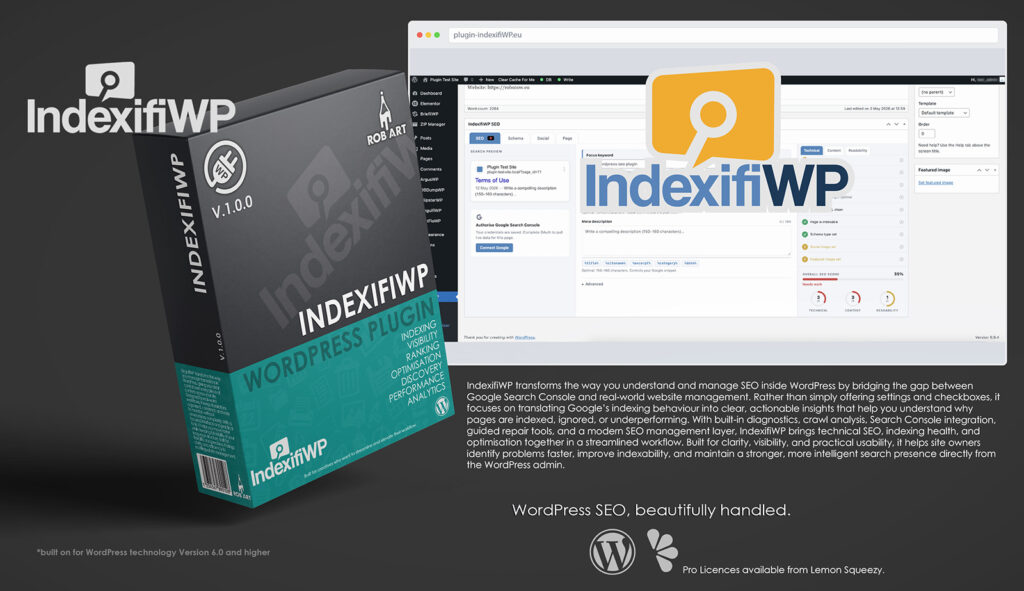
IndexifiWP is a professional SEO diagnostics and indexing intelligence plugin built specifically for WordPress. It gives site owners, developers, and agencies a clearer understanding of how Google sees their website, why pages may not be indexed correctly, and what actions can improve visibility in search results. Rather than functioning as just another settings-based SEO plugin, IndexifiWP focuses on translating complex Google Search Console data and technical SEO signals into practical, understandable guidance directly inside the WordPress admin.
Designed for real-world website management, IndexifiWP combines traditional SEO controls with an advanced diagnostics system that actively analyses your site against Google’s indexing expectations. Instead of leaving users to interpret vague warnings or technical terminology, the plugin explains problems in plain language, showing what the issue means, why it happens on WordPress specifically, and how it can be resolved safely.
At its core, IndexifiWP provides a full SEO management layer including meta titles, descriptions, Open Graph controls, schema generation, XML sitemaps, canonical handling, robots.txt management, and redirect support. These tools are integrated into a streamlined interface designed to keep SEO configuration organised, accessible, and easy to manage across both individual posts and sitewide settings.
The diagnostics engine continuously scans your WordPress configuration for issues that may affect crawling, indexing, and search visibility. Problems are grouped by severity, allowing you to quickly identify critical blockers, warnings, and optimisation opportunities. Detailed issue panels provide guided repair instructions, while Pro features add automated fixes, rollback snapshots, and repair logging for safer workflow management.
IndexifiWP also brings Google Search Console directly into WordPress through an integrated dashboard experience. Coverage reports, indexing states, clicks, impressions, CTR, and ranking trends are surfaced visually and explained in context, helping users understand not just what Google reports, but what those reports actually mean for their site. This creates a clearer workflow between diagnostics, SEO configuration, and real search performance data.
For ongoing monitoring, IndexifiWP includes health statistics, indexability scoring, historical trend tracking, and issue progression reporting. These tools make it easier to measure the impact of changes over time and maintain long-term SEO stability rather than relying on isolated fixes.
Advanced features such as the Honeypot system add an additional layer of protection by trapping and blocking harmful crawlers that ignore robots.txt rules, helping reduce unnecessary bot traffic and server overhead while ensuring trusted search engine bots remain unaffected.
Built for clarity, visibility, and practical usability, IndexifiWP helps transform technical SEO and indexing management into a more understandable, structured, and actionable process. Whether you are improving a small business site, managing client projects, or maintaining larger WordPress environments, it provides a centralised system for understanding how your site performs in search and how to improve it with confidence.
Key Features
- SEO Diagnostics Engine – Analyse your WordPress site against Google indexing expectations and uncover technical SEO issues quickly.
- Indexability Score – Get a live overall health score combining diagnostics data and Search Console insights.
- Google Search Console Integration – View indexing coverage, clicks, impressions, CTR, and performance data directly inside WordPress.
- Plain-English Issue Explanations – Understand what problems mean, why they happen, and how to fix them without technical guesswork.
- Severity-Based Issue Tracking – Separate Critical, Warning, and Opportunity issues for clearer prioritisation.
- Guided Repair System – Receive step-by-step repair instructions tailored specifically for WordPress environments.
- Auto-Fix Engine (Pro) – Apply safe automatic repairs directly from the diagnostics panel.
- Repair Rollback Snapshots (Pro) – Undo automated changes safely with logged repair history and rollback support.
- Meta & Open Graph Controls – Manage SEO titles, descriptions, social sharing previews, and default Open Graph content.
- Schema Generator – Output structured data including Organisation, WebSite, Breadcrumb, and post-level schema support.
- XML Sitemap Generation – Automatically generate and manage clean XML sitemaps for search engines.
- Robots.txt Management – Edit and preview your effective robots.txt configuration directly inside WordPress.
- Redirect Manager (Pro) – Create and manage 301, 302, and 307 redirects with loop detection and hit tracking.
- Per-Post SEO Panel – Override titles, descriptions, canonicals, schema, and indexing settings on individual posts and pages.
- Trend Tracking (Pro) – Monitor SEO health progression, issue reduction, and indexing improvements over time.
- Coverage Status Mapping – Translate Google indexing states into understandable WordPress-focused explanations.
- Search Visibility Insights – Identify pages Google crawls, ignores, excludes, or struggles to index.
- Honeypot Bot Trap (Pro) – Automatically trap and block harmful crawlers that ignore robots.txt rules.
- Bot Activity Logging (Pro) – Track suspicious crawler behaviour with detailed logs and activity charts.
- Safe WordPress Integration – Built specifically for WordPress workflows with lightweight scanning and admin-focused usability.
- Professional Workflow Focus – Designed for developers, agencies, and site owners who need clarity, visibility, and actionable SEO control.
Requirements:
- Minimum WP Version: 6.0
- Minimum PHP Version: 7.4
- Internet Connection
- Free Version or Valid Licence for Pro Version
*Please note this plugin has the following built in languages: English
Plugin News
Happy to say we are in the process of making and deploying a dedicated support hub. Stay tuned for more details. Their will be links posted in the plugin as well as any known locations.
Changelog/Bugs
Changelog
IndexifiWP - Version History
Version 1.0.16 Minor
2026-08-05- ### Added
- - **Decision Path** in the Investigator dossier (`ixwp_dossier_decision_path`). Renders the ordered gates the verdict engine walked (reachable → published → crawlable → index-allowed → no-block-header → canonical-self → Google\'s verdict → outcome), the first hard failure badged DECISIVE with later gates dimmed to \"moot\". Derived from the same signals as the verdict — honest, not a separate flow.
- - **Fix pill** on the decisive step — routes to where a human resolves it (noindex/canonical/publish → the post editor). Layer 2 Explain: navigates, never writes.
- - **Index Matrix** — new page: every published URL × signal columns (Crawl · Index · Canonical · Sitemap · Status) → verdict pill, title opens the dossier. Type + verdict filters, pagination. Uses `ixwp_matrix_row()` — local signals only, no live HTTP/GSC per row, so a whole site renders fast.
- - **Dashboard summary cards** — Indexability (free, site-wide Matrix tally via `ixwp_matrix_tally`, cached 15 min, bust on any ledger record) and Fix Verification (Pro, `ixwp_verify_tally`: awaiting/recovered/regressed).
- ### Changed
- - Investigator: Evidence + Decision Path laid out side by side (facts left, reasoning right); shared brand-blue panel headers with an icon slot; evidence rail centred under the dots; fix pill inline with the decisive label.
- - Dashboard: Clicks & Impressions chart moved to the left column to balance the two columns.
- ### Fixed
- - **Meta-change watcher swallowed every noindex/canonical toggle.** It read the \"old\" value after WP had already primed the cache with the new value, so old always equalled new and the no-op guard dropped the row — nothing reached the ledger. A pre-write hook now stashes the genuine old value.
- - **Meta-change severity is now directional** — noindex-on / canonical-away = a concern (surfaces on the dashboard); the reverse (a fix) = a notice. Previously a page turned noindex logged a bland notice and never appeared as a concern.
- - **\"Recovered\" over-claimed without Google.** An indexing fix on a site with no GSC was marked Recovered off a local 200 alone; now only genuinely confirmable states count (GSC \"indexed\", or self-verifiable published/200) — an indexing fix without GSC rests at Awaiting.
- - Hard local blockers (noindex, robots disallow, 404) now read confidence \"Confirmed\", not \"strong indication\" — they\'re certainties. Verify badge on the ledger falls back to the post permalink when a row stored a blank URL.
Version 1.0.15 Patch
2026-08-04- ### Added
- - **Investigator workspace (Page Dossier).** New admin page: enter/search any URL and it opens a full forensic dossier — a verdict header (status + confidence + plain-English summary) plus an Evidence Stack rendering every indexing signal (HTTP, robots.txt, meta robots, X-Robots, canonical, sitemap, internal links, publish status, Google index status) as a connected status-coloured trail. Reads the `ixwp_dossier()` engine; GSC-authoritative when connected, honest (\"strong indication\") when not; works on any URL, healthy or not, so the forensics has a visible identity even with nothing wrong.
- - **URL type-ahead.** As-you-type suggestions of the site\'s own published posts/pages/products by title (new `ixwp_url_suggest` AJAX, nonce + capability gated, public post types only). Arrow-key/Enter or click fills and submits straight to the dossier; skips suggesting once a full URL is being pasted.
- - **Verify badge on the Change Ledger (Pro).** The Layer 3 Verify verdict now surfaces as a per-row badge — Recovered / Awaiting Google / Regressed — present only when the pro/ package is loaded (function-gated; free build\'s ledger unchanged).
- ### Changed
- - Investigator search box gained a Clear button to reset to the empty state (the investigated URL lives in the query string, so a dossier is bookmarkable/shareable).
- ### Fixed
- - Investigator content filled its column instead of leaving a large empty gutter on the right (removed an over-tight max-width).
Version 1.0.14 Patch
2026-08-04- ### Added
- - **Forensics Layer 3 — Verify (Pro)** — `pro/modules/verify.php`. When a fix-shaped change lands in the Change Ledger (noindex removed, status→publish, canonical cleared, 404→200, site made public) it auto-starts a watch on that URL and tracks Awaiting Google → Recovered → Regressed over an hourly re-check. GSC is authoritative: a page that loads locally but Google hasn\'t indexed reads as Awaiting, never Recovered. New `ixwp_verifications` table (installed when Pro present); `do_action(\'ixwp_ledger_recorded\')` added so downstream layers can react. Live-proven against a real GSC property.
- ### Changed
- - **GSC connection hardened (from live testing).** The OAuth callback now auto-selects and saves the correct Search Console property (preferring a domain property that covers http/https/www), fixing a bug where no property was ever stored and every API call silently failed. Coverage-state mapping rewritten against Google\'s REAL URL-Inspection wording (\"Submitted and indexed\", \"URL is unknown to Google\", \"Crawled - currently not indexed\", …). `ixwp_gsc_is_connected()` now reflects a genuinely usable connection (refresh token + property), with a nuanced health status for the settings UI.
- - Tier checks renamed `ixwp_is_pro/is_premium` → `ixwp_pro_active/premium_active` across the codebase (WP.org scanner compliance).
- ### Fixed
- - Change Ledger \"Item\" column now resolves plugin/theme/site names (was a bare dash for non-post changes — a \"Theme updated\" row never said which theme).
Version 1.0.13 Patch
2026-08-04- ### Added
- - **Forensics Layer 2 — Explain** — a probable-cause engine (`includes/explain.php`) plus a \"Why this page may not be indexed\" panel in the post SEO metabox. When a page has an active indexing concern (noindex, canonical pointing away, unpublished, or a site-wide override) it correlates that with the Change Ledger and states what\'s wrong, WHEN it changed, what caused it, and the fix. Appears only when there is something to report; read-only; works with no GSC connection. A never-published draft is not flagged (normal authoring).
- - **Change Ledger — medium band** — polled watchers (`includes/ledger-poll.php`, hourly cron) for signals WordPress fires no hook for: robots.txt content changes (critical when it newly blocks all crawlers), sitemap presence + URL-count drops, and a site-wide X-Robots-Tag noindex header. Snapshot-and-diff; silent baseline on first run.
- - **Change Ledger — heavy band** — a cost-controlled per-URL crawler (`includes/ledger-crawl.php`) that batches through published URLs and logs HTTP-status transitions: 404, server error (5xx), soft-404, forbidden (403), unauthorized (401), and redirect errors. This covers Google\'s entire \"Technical & Server Errors\" non-indexing category locally, no Google connection needed.
- ### Changed
- - **Dashboard redesigned forensics-first** — a full-width hero leads with \"Active indexing concerns\" and \"Recent search-facing changes\" (from the ledger); the SEO health score moves to the lower-right as supporting context. The plugin now reads as a diagnostics tool the moment it opens.
- ### Fixed
- - Ledger detail display humanised: raw stored values shown as plain words (e.g. Indexed → Noindex), a dedicated Page column with the affected post/page/product title, and a no-op collision in the robots.txt watcher that could drop a real change.
Version 1.0.12 Patch
2026-08-03- ### Added
- - **Change Ledger (forensics Layer 1)** — a new admin page, placed directly under the Dashboard, that records every search-relevant change as it happens (indexing/noindex, canonical, slug, status, permalink structure, search-visibility toggle, plugin activate/deactivate/update, theme switch). Observe-only; the recorder has a no-op guard, self-healing table, and actor auto-detection. This is the spine for the planned Explain / Verify / Repair layers, and doubles as the source of truth for future auto-fix rollback.
- ### Changed
- - **Product-aware SEO scoring** — WooCommerce products are scored on a product profile: long + short description combined for word count and keyword-in-intro/density; alt-text check folds in the product featured image and gallery; article-only checks (headings, internal/outbound links) are neutralised and no longer count against the score denominator.
- - **Product structured data** — the Product schema now carries the fields Google requires/recommends for a product rich result (Offer with price, currency, availability; SKU; short description; aggregate rating), read from WooCommerce and fully guarded.
- - **Character counters count the resolved value** — SEO title and meta description length checks and counter bars now measure the expanded value (placeholders resolved) instead of the literal template.
- - **Posts-list SEO badge** now reflects the authoritative editor score (persisted on save) instead of a separate simplified calculation, and shares its colour thresholds.
- - **Bot honeypot is now fully Pro-only** — its page, assets, engine, and all UI/upsell/documentation references were moved into the Pro package or removed, so the free build carries no trace of it.
- ### Fixed
- - Info tooltips in the post SEO panel now appear at the clicked button instead of a fixed corner.
- ### Removed
- - Stripped the honeypot menu, upsell page, assets, and cloaking-technique description from the free build; regenerated the translation template from the free build only.
- > Added a distribution manifest so the paid tiers and internal docs are never packaged into the public build.
Version 1.0.11 Minor
2026-05-13- ### Added
- Added SVG icons to wizard feature list, dashboard card headers, all SEO tab headers, Statistics, Honeypot, Settings, and Search Console pages
- Added phpcs:ignore calls in honeypot .htaccess writer (WP_Filesystem not suitable direct file operations)
- Added translators comments to all `sprintf()`/`_n()` calls with placeholders (30 occurrences)
- Added phpcs:disable (no enable) NonPrefixedVariableFound in all included page template files
- Added status filter dropdown to Page Coverage table
- Added sortable Status column (sort by severity: good → info → warning → critical)
- Added and `data-sev` attributes to coverage rows JS filtering/sorting
- Added colour-coded SEO score column to WP post/page list views (all public post types)
- ### Changed
- Icons
- Replaced all emoji status indicators in Honeypot page with SVG icons (honey_blue.svg, zzz_blue.svg)
- Replaced all `date()` → `gmdate()` (6 occurrences)
- Replaced all → (4 occurrences)
- Replaced `mt_rand()` → `wp_rand()` (2 occurrences)
- Suppressed NonceVerification on all read-only `$_GET` tab/page navigation (27 occurrences)
- Suppressed SafeRedirect warning on redirect engine — intentionally allows external URLs
- Updated Stable Tag to match plugin version
- Search Console — Coverage table
- Post/Page list — SEO score column
- 5 checks × 20pts: custom meta title, meta description, focus keyword, not noindex, has featured image
- Score pill: ≥66% green, ≥33% orange, <33% red
- Removed
- Moved `dev.md` to `.dev.md` to remove from scanner
- ### Fixed
- WP Plugin Check — zero errors
- Renamed plugin folder to lowercase to fix 1,090 TextDomainMismatch errors
- Removed stale worktree directory that was inflating error count by 566
- Fixed all direct DB query phpcs suppressions across 12 files (DirectQuery, NoCaching, InterpolatedNotPrepared, UnescapedDBParameter) — switched multi-line statements to phpcs:disable/enable blocks
- Fixed all EscapeOutput errors — `printf()absint()` + phpcs:ignore (12 occurrences)
- Fixed MissingUnslash + InputNotSanitized in honeypot module — `$_SERVERwp_unslash()` +
- Fixed NonSingularStringLiteralText in tab-schema.php and tab-meta.php — ternary inside split into explicit conditionals
- Bug fix
- **Robots.txt honeypot stripping**: was running at priority 20, after the honeypot filter at priority 10, and returning the saved custom content directly — discarding the honeypot `Disallowixwp_filter_robots_txt` to priority 5 so it sets the base content first and later filters (honeypot at 10) can append correctly.
Version 1.0.10 Minor
2026-05-12- ### Added
- Built full Schema tab replacing stub — left/right grid layout (1fr / 340px)
- Registered 6 new options: ,
- added schema tab
- Built full Meta & Social tab replacing stub — left/right grid layout (1fr / 300px)
- Registered 6 new options: , , , , ,
- added meta tab; `sitenameixwpData` JS preview
- : added `initixwp_install()ixwp_db_versionIXWP_VERSION` — no more manual deactivate/reactivate needed after DB schema changes
- Bot Honeypot Trap noted in `dev.md` as a parked Pro feature with full implementation spec
- ### Changed
- SEO > Schema tab
- Site identity form: Organisation / Person toggle (styled pill buttons with dashicons), name, URL, description, logo picker (WP media library, 60×60 preview), 5 sameAs social profile URL fields
- Schema coverage dashboard: 3 stat numbers (total / custom / auto-detected) + horizontal bar chart of schema types set across posts
- Homepage JSON-LD preview card: collapsed by default, Show/Hide toggle reveals live `WebSite` + blocks in dark code style
- helper — centralises identity data schema output
- updated: outputs `WebSite` + identity block on homepage; publisher field in article schema uses saved logo
- SEO > Meta & Social tab
- Title Format card: pattern input with token pills (%title% %sep% %sitename% %category% %date%), visual separator button group (8 options), live preview bar with character count (amber >50, red >60)
- Homepage Defaults card: dedicated homepage title + meta description with character counter (0/158)
- Social & Open Graph card: default OG image picker (1200×630 recommended), Twitter/X handle field tag
- Homepage Defaults and Social cards placed side by side in a 2-column pair grid
- Meta Coverage dashboard: total posts count + 3 colour-coded progress bars (custom title / description / OG image) with % and counts, insight callout missing descriptions
- Current Title Output card: live Google SERP-style preview that updates on format/separator change
- now reads from DB instead of hardcoded value
- SEO > Sitemap tab
- Settings section moved from below-divider form to a right-column grey panel alongside the table
- 2/1 grid layout: table + actions left, settings right (surface-alt background)
- Post type checkboxes stacked vertically; Include Images toggle in bordered row; Save button at bottom
- \"Save Sitemap Settings\" → \"Save Settings\" (shorter, context is clear)
- Robots tab
- Replaced always-visible warning blocks with a compact ⚠ icon button (amber = medium, red = high)
- Clicking ⚠ opens a floating tooltip panel (280px wide, colour-coded by severity) with the warning text and ✕ close button
- Clicking outside or clicking ⚠ again closes the tooltip; only one tooltip open at a time
- Core
- ### Fixed
- updated: falls back to homepage defaults and global title format; OG image falls back to featured image then site default; tag output; tokens resolved on OG/Twitter fields
- Redirect save form: only closes on confirmed AJAX success; inline red error message shown on failure or empty fields
Version 1.0.9 Minor
2026-05-12- ### Added
- Added \"↗ Redirect\" pill to 404 and soft-404 rows in the GSC Coverage table — links to SEO > Redirects tab with `?from=` path pre-filled
- Added \"Pick page\" button to the To URL field — opens an inline dropdown search across all public post types
- Added CSS pill and to
- ### Changed
- Redirect Manager
- Redirect form auto-opens pre-filled when arriving via the coverage pill; scrolls into view
- After saving a redirect, path stored in ; returning to Search Console swaps the pill a green \"↗ Redirected\" badge
- Debounced AJAX search handler — returns title, permalink, and post type up to 10 results
- Selecting a result fills the To URL field and closes the picker; free-text still works as before
- All fields top-aligned (); arrow uses to sit beside inputs rather than labels
- Responsive wrap below 900 px; arrow hidden on small screens
- ### Fixed
- Redirect form layout refactored: From (fixed 200 px) → arrow → To (flex, max 420 px) → Type (fixed 150 px) — no more crushing or vertical drift
Version 1.0.8 Minor
2026-05-12- ### Added
- Added graceful fallback: when URL Inspection API fails, Index Status pill and Last Crawled now load from the local DB table via
- ### Changed
- Replaced hardcoded with `strpos` PHP 7.x compatibility
- ### Fixed
- Fixed URL Inspection API always returning \"unavailable\" — `siteUrl` now normalised with trailing slash URL-prefix GSC properties (sc-domain: properties left unchanged)
- API error messages now passed through to JS (previously swallowed silently), enabling future diagnostics
Version 1.0.7 Minor
2026-05-11- ### Added
- Token pills added to all four social fields: OG title, OG description, Twitter title, Twitter description
- ### Changed
- Rebuilt Social tab from stub to full two-column layout — preview left, fields right
- Cards centred with max-width in preview column — no longer stretching edge to edge
- Platform sub-tabs (Facebook / X Twitter) as pill buttons — card preview and field set simultaneously
- Twitter card type selector (summary_large_image / summary)
- Twitter fields fall back to Facebook values in placeholders
- %sep% token now reads from ixwp_title_separator option (defaults to | — was –), ready settings UI
- ### Removed
- Image picker syncs to both card previews simultaneously on select/remove
- ### Fixed
- Facebook card mock-up: 460×242px fixed crop, correct #F2F3F5 meta bar, Helvetica font, uppercase domain, 2-line title clamp, 3-line desc clamp — matches real FB link preview
- Twitter/X card mock-up: 460×230px at 2:1 ratio, 16px border-radius, #CFD9DE border, correct font sizes — matches real X summary_large_image card
- Live preview updates on keystroke via toPreviewHtml() — escapes text, resolves tokens, converts \\n to <br>
- Tokens resolved on page load saved values
- Fixed readability checks falsely passing on shortcode-only pages — now requires wc >= 50 before scoring
- Fixed Gutenberg content flickering — getPostContent() caches last known non-empty content, returns it when wp.data momentarily returns empty string during re-render
Version 1.0.6 Minor
2026-05-11- ### Added
- Built full post editor metabox SEO panel — 1/2/1 three-column grid (preview / fields / checks)
- Added indexing OAuth scope to GSC connector (webmasters.readonly + indexing)
- Added D3 content tree to SEO > Sitemap tab — site hierarchy with nodes coloured by SEO completeness (green/amber/red), click leaf to open post editor, click branch to collapse
- Added ixwp_gsc_search_analytics and ixwp_gsc_url_inspection AJAX handlers in core/ajax.php
- Added ixwp-cards CSS dependency to metabox enqueue
- ### Changed
- SERP preview with live title, description, breadcrumb, favicon, and date
- SEO title + meta description with character counters, colour-coded bars, and token/variable pills (%title%, %sep%, %sitename%, %page%, %category%, %excerpt%, %date%)
- Token insertion tracks cursor position via mousedown preventDefault — no focus loss
- Focus keyword field with blue left-border accent
- 19-check content analysis across Technical (8), Content (9), Readability (2) tabs
- Each check has ⓘ tooltip with explanation
- Score zone: overall progress bar + three SVG donut rings (Technical/Content/Readability)
- SEO tab badge — black rounded rect with bright green/amber/red dot indicating overall score
- Suite pill tab style using <a> tags (not buttons) to avoid WP admin CSS conflicts
- Schema tab: page type selector (stub, multiple schema blocks planned Pro)
- Social tab: OG title, description, image picker with WP media library
- Advanced section: Index/Follow/Advanced robots selects + Canonical URL with ⓘ info tooltip + Breadcrumb title
- GSC panel in preview column with three-state gate: no Pro → upgrade nudge; Pro + no credentials → link to Settings; Pro + credentials but not OAuth\'d → Connect Google link; fully connected → live data
- GSC Search Analytics: clicks, impressions, CTR, average position (last 28 days) + top 5 queries per page
- GSC URL Inspection: index verdict, crawl date, Google canonical, mobile usability, rich results detected
- Refactored admin/pages/seo.php to a clean router — each tab extracted to admin/pages/seo/tab-*.php
- AJAX handler ixwp_sitemap_tree serves page/post hierarchy with per-post SEO meta tree colouring
- Extended wp_localize_script tokens array in enqueue.php metabox token pills
- ### Removed
- Legend bottom-left of tree; collapse arrows removed (click behaviour discoverable via pointer cursor)
- ### Fixed
- Request Indexing button next to index status pill — calls Indexing API, shows Submitted ✓ or error
Version 1.0.5 Minor
2026-05-11- ### Added
- Built full 6-step setup wizard in admin/partials/wizard.php — Welcome, Conflict Scan, Database, GSC, Licence, Ready
- Step 3 Database: shows table status, Create Tables button triggers AJAX ixwp_wizard_db, updates rows live, advances on success
- Built admin/wizard-ajax.php — handlers ixwp_wizard_db, ixwp_wizard_activate_licence, ixwp_wizard_complete
- Built assets/css/admin-wizard.css — full-screen overlay, step indicator with done/active states, conflict rows, DB rows, connected state, checklist, footer
- Added ixwp_wizard_scan_conflicts() helper (lives in wizard.php)
- ### Changed
- Step 1 Welcome: plugin intro with 4 feature tiles
- Step 2 Conflict Scan: detects SEO plugins, sitemap generators, redirect managers, robots.txt managers, schema plugins — 7+ plugins per category with severity-coded rows (warn/info/ok)
- Step 4 GSC: shows connected state already linked; otherwise shows 4-step OAuth instructions + copyable redirect URI + link to Settings → GSC
- Step 5 Licence: shows active tier Pro; otherwise shows key input + Activate AJAX + Get a licence link
- Step 6 Ready: checklist of 5 setup checks with warn/ok states + contextual next-step links
- Required wizard-ajax.php in indexifiwp.php
- Wizard CSS now only enqueued when ixwp_show_wizard option is set (not on every page)
- Used Indexifi_blue.svg logo in wizard header
Version 1.0.4 Minor
2026-05-11- ### Added
- Added isPremium and purchaseUrl to ixwpData wp_localize_script in enqueue.php (previously missing, referenced by search-console.js)
- Built admin/pages/seo.php — full SEO page with Meta, Schema, Sitemap, Robots, Redirects tabs
- Built assets/css/admin-seo.css — managed badge, sitemap table, divider, robots textarea, inline notice styles
- Built assets/js/seo.js — Ping Google AJAX call with button state feedback
- Added ixwp_filter_robots_txt filter to apply custom robots.txt via WP robots_txt filter
- Added ixwp_ajax_ping_google AJAX handler in core/ajax.php
- ### Changed
- Sitemap tab: detects active sitemap plugin (Yoast/RankMath/AIOSEO) — found, shows \"Managed by X\" with deep-link; not found, IndexifiWP owns it with table of sitemap URLs, post type checkboxes, image toggle, Ping Google button
- Robots tab: textarea editor robots.txt rules, shows warning physical robots.txt file exists on server, links to live robots.txt
- Redirects tab: Pro-only gate — locked upgrade panel free; redirect plugin detected, shows deep-link to that plugin as interim option; Pro tab body is a placeholder the Pro module
- Registered ixwp_seo_settings options group in settings.php (ixwp_sitemap_post_types, ixwp_sitemap_images, ixwp_robots_custom)
- Conditional enqueue of ixwp-seo CSS and JS on SEO page hook only
- Established: Sitemap = SEO page tab (not separate menu item), Redirects = SEO page Pro tab
Version 1.0.3 Minor
2026-05-11- ### Added
- Built includes/gsc-data.php — GSC data layer with mock mode (IXWP_MOCK_GSC) and live API fetch coverage and performance, 6-hour transient cache
- Added IXWP_MOCK_GSC=true to local wp-config.php local dev without API
- Built Search Console page — Coverage tab with summary strip + pages table + severity pills + Details slide-in panel per page
- Built Performance tab with clicks/impressions/CTR/position summary strip + top pages table
- Built assets/js/search-console.js — issue detail panel slides in from right, shows explanation, WP causes, fix steps, closes on ✕ or Escape
- Built assets/css/admin-search-console.css — summary strip, table, severity pills, issue panel styles
- Built admin sidebar as ixwp_admin_sidebar($page) with page-specific sections all 6 pages
- Added GSC connection status dot to sidebar on every page
- Added --ixwp-surface-alt token and sidebar utility classes to admin-base.css
- Updated session-start.md with all new decisions
- ### Changed
- Required sidebar.php at plugin load level to make available
- Established sitemap ownership rule: own it when no sitemap plugin active, defer with deep-link when Yoast/RankMath detected
- ### Fixed
- Populated includes/issue-library.php with all 20 official GSC coverage states
- Established fix philosophy: never give generic instructions — either fix it in-plugin or deep-link to exact fix screen
Version 1.0.2 Minor
2026-05-11- ### Added
- Fixed redirect URI sent to Google: replaced add_query_arg() with http_build_query() to prevent double-encoding of query parameters
- Updated redirect URI in UI copy box to match new admin-post.php endpoint
- Added GSC callback success/error/disconnect notices to Settings > GSC tab
- ### Changed
- GSC OAuth flow confirmed working end-to-end on live site
- ### Fixed
- Fixed GSC OAuth callback: switched from admin_init hook to admin_post_ixwp_gsc_callback (admin-post.php) so Google\'s redirect lands on a clean single-parameter URL
- All error states now show plain-English messages (invalid state, missing credentials, token failed, access denied)
Version 1.0.1 Minor
2026-05-11- ### Added
- Built admin-cards.css with shared card, button, hint, and nav-tab components
- Added --ixwp-surface-alt token to admin-base.css :root
- Built admin-settings.css with fields, labels, inputs, toggles, save bar, tier pills, post-type grid, GSC step badges, URI copy box, connected/not-connected states
- Built assets/js/gsc-connect.js — copy-to-clipboard OAuth redirect URI with fallback older browsers
- Rewrote Settings > GSC tab Step 3 instructions: accurate Create Credentials flow, consent screen path (☰ → APIs & Services → OAuth consent screen), leave JS origins blank, + Add URI redirect URI, test users requirement
- Added note that Authorised JavaScript origins can be left blank (server-side OAuth only)
- Added instruction to add connecting Google account to test users list on consent screen
- ### Changed
- Replaced underline nav-tab style with KookiiWP pill+animated-top-border pattern (::before sweep left→right on hover, solid blue active state)
- Enqueued gsc-connect.js conditionally on settings page hook only
- Rewrote Settings > GSC tab Step 2 instructions: ☰ menu → APIs & Services → Library
- Updated session-start.md with Settings tab decisions, GSC free/pro gate, and CSS split rationale
- ### Fixed
- Corrected all --ixwp-primary token references to --ixwp-blue / --ixwp-blue-dark throughout cards and settings CSS
Version 1.0.0 Minor
2026-05-11- ### Added
- Created admin-base.css with full :root token system
- Created core/licence.php (KookiiWP pattern)
- Created core/database.php with ixwp_gsc_issues and ixwp_repairs tables
- Created core/ajax.php, core/review-notice.php
- Created admin/admin-page.php, admin/enqueue.php, admin/metabox.php
- Created admin/partials: page-wrap-open, page-wrap-close, nav-tabs, sidebar, wizard, metabox-panel, all tab stubs
- Created includes: settings, issue-library, scanner, gsc-connector, pro-installer, premium-installer
- Created pro/pro.php and premium/premium.php loaders
- Created stub CSS modules: admin-cards, admin-modals, admin-dashboard, admin-diagnostics, admin-settings, admin-metabox, admin-wizard
- Created stub JS modules: admin, dashboard, diagnostics, metabox, gsc-connect
- Created uninstall.php
- Created _dev/session-start.md and dev.md
- ### Changed
- Scaffolded full plugin file structure
Bugs
IndexifiWP - Known Issues
No known issues at this time.
Updates
IndexifiWP - Latest Update
Release Notes:
- ### Added
- - **Decision Path** in the Investigator dossier (`ixwp_dossier_decision_path`). Renders the ordered gates the verdict engine walked (reachable → published → crawlable → index-allowed → no-block-header → canonical-self → Google\'s verdict → outcome), the first hard failure badged DECISIVE with later gates dimmed to \"moot\". Derived from the same signals as the verdict — honest, not a separate flow.
- - **Fix pill** on the decisive step — routes to where a human resolves it (noindex/canonical/publish → the post editor). Layer 2 Explain: navigates, never writes.
- - **Index Matrix** — new page: every published URL × signal columns (Crawl · Index · Canonical · Sitemap · Status) → verdict pill, title opens the dossier. Type + verdict filters, pagination. Uses `ixwp_matrix_row()` — local signals only, no live HTTP/GSC per row, so a whole site renders fast.
- - **Dashboard summary cards** — Indexability (free, site-wide Matrix tally via `ixwp_matrix_tally`, cached 15 min, bust on any ledger record) and Fix Verification (Pro, `ixwp_verify_tally`: awaiting/recovered/regressed).
- ### Changed
- - Investigator: Evidence + Decision Path laid out side by side (facts left, reasoning right); shared brand-blue panel headers with an icon slot; evidence rail centred under the dots; fix pill inline with the decisive label.
- - Dashboard: Clicks & Impressions chart moved to the left column to balance the two columns.
- ### Fixed
- - **Meta-change watcher swallowed every noindex/canonical toggle.** It read the \"old\" value after WP had already primed the cache with the new value, so old always equalled new and the no-op guard dropped the row — nothing reached the ledger. A pre-write hook now stashes the genuine old value.
- - **Meta-change severity is now directional** — noindex-on / canonical-away = a concern (surfaces on the dashboard); the reverse (a fix) = a notice. Previously a page turned noindex logged a bland notice and never appeared as a concern.
- - **\"Recovered\" over-claimed without Google.** An indexing fix on a site with no GSC was marked Recovered off a local 200 alone; now only genuinely confirmable states count (GSC \"indexed\", or self-verifiable published/200) — an indexing fix without GSC rests at Awaiting.
- - Hard local blockers (noindex, robots disallow, 404) now read confidence \"Confirmed\", not \"strong indication\" — they\'re certainties. Verify badge on the ledger falls back to the post permalink when a row stored a blank URL.
Download:
Requires: WordPress 6.2+ · PHP 8.0+
Documentation and Tutorials
Additional Learning Resources
For Plugin specific Help & Documentation visit this page.
A detailed PDF User Guide is available for download using the link provided below. This document explains all key features and functions of the plugin, helping you become familiar with its tools and workflow so you can make the most of your creative process.
For hands-on demonstrations and walkthroughs, visit our YouTube channel, where a full series of video tutorials cover everything you need to get started with the app. These videos provide visual guidance, practical examples, and helpful tips to ensure a smooth and productive learning experience.
To stay updated with new tutorials, feature overviews, and upcoming releases, subscribe to the channel here: RobArt Illustration
PDF User Manual Link(s) English