
Indetpha Data Health
Your WordPress database—monitoring health, fixing issues, and creating reliable exports from one simple interface.
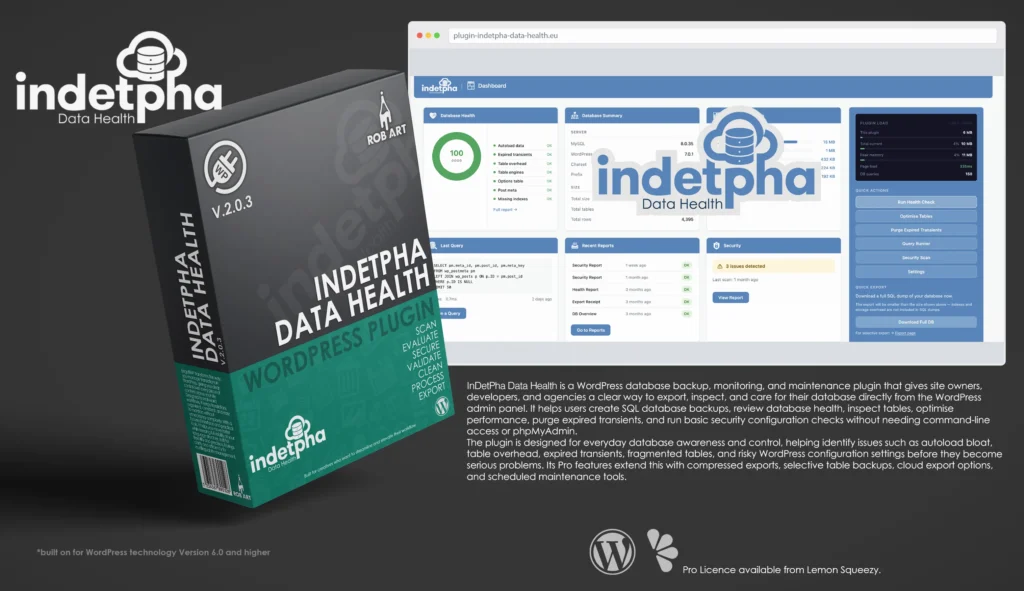
Indetpha Data Health is a professional database monitoring, health analysis, and export tool built specifically for WordPress. It gives site owners, developers, and agencies a clear, visual understanding of what’s happening inside their database, without the need for phpMyAdmin or command-line tools. Instead of treating the database as a hidden system layer, Indetpha Data Health brings it into the WordPress admin as an accessible, structured workspace where performance, storage, and security can be understood at a glance.
Designed for real-world use, Indetpha Data Health focuses on clarity and control. The dashboard presents key areas such as health, security, optimisation, tables, and exports as intuitive cards, allowing you to quickly identify issues like bloated autoload data, expired transients, table overhead, or misconfigured environments. Each check is explained in plain language, with guidance that helps you understand not just what is happening, but what action to take next.
At its core, Indetpha Data Health provides powerful export functionality, enabling full database backups in standard SQL format, with optional compressed formats and selective table exports available in the Pro version. Exports can be downloaded locally or sent directly to cloud storage, giving you flexibility in how you manage and store your data. With export history tracking and structured output, it becomes easy to maintain a reliable backup workflow.
Beyond exports, Indetpha Data Health includes tools to actively maintain and optimise your database. You can repair tables, purge expired transients, inspect table structures, and browse data safely without risk of accidental modification. The plugin surfaces performance-impacting issues and provides safe, guided paths to resolve them, making routine database maintenance far more approachable.
The built-in security scan checks critical configuration points within your WordPress environment, helping you identify risks such as exposed debug modes, weak file permissions, or default table prefixes. Each result is paired with clear, actionable guidance, allowing even non-technical users to strengthen their setup with confidence.
Indetpha Data Health is built for people who need real visibility and control over their WordPress database. Whether you’re managing a single site, maintaining client projects, or debugging complex environments, it provides a reliable, structured way to monitor, maintain, and safeguard your data. With a clean interface, practical tooling, and a focus on meaningful insights, it transforms database management from a hidden complexity into a clear and manageable part of your workflow.
Key Features
- Database Monitoring Dashboard – Visual overview of health, security, optimisation, tables, and exports in a clean card-based interface.
- Full SQL Export – Generate complete database backups directly from the WordPress admin.
- Compressed & Selective Exports (Pro) – Export individual tables and reduce file size with ZIP or GZ formats.
- Cloud Export (Pro) – Send backups directly to Dropbox, with additional providers planned.
- Health Analysis – Detect autoload bloat, expired transients, table overhead, orphaned data, and more.
- Security Scan – Identify common configuration risks with clear pass/fail indicators and fix guidance.
- Table Browser – Explore database tables, structures, and data safely without editing risk.
- Optimisation Tools – Repair tables, reclaim overhead, and purge expired transients.
- Export History – Track previous exports with format, size, and status for easy reference.
- Plain-English Guidance – Every check includes clear explanations and recommended actions.
- Lightweight & On-Demand – No background load unless triggered, ensuring minimal impact on your site.
- Professional Workflow Focus – Built for developers, agencies, and site owners who need clarity and control.
Requirements:
- Minimum WP Version: 6.0
- Minimum PHP Version: 7.4
- Internet Connection
- Free Version or Valid Licence for Pro Version
*Please note this plugin has the following built in languages: English
Plugin News
Happy to say we are in the process of making and deploying a dedicated support hub. Stay tuned for more details. Their will be links posted in the plugin as well as any known locations.
Indetpha Data Health continues to evolve as a modern approach to WordPress database management, focusing on clarity, control, and real usability inside the admin environment. As database plugins become essential tools for performance, backups, and site stability, Indetpha Data Health is positioning itself beyond traditional backup-only solutions by combining health monitoring, optimisation, and security checks into a single streamlined interface.
Recent development has focused on improving visibility and workflow efficiency, giving users a clearer understanding of what’s happening inside their database and how to act on it. With ongoing expansion into cloud exports, automation, and smarter diagnostics, Indetpha Data Health is steadily moving toward a more intelligent, insight-driven system—bridging the gap between technical database tools and everyday WordPress usability.
Changelog/Bugs
Changelog
Indetpha Data Health - Version History
Version 2.0.5 Minor
2026-07-10- ### Added
- - Selective table-specific export is now available to all users.
- - Read-only database queries (SELECT, SHOW, DESCRIBE, EXPLAIN) run in the free version.
- ### Changed
- - Every Export tab, including Scheduled and Cloud, is now visible to all users with an upgrade note on the actions that require Pro; no feature is hidden behind the licence.
- - Running data-changing database queries is now a Pro-only capability, injected by the paid add-on.
- - Renamed an internal script data object to use the plugin\'s own prefix.
- ### Fixed
- - Hardening and code-quality improvements to the export and query screens.
Version 2.0.4 Patch
2026-07-03- ### Changed
- - Updated the Pro upgrade and checkout link to the new Indetpha Data Health product page.
Version 2.0.3
2026-07-03- ### Fixed
- - Health screen table optimise buttons ran the optimise but left the status pill unchanged; the row now refreshes after optimising.
- - InnoDB tables were mislabelled as \"Fragmented\" on the Health screen; their reserved page space is now correctly shown as normal, matching the Optimise panel.
Version 2.0.2 Patch
2026-07-03- ### Changed
- - Renamed the admin menu page slugs to the plugin\'s declared prefix so every registered name is prefix-consistent, satisfying WordPress.org naming guidelines.
Version 2.0.1
2026-07-03- ### Fixed
- - Welcome screen buttons showed blue text on a blue background, making the labels invisible; primary and secondary button labels now render with the correct colour.
Version 2.0.0 Major
2026-07-03- ### Added
- - One-time automatic migration that carries existing settings and history across to the renamed plugin, with no reconfiguration required.
- ### Changed
- - Renamed the plugin to Indetpha Data Health, reflecting a focus on a clear, visual view of database health rather than backups alone.
- - Updated the text domain, plugin slug, menu location and all internal identifiers to match the new name.
- - Refreshed the description and positioning around database health signals, table inspection, environment checks, cleanup, optimisation and exports.
Version 1.3.26 Minor
2026-06-20- ### Changed
- - Raised \"Requires at least\" to WordPress 6.2 (needed for the %i identifier
- placeholder used below).
- ### Fixed
- - All table-referencing queries across the export, optimise, health and
- table-browser features now use $wpdb->prepare() with the %i identifier
- placeholder instead of interpolating a backtick-quoted table name
- (SHOW CREATE TABLE, SELECT, OPTIMIZE/REPAIR/CHECK/ANALYZE TABLE,
- SHOW INDEX, SHOW FULL COLUMNS, COUNT/paginated browse). Table names
- originate from SHOW TABLES or hard-sanitised input; behaviour is unchanged.
- ### Notes
- - Two operator-facing features intentionally retain non-prepared SQL, each
- gated by a nonce + manage_options and documented in-code: the SQL console
- (runs arbitrary admin-typed queries — no bindable placeholders, and
- prepare() would corrupt literal %), and the backup download stream (emits
- a binary gzip / raw .sql file — escaping would corrupt the download).
Version 1.3.24 Patch
2026-05-31- ### Changed
- - All admin CSS/JS extracted to enqueued asset files; no inline <script>/<style> tags remain in the free build
- - Welcome/splash screen restructured — free build shows an upgrade advert; licence-key entry + activation moved out of the free package (injected by Pro via a seam)
- - User manual and translation template (.pot) updated to the new plugin name and accurate free/Pro feature lists
Version 1.3.23 Patch
2026-05-31- ### Fixed
- - Readme title now matches the plugin header name, clearing the Plugin Check name-mismatch and restricted-term warnings
- ### Changed
- - Free/Pro feature lists corrected to match the code — SQL/ZIP/GZ/email export are free; selective export and cloud destinations are Pro
Version 1.3.22 Patch
2026-05-31- ### Fixed
- - Uninstall now removes every option, transient, scheduled event, and the scheduled-backup directory the plugin created
- > Completeness audit of uninstall cleanup; closed gaps in options, crons and the dump folder.
Version 1.3.21 Patch
2026-05-31- ### Added
- - Subtle Pro promo panels in the blue sidebar on Optimise, Export and Tables
Version 1.3.20
2026-05-31- ### Fixed
- - WordPress 7.0 select dropdown arrows overlapping option text; added a custom chevron and reserved padding
Version 1.3.19 Patch
2026-05-31- ### Removed
- - Two dead duplicate Settings cards (Scheduled Exports, Destinations) so free and Pro show the same card set
Version 1.3.18 Patch
2026-05-31- ### Changed
- - Upgrade overlay right column: removed the licence-key entry, replaced with an upsell feature list
Version 1.3.17 Patch
2026-05-31- ### Changed
- - Settings licence card now injects its key entry from the Pro package via a seam
Version 1.3.16 Patch
2026-05-31- ### Changed
- - Licence card adopts the advert-in-free / key-entry-from-Pro pattern
Version 1.3.15 Patch
2026-05-31- ### Changed
- - Reports: the three Pro report cards now show as advert panels in free instead of locked cards
Version 1.3.14 Patch
2026-05-31- ### Changed
- - Bulk \"Optimise All Tables\" moved to the Pro package; individual table optimise stays free
Version 1.3.13 Patch
2026-05-31- ### Changed
- - Settings-page Dropbox / Cloud Destinations card moved to the Pro package
Version 1.3.12 Patch
2026-05-31- ### Changed
- - Export-page Dropbox connection UI and save handler moved to the Pro package; free shows advert text
Version 1.3.11 Minor
2026-05-31- ### Changed
- - Orphaned-meta cleanup moved to the Pro package and given a working handler
Version 1.3.10
2026-05-31- ### Fixed
- - Scan description showing literal HTML tags instead of bold text
Version 1.3.9 Patch
2026-05-31- ### Added
- - Visible pulse feedback on security scan cards so a re-scan is obvious even when counts are unchanged
Version 1.3.8 Patch
2026-05-31- ### Fixed
- - Menu icon now degrades to a dashicon if the SVG asset is missing (no PHP warning)
Version 1.3.7 Minor
2026-05-31- ### Changed
- - Security scan: the free build now computes counts only; the detailed scan and lists moved to the Pro package
- > Removed the Trialware pattern where the free build computed and stored full scan details behind a tier check.
Version 1.3.6 Minor
2026-05-31- ### Changed
- - Dashboard-widget upsell band repositioned above the widget header bar
Version 1.3.5 Patch
2026-05-31- ### Added
- - Upsell band in the WordPress dashboard widget
Version 1.3.4 Patch
2026-05-31- ### Added
- - \"Get Pro\" link on the Plugins screen; fixed an unescaped Settings link
Version 1.3.3 Patch
2026-05-31- ### Fixed
- - Admin styles not loading on sub-pages after the menu rename; gate now uses the stable page slug
Version 1.3.2
2026-05-21- ### Fixed
- - WordPress 7.0 form, button, checkbox and radio styling restored to the familiar appearance
Version 1.3.1 Minor
2026-04-13- ### Changed
- - Pro module moved from `includes/pro/` to `pro/` at plugin root — consistent with suite convention
- - Pro-installer updated: unzips to plugin root, verifies `pro/pro.php`, updated asset enqueue paths
- - `pro/pro.php` internal requires updated from `includes/pro/` to `pro/`
- - `DBD_PRO_TEMPLATES` constant updated to `pro/templates/`
- - Languages folder added; `dbdumpwp_backend.pot` created covering all admin-facing strings
- - Plugin header updated with `Text Domain: dbdumpwp` and `Domain Path: /languages`
Version 1.3.0 Major
2026-04-08- Added Scheduled Exports (Pro) — daily, weekly, or monthly exports to local uploads folder and/or Dropbox with configurable retention
- Added WP-Cron heartbeat REST endpoint for reliable scheduling on low-traffic sites via external ping services
- Added Email export destination — send SQL/ZIP/GZ dumps up to 10 MB directly to any email address (free tier)
- Export destination order updated to Local | Email | Dropbox
- Added Optimise persistence — recently optimised tables show ✓ OK after tab switches using a 1-hour transient
- Added ANALYZE TABLE after OPTIMIZE TABLE to flush MySQL stats immediately
- Added Scheduled export notifications in Settings — \"Export complete\" and \"Export failed\" triggers under a dedicated Scheduled Exports column
- Fixed security scan issue count on dashboard card — now counts flagged categories not individual flags
- Fixed Optimise All column shift — corrected cell index mapping in updateOptimiseRow()
- Added table card colour key in Tables sidebar — blue = WordPress Core, green = Plugin, purple = Other/Custom
- Removed DejaVu font files from dompdf (7 MB saving)
Version 1.2.6 Major
2026-04-05- Added Cloud Destinations tab in Export panel — Dropbox active, Google Drive and Amazon S3 displayed as coming soon
- Added Export and Tables settings card with default format, history limit, and browse rows-per-page options
- Added Security Scan settings card with configurable admin login days and modified files hours thresholds
- Added danger banners on high-risk security fix guides (table prefix change, salts regeneration, file permission changes) prompting users to back up before proceeding
- Added full transient list in Optimise panel with Expired / Active / No Expiry status badges and per-transient details
- Improved Dropbox connection status badge and Test Connection button UX
Version 1.1.2 Patch
2026-04-06- Added dashboard overview cards for Recent Exports, Health, Security, Optimise, and Tables
- Overhauled Settings panel with live threshold previews for autoload and overhead values
- Added table category filter (WordPress Core / Plugins / Other) to Tables panel
- Added Health check icon set for clearer pass/warning/fail status at a glance
Version 1.0.0 Major
2026-04-02- Initial development candidate
Bugs
Indetpha Data Health - Known Issues
No known issues at this time.
Updates
Indetpha Data Health - Latest Update
Release Notes:
- ### Added
- - Selective table-specific export is now available to all users.
- - Read-only database queries (SELECT, SHOW, DESCRIBE, EXPLAIN) run in the free version.
- ### Changed
- - Every Export tab, including Scheduled and Cloud, is now visible to all users with an upgrade note on the actions that require Pro; no feature is hidden behind the licence.
- - Running data-changing database queries is now a Pro-only capability, injected by the paid add-on.
- - Renamed an internal script data object to use the plugin\'s own prefix.
- ### Fixed
- - Hardening and code-quality improvements to the export and query screens.
Download:
Requires: WordPress 6.0+ · PHP 8.4+
Documentation and Tutorials
Additional Learning Resources
For Plugin specific Help & Documentation visit this page.
A detailed PDF User Guide is available for download using the link provided below. This document explains all key features and functions of the plugin, helping you become familiar with its tools and workflow so you can make the most of your creative process.
For hands-on demonstrations and walkthroughs, visit our YouTube channel, where a full series of video tutorials cover everything you need to get started with the app. These videos provide visual guidance, practical examples, and helpful tips to ensure a smooth and productive learning experience.
To stay updated with new tutorials, feature overviews, and upcoming releases, subscribe to the channel here: RobArt Illustration
PDF User Manual Link(s) English