
DBDumpWP
Your WordPress database—monitoring health, fixing issues, and creating reliable exports from one simple interface.
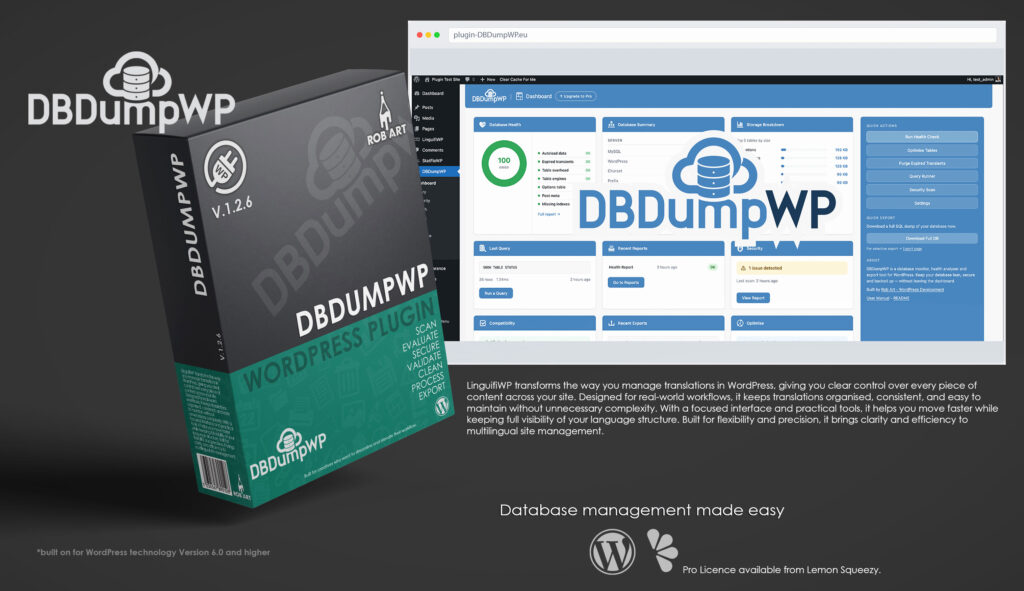
DBDumpWP is a professional database monitoring, health analysis, and export tool built specifically for WordPress. It gives site owners, developers, and agencies a clear, visual understanding of what’s happening inside their database, without the need for phpMyAdmin or command-line tools. Instead of treating the database as a hidden system layer, DBDumpWP brings it into the WordPress admin as an accessible, structured workspace where performance, storage, and security can be understood at a glance.
Designed for real-world use, DBDumpWP focuses on clarity and control. The dashboard presents key areas such as health, security, optimisation, tables, and exports as intuitive cards, allowing you to quickly identify issues like bloated autoload data, expired transients, table overhead, or misconfigured environments. Each check is explained in plain language, with guidance that helps you understand not just what is happening, but what action to take next.
At its core, DBDumpWP provides powerful export functionality, enabling full database backups in standard SQL format, with optional compressed formats and selective table exports available in the Pro version. Exports can be downloaded locally or sent directly to cloud storage, giving you flexibility in how you manage and store your data. With export history tracking and structured output, it becomes easy to maintain a reliable backup workflow.
Beyond exports, DBDumpWP includes tools to actively maintain and optimise your database. You can repair tables, purge expired transients, inspect table structures, and browse data safely without risk of accidental modification. The plugin surfaces performance-impacting issues and provides safe, guided paths to resolve them, making routine database maintenance far more approachable.
The built-in security scan checks critical configuration points within your WordPress environment, helping you identify risks such as exposed debug modes, weak file permissions, or default table prefixes. Each result is paired with clear, actionable guidance, allowing even non-technical users to strengthen their setup with confidence.
DBDumpWP is built for people who need real visibility and control over their WordPress database. Whether you’re managing a single site, maintaining client projects, or debugging complex environments, it provides a reliable, structured way to monitor, maintain, and safeguard your data. With a clean interface, practical tooling, and a focus on meaningful insights, it transforms database management from a hidden complexity into a clear and manageable part of your workflow.
Key Features
- Database Monitoring Dashboard – Visual overview of health, security, optimisation, tables, and exports in a clean card-based interface.
- Full SQL Export – Generate complete database backups directly from the WordPress admin.
- Compressed & Selective Exports (Pro) – Export individual tables and reduce file size with ZIP or GZ formats.
- Cloud Export (Pro) – Send backups directly to Dropbox, with additional providers planned.
- Health Analysis – Detect autoload bloat, expired transients, table overhead, orphaned data, and more.
- Security Scan – Identify common configuration risks with clear pass/fail indicators and fix guidance.
- Table Browser – Explore database tables, structures, and data safely without editing risk.
- Optimisation Tools – Repair tables, reclaim overhead, and purge expired transients.
- Export History – Track previous exports with format, size, and status for easy reference.
- Plain-English Guidance – Every check includes clear explanations and recommended actions.
- Lightweight & On-Demand – No background load unless triggered, ensuring minimal impact on your site.
- Professional Workflow Focus – Built for developers, agencies, and site owners who need clarity and control.
Requirements:
- Minimum WP Version: 6.0
- Minimum PHP Version: 7.4
- Internet Connection
- Free Version or Valid Licence for Pro Version
*Please note this plugin has the following built in languages: English
Plugin News
DBDumpWP continues to evolve as a modern approach to WordPress database management, focusing on clarity, control, and real usability inside the admin environment. As database plugins become essential tools for performance, backups, and site stability, DBDumpWP is positioning itself beyond traditional backup-only solutions by combining health monitoring, optimisation, and security checks into a single streamlined interface.
Recent development has focused on improving visibility and workflow efficiency, giving users a clearer understanding of what’s happening inside their database and how to act on it. With ongoing expansion into cloud exports, automation, and smarter diagnostics, DBDumpWP is steadily moving toward a more intelligent, insight-driven system—bridging the gap between technical database tools and everyday WordPress usability.
Changelog/Bugs
Changelog
Bugs
Updates
Documentation and Tutorials
Additional Learning Resources
For Plugin specific Help & Documentation visit this page.
A detailed PDF User Guide is available for download using the link provided below. This document explains all key features and functions of the plugin, helping you become familiar with its tools and workflow so you can make the most of your creative process.
For hands-on demonstrations and walkthroughs, visit our YouTube channel, where a full series of video tutorials cover everything you need to get started with the app. These videos provide visual guidance, practical examples, and helpful tips to ensure a smooth and productive learning experience.
To stay updated with new tutorials, feature overviews, and upcoming releases, subscribe to the channel here: RobArt Illustration
PDF User Manual Link(s) English