
XMP Stripper Plugin
“XMP Stripper — a plugin built by a designer, for designers, to easily remove those things need removing”
Clean Your Files with Confidence
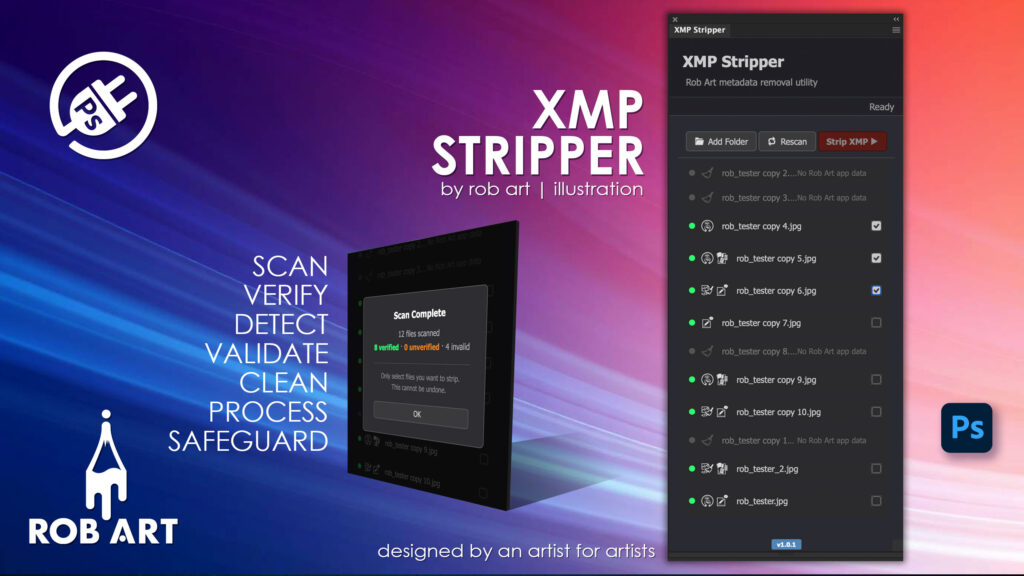
XMP Stripper is a precision-built utility for Adobe Photoshop that gives you full control over the hidden metadata inside your files. Designed for professionals who value privacy, clarity, and clean deliverables, it scans, verifies, and permanently removes embedded XMP data written by Rob Art plugins — ensuring your files contain only what you intend to share.
Built for Safe, Intentional Control
XMP data is invisible but powerful. XMP Stripper ensures you never remove the wrong information by mistake. Every file is passed through a multi-stage verification system before it can be selected, confirming it genuinely belongs to your workflow. Only verified files can be processed, giving you confidence and control at every step.
Efficient Scanning and Selective Processing
Scan open Photoshop documents instantly or process entire folders in batch mode. Clear visual indicators show which files are verified, partial, or invalid, so you always understand what’s happening. Select exactly which files to process and strip only what you choose — nothing more, nothing less.
Designed for Professional Workflows
Whether you’re preparing files for client delivery, reducing file size, protecting your workflow data, or archiving clean masters, XMP Stripper fits seamlessly into your process. It removes only Rob Art plugin metadata, leaving essential Adobe, EXIF, and copyright information untouched.
Powerful, Irreversible Precision
Stripping is permanent — and that’s the point. XMP Stripper is built to execute clean, final actions with clarity and intent. With confirmation prompts, status feedback, and reliable processing, you stay fully in control of your files from start to finish.
- Multi-stage verification — ensures only genuine workflow files can be processed
- Scan open files or folders — flexible workflow for single or batch operations
- Clear status indicators — instantly identify verified, partial, and invalid files
- Selective stripping — choose exactly which files to process
- Permanent metadata removal — clean files with no residual plugin data
- Rob Art ecosystem detection — identifies which plugins wrote data to each file
- Safe processing flow — confirmation prompts prevent accidental actions
- Cross-platform support — compatible with macOS and Windows
Requirements:
- Minimum PS Version: 23.2.0
- Internet Connection
- No Licence required – Freeware!
*Please note this plugin has the following built in languages: English
Plugin News
Lorem ipsum dolor sit amet, consectetur adipiscing elit. Ut elit tellus, luctus nec ullamcorper mattis, pulvinar dapibus leo.
Changelog/Bugs
Changelog
XMP Stripper - Latest Update
Release Notes:
- ### Fixed
- - **Native form-control styling under the new Photoshop UI backend** — a recent Photoshop update draws native `<button>`/`<input>`/`<select>` chrome below CSS (rounded/tall buttons, over-tall inputs). Added a UA-reset stylesheet and a button shim that retags the settings-modal `<button>`s to `<div role=\"button\">` so they stay CSS-controllable. The main panel already used div buttons, so only the settings modal needed shimming.
- - **False \"Update Available\" popup** — the update checker read its current version from a stale `config/app.config.json` (1.0.1) while the plugin was actually 1.0.3, so it always reported an update. The config version now matches the manifest.
Requires: Adobe Photoshop 23.3.0 or later
Bugs
XMP Stripper - Known Issues
No known issues at this time.
Updates
XMP Stripper - Version History
Version 1.0.4
2026-08-30- ### Fixed
- - **Native form-control styling under the new Photoshop UI backend** — a recent Photoshop update draws native `<button>`/`<input>`/`<select>` chrome below CSS (rounded/tall buttons, over-tall inputs). Added a UA-reset stylesheet and a button shim that retags the settings-modal `<button>`s to `<div role=\"button\">` so they stay CSS-controllable. The main panel already used div buttons, so only the settings modal needed shimming.
- - **False \"Update Available\" popup** — the update checker read its current version from a stale `config/app.config.json` (1.0.1) while the plugin was actually 1.0.3, so it always reported an update. The config version now matches the manifest.
Version 1.0.3 Patch
2026-03-21- ### Fixed
- - Append/Replace overlay buttons had no spacing — replaced `gap` (unsupported in UXP) with `margin-right` on child elements
- - Strip XMP button now visually activates (bright red) when files are checked — previously the active state was invisible
- - Rescan now re-scans all appended folders, not just the last one added
- - Folder path memory is now an array — supports multiple folders added via Append
Version 1.0.2 Patch
2026-03-21- ### Added
- - **Check All / Uncheck All** button (footer right, blue) — checks all verified files in one click; toggles to Uncheck All when all are checked; resets on rescan or clear
- - **Clear List** button (footer left, grey) — now appears on any scan result, not just folder scans; previously only showed during batch/folder mode
- - **Footer bar** — dedicated bottom bar holds Clear List and Check All buttons in a proper in-panel layout (replaces previous `position:fixed` approach which didn\'t work reliably in UXP)
- - **Smart Rescan** — Rescan now re-runs the last folder scan if a folder was loaded, rather than falling back to open documents and wiping the list
- - **Append / Replace prompt** — when Add Folder is clicked with a list already loaded, an overlay prompts to replace the list or append to it; duplicate file paths are skipped on append
- ### Fixed
- - Clear List and Check All buttons were not appearing on open-document scans (only showed on folder scans)
Version 1.0.1 Minor
2026-03-20- ### Fixed
- - Corrected Rob Art XMP namespace URIs in strip engine — noteli, jotflagger, and sylentid were pointing to wrong URIs causing app data to go undetected
- - SylentID namespace identified as `http://ns.adobe.com/StockPhoto/1.0/` (bmsp prefix) — updated in strip engine
- - Files with no app data (stripped/clean) now correctly show as locked/grey even if signature is present (UILab re-injection after strip was showing green)
- - Overlay scan stats now correctly bucket clean files as invalid rather than verified
- - Injector no longer skips old-format signatures missing `d` and `f` fields — rewrites them automatically on next document open
- - Overlay no longer persists when the last open document is closed (`clear()` now hides it)
- ### Added
- - Multiple app icons per file row — shows one icon per detected Rob Art app
- - `clean.svg` icon displayed for files with no Rob Art app data (replaces grey placeholder)
- - SylentID legal warning in strip confirmation dialog — advises that removing SylentID data may affect copyright watermark verification
- - Strip XMP button now shows as dark red when inactive (was transparent/greyed) so it remains visible
- - **Clear List button** — fixed bottom-right, brand blue, visible only during folder/batch scans when list is populated; clears results and resets to empty state
- ### Changed
- - App icons wrapper uses `margin-right` instead of `gap` (UXP does not support `gap` on flex containers)
- - `dc:description` cleanup now covers all Rob Art app keywords, not just UILab
Version 1.0.0 Major
2026-03-20- ### Initial release
- #### Core
- - Three-check signature verification system
- - Check 1: Rob Art plugin present in UXP External folder (mac + win)
- - Check 2: `dcp:origin` XMP property present and valid
- - Check 3: Hash verified using stored DocumentID and device fingerprint
- - Batch folder scan via Add Folder button
- - Auto-scan of open Photoshop documents on panel load and document change
- - Verification states: `verified` (green), `partial` (orange), `invalid` (grey)
- #### UI
- - Toolbar: Add Folder · Rescan · Strip XMP
- - File list with status dot, app icon, filename, reason, checkbox
- - Scan overlay (true overlay with dark transparent background) showing totals
- - Strip button inactive until verified files are selected
- #### Signature payload format (v1)
- ```json
- { \"h\": \"...\", \"a\": \"appid\", \"v\": \"1\", \"d\": \"documentID\", \"f\": \"fingerprint\" }
- ```
- - `d` and `f` stored in payload to ensure cross-plugin verification reliability
- #### Supported file types
- PSD, PSB, JPG, JPEG, PNG, TIF, TIFF
Documentation and Tutorials
Additional Learning Resources
For Plugin specific Help & Documentation visit this page.
A detailed PDF User Guide is available for download using the link provided below. This document explains all key features and functions of the plugin, helping you become familiar with its tools and workflow so you can make the most of your creative process.
For hands-on demonstrations and walkthroughs, visit our YouTube channel, where a full series of video tutorials cover everything you need to get started with the app. These videos provide visual guidance, practical examples, and helpful tips to ensure a smooth and productive learning experience.
To stay updated with new tutorials, feature overviews, and upcoming releases, subscribe to the channel here: RobArt Illustration
PDF User Manual Link(s) English