
Remind-a
"Built by an artist for artists — Never forget what matters, with reminders embedded directly into your Photoshop documents."
Never forgetting work flow
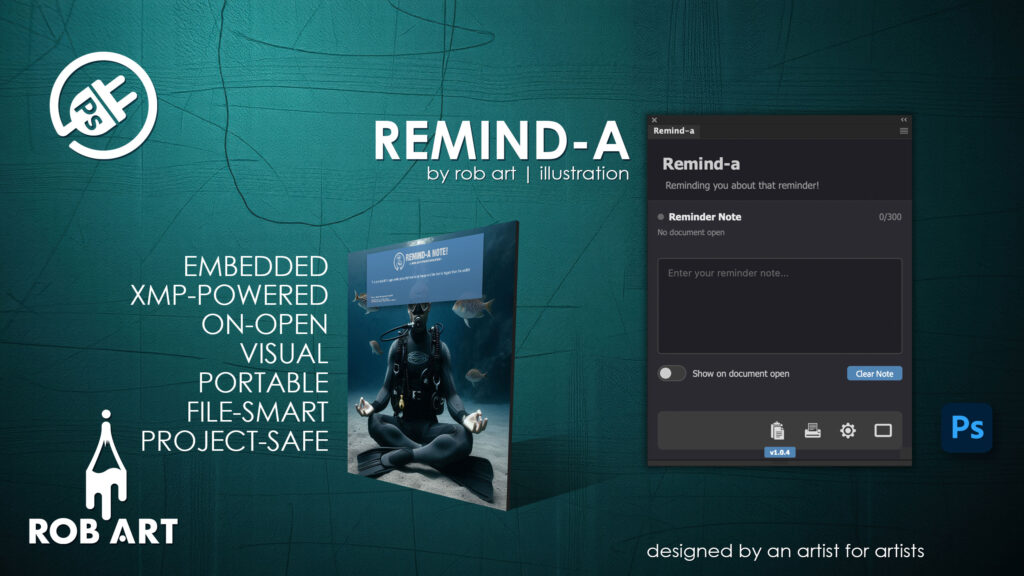
Remind-A is a professional reminder system for Adobe Photoshop that gives designers a simple, visual way to manage critical tasks directly inside their creative workflow. Instead of relying on memory, emails, or external notes, Remind-A embeds your reminders straight into your Photoshop documents using XMP metadata — ensuring your instructions travel permanently with your PSD files.
Easy to create
Designed for clarity and speed, Remind-A features a clean, distraction-free panel that integrates seamlessly into Photoshop. Create concise reminders in seconds, enable on-open display, and let the system handle the rest. When activated, Remind-A generates a prominent visual reminder card directly on your canvas, making essential tasks impossible to overlook.
Lives in your document
With permanent document association at its core, Remind-A automatically links reminders to each individual file. Switch between projects and your correct reminder loads instantly. Because reminders are embedded via XMP metadata, they remain attached even if files are renamed, moved, duplicated, or archived for years.
A professional aide to help speed up workflow
Remind-A is built for professionals who value reliability and workflow discipline. Whether you’re managing client revisions, tracking technical print requirements, coordinating handoffs, or juggling multiple commissions, Remind-A ensures nothing slips through the cracks. Simple, powerful, and permanently embedded, it’s your visual safeguard inside Photoshop.
- Embedded XMP Storage – Reminders are written directly into Photoshop document metadata, permanently travelling with your PSDs.
- Visual Reminder Card – Automatically generates a prominent overlay layer when documents are opened.
- On-Open Display Control – Toggle whether reminders appear automatically when reopening a file.
- Real-Time Sync – Notes are saved instantly to metadata as you type.
- Multi-Document Awareness – Instantly switches reminders as you move between open Photoshop files.
- Customisable Card Appearance – Adjust position, opacity, gradient style, logo visibility, and shadow.
- Export Options – Export reminders to PDF, RTF, or TXT for documentation and sharing.
- Multi-Language Support – 9 interface languages including UK/US English, Spanish, French, German, Italian, Portuguese, Greek, and Japanese.
- Completely Free – No license required, no subscription, no activation.
Requirements:
- Minimum PS Version: 23.3.0
- Internet Connection
- Valid Account on Gumroad/Lemon Squeezy or an Adobe Cloud Account
*Please note this plugin has the following built in languages: English, English US, Français, Deutsch, Español, Italiano, Português, Ελληνικά and 日本語
Plugin News
- There is a projected release date for v.1.0.7 for March 2026.
- In an incredible series of events and the release of Photoshop 27, there was a break in the code that allowed XMP data to be written from the UXP environment. Mainly due to security and a new pipeline built to deal with Content Credential data. For that reason, the past 3 days has been used to find a solution. Luckily a new more robust data saving XMP engine has been designed and is being deployed into th app. So v 1.0.4 is still set for March release.
Changelog/Bugs
Changelog
Remind-a - Version History
Version 1.0.9
2026-08-10- ### Fixed
- - **Native form-control styling under the new Photoshop UI backend** — a recent Photoshop update ships user-agent styles for native `<input>`/`<button>` that override our CSS: taller inputs, rounded buttons, and the primary button losing its brand fill
- - Root cause: the newer UXP build draws native button chrome below the CSS layer, so `appearance:none` and `border-radius:0` report as applied but do not suppress it
- - Fix: added `lib/styles/uxp-reset.css` (brand-agnostic UA-reset that clears the injected height and pins component heights) and `lib/ui/uxp-button-shim.js` which retags `<button>` → `<div role=\\\"button\\\">` (no native chrome, fully CSS-controllable). All id/class/data-* attributes are copied so existing handlers keep working, and Enter/Space keyboard access is preserved
- - **Static licence-screen buttons** — the licence modal\\\'s buttons are now shimmed on load so they render with the correct styling from first paint
- ### Technical
- - `lib/styles/uxp-reset.css` (new) — UA-reset; kills native appearance, clears injected height
- - `lib/ui/uxp-button-shim.js` (new) — obfuscation-safe bracket-key globals; retags buttons to divs
- - `index.html` — static reset link + shim loaded before modal-engine
- - `brand-switcher.js` — re-appends the reset last in `<head>` on every brand load
- - `modal-engine.js` — runs the shim after modal markup, before handlers bind
- - `xmp-signature-injector.js` — guarded bare `module.exports` (script-loaded scope)
- - `reminda.css` — keeps the Clear button off the scrollable right edge
- - `manifest.json` — version bumped to 1.0.9
- - `docs/UXP-UA-STYLE-FIX.html` — reusable playbook for porting the fix to other plugins
Version 1.0.8
2026-03-17- ### Fixed
- - **JPG image degradation** — Notes no longer cause lossy re-encoding of JPG documents
- - Root cause: `ensureDocumentNeedsSave()` painted an invisible pixel to dirty the document, which got baked into the JPG on every save. Additional `batchPlay save` calls (including up to 4 retry cycles) compounded the damage.
- - Fix: `writeNote` now calls `performXMPFilePatching` directly on blur (same pattern as `clearNote`), bypassing the dirty pixel and save interception entirely. XMPFile API writes directly to the file\\\'s metadata block — no pixel data touched, no re-encode.
- - Fallback: if the document has never been saved (no file path), pending metadata is stored and written on first CMD+S as before.
- - **\\\"Save As\\\" dialog on JPG after card render** — Editing a note on a JPG that has a reminder card layer no longer triggers Photoshop\\\'s \\\"Save As\\\" dialog. The card layer is automatically removed before the XMP patch when the file is a JPG.
- - **Spinner delay removed** — Eliminated the 500ms verification re-read after `performXMPFilePatching`. The `CLOSE_UPDATE_SAFELY` flag guarantees the write succeeded; the re-read was debug code only.
- ### Technical
- - `reminda-xmp-wrapper.js`: `writeNote` now calls `engine.performXMPFilePatching` directly instead of `engine.injectMetadata`
- - `psd-metadata-engine.js`: Removed `ensureDocumentNeedsSave()` call from `injectMetadata`
- - `psd-metadata-engine.js`: Removed batchPlay XMP sync + silent save after `putXMP()` in `performXMPFilePatching`
- - `psd-metadata-engine.js`: Removed post-write verification block (500ms delay + file re-open)
Version 1.0.7
2026-03-16- #### Bugs Fixed
- - **Tofu box on rendered card** — Root cause: `wordWrap()` was inserting `\\\\n` at ~60 chars; Photoshop rendered the newline as a tofu box. Fixed by removing JS word-wrap entirely and passing raw text to `batchPlay` — Photoshop handles wrapping within the text box bounds
- - **`btoa` InvalidCharacterError** — Curly apostrophes and other non-Latin1 chars (e.g. `\\\'` U+2019) caused `secureEncode` to throw. Fixed with Unicode-safe base64: `btoa(unescape(encodeURIComponent(str)))` / `decodeURIComponent(escape(atob(str)))`
- - **Dirty flag reappearing after save** — `batchPlay set XMPMetadataAsUTF8` (needed to sync PS internal buffer) was marking doc dirty again post-save. Fixed by performing a silent `batchPlay save` immediately after the sync to clear the dirty flag
- - **`injectMetadata` failing when PS busy** — `ensureDocumentNeedsSave` threw when modal lock unavailable. Made non-fatal: dirty pixel failure is caught silently; `pendingMetadata` is already set and writes on next CMD+S
- - **Data Management buttons broken** — Export, Import, Reset, Export Error Log all used browser APIs (`URL.createObjectURL`, `<input type=file>`) which don\\\'t work in UXP. Rewrote all four using `localFileSystem.getFileForSaving` / `getFileForOpening`
- #### Features Improved
- - **Bullet inputs → `<input type=\\\"text\\\">`** — Replaced `<textarea rows=\\\"2\\\">` with single-line `<input type=\\\"text\\\">` so text scrolls horizontally instead of wrapping/hiding whole words
- - **Sanitise on render** — Added `sanitizeForPhotoshop()` function in `reminder-card-renderer.js`: normalises Unicode, maps smart quotes/dashes/ellipsis to ASCII equivalents, strips invisible chars, strips anything outside `\\\\x20-\\\\x7E`. Applied to all four bullet lines, instruction text, and copyright lines
- - **Paste handler** — Strips invisible chars and newlines at point of paste into bullet inputs
- - **Enter blocked** — `keydown` handler prevents Enter in bullet inputs (no newlines possible)
- - **Arrow key navigation** — Up: moves to previous input (cursor at end) or jumps to start if on first; Down: moves to next input (cursor at start) or jumps to end if on last
- - **Max chars per bullet: 70 → 80** — Updated `maxCharsPerBullet`, all `maxlength` attributes, counter display `0/240` → `0/320`
- #### Key Architecture Notes
- - `wordWrap()` method still exists in `reminder-card-renderer.js` but is no longer called — can be removed in future cleanup
- - `sanitizeForPhotoshop()` is defined at module level in `reminder-card-renderer.js`, applied only at render time (XMP stores raw text)
- - Silent save after batchPlay XMP sync: `synchronousExecution: false` to avoid blocking the modal
- #### Files Modified
- - `lib/core/reminder-card-renderer.js` — removed wordWrap from `createPositionedText`, added `sanitizeForPhotoshop()`, applied to all text layers
- - `lib/core/psd-metadata-engine.js` — Unicode-safe base64 in `secureEncode`/`secureDecode`, non-fatal dirty pixel, silent save after batchPlay sync
- - `lib/core/settings-modal.js` — all four Data Management handlers rewritten for UXP file system
- - `lib/reminda-app.js` — `maxCharsPerBullet` 70→80, paste handler, Enter block, Up/Down arrow navigation, newline strip in `getBulletLines` and `setBulletLines`
- - `index.html` — `<textarea>` → `<input type=\\\"text\\\">`, `maxlength` 70→80, counter 0/240→0/320
- - `lib/styles/reminda.css` — `.bullet-row` align-items center, `.bullet-dot` padding-top removed, `.bullet-textarea` styles for single-line input
- - `manifest.json` + `config/app.config.json` — version bump to 1.0.7
Version 1.0.6 Minor
2026-03-16- ### Fixed
- - **Copy to clipboard** — updated to collect text from 4 bullet textareas (was targeting old single `#reminderNote` textarea); joins non-empty lines as `• bullet\\\\n• bullet` and writes via `ClipboardUtils.writeText()`
- - **Print / Export** — all four export paths (left-click PDF + right-click PDF/RTF/TXT) now use a shared `getBulletNoteText()` helper that collects from `.bullet-textarea` elements instead of `#reminderNote`
Version 1.0.5 Minor
2026-03-16- ### Added
- - **4-Bullet Input System** — replaced single textarea with 4 individual 2-row inputs (70 chars each, 280 total)
- - Tab key navigates between fields
- - Bullet dot (•) rendered inline left of each input
- - Pipe-delimited storage format (`line1|line2|line3|line4`) in XMP
- - Reminder card renders each non-empty bullet as a separate line
- - **Dual Character Counter** — shows `field/70 | total/280` when a field is active
- - Field counter turns orange at 85%, red at 100%
- - Total counter turns orange at 90%, red at 100%
- - Shows total only when no field is active
- - **XMP Clear Now Works Reliably** — The Cat Came Back problem solved
- - Root cause: Photoshop flushes its internal XMP cache to disk on document close, overwriting `XMPFile.putXMP()` writes
- - Fix: `batchPlay set XMPMetadataAsUTF8` syncs cleared data into Photoshop\\\'s internal save buffer so it flushes the correct data on close
- - Gemini identified the solution; ChatGPT correctly identified the problem architecture
- - **File Path Captured Before Save Delay** — prevents \\\"No active document\\\" error on close-save
- - `pendingMetadata` now stores `filePath` at write time
- - `onSaveDetected` captures path before 3-second delay
- - `performXMPFilePatching` accepts `overrideFilePath` parameter so it works even after doc closes
- - **Settings → XMP/Data: Clear All XMP Data fixed**
- - Was calling broken `require(\\\'./reminda-xmp-wrapper.js\\\')` — now uses `window.RemindaXMP`
- - Inline feedback text: \\\"✓ Cleared\\\" (green) or \\\"✗ Failed\\\" (red), auto-clears after 3s
- - Also calls `RemindaApp.clearUI()` to reset main panel after nuke
- ### Fixed
- - **Blur/Clear race condition** — `mousedown` on Clear button sets `isClearing=true` before blur fires, preventing blur from saving old content back
- - **batchPlay modal dialog on close** — `set XMPMetadataAsUTF8` now guarded by `psApp.activeDocument` check; skips gracefully if doc already closed
- - **Save event firing twice** — duplicate `onSaveDetected` calls handled cleanly
- ### Changed
- - `extractMetadata` reads directly from disk via `XMPFile` (not Photoshop\\\'s in-memory batchPlay cache)
- - Silent save when tabbing between bullet fields (no notification); full save with notification when leaving all fields
- - `dispatchEvent(new Event(\\\'input\\\'))` after programmatic `value = \\\'\\\'` to prevent UXP treating field as pristine
- ### Technical
- - `performXMPFilePatching(encodedData, overrideFilePath)` — added optional path parameter
- - `window.pendingMetadata` now includes `filePath` field
- - `batchPlay set XMPMetadataAsUTF8` added after `putXMP()` to sync PS internal buffer
- - `batchPlay` sync skipped when no active document (prevents Photoshop error modals)
- - Inline `#xmpNukeFeedback` span added next to nuke button in settings modal HTML
Version 1.0.4 Major
2026-02-28- ### Added
- - **Complete Multi-Language Support**
- - 9 languages: English (UK/US), Deutsch, Ελληνικά, Español, Français, Italiano, 日本語, Português
- - All UI elements fully translated: settings modal, main panel, header, tooltips
- - Language-specific SVG logos that swap automatically based on selected language
- - Professional translations for all dropdown menus, labels, buttons, and placeholders
- - Reminder card footer text now uses localized translations
- - **Dynamic Dropdown Translation System**
- - Dropdowns rebuild options dynamically when language changes
- - All 6 settings dropdowns translate correctly (language, theme, background type, opacity, position, encoding)
- - Fixes UXP rendering issues with static HTML option elements
- - Options generated at runtime using `i18n.t()` for immediate translation
- ### Fixed
- - **Language Persistence Bug**: Fixed critical localStorage key mismatch
- - i18n.js was using `plugin_language` while settings modal used `universalEngine_language`
- - Language selection now persists correctly across plugin reloads
- - Translations no longer revert to English after save
- - **Header Subtitle Translation**: Fixed subtitle not updating on language change
- - Removed static initialization at module load time
- - Subtitle now translates dynamically with all other elements
- - Added `configureHeader()` callback to settings modal
- - **Dropdown Translation Rendering**: Fixed dropdowns not visually updating in UXP
- - UXP renders dropdown options at creation time, not dynamically
- - Switched from post-creation translation to pre-creation generation
- - Adopted sylentID\\\'s approach: rebuild options with translations already applied
- ### Changed
- - Enhanced `i18n.js` to handle OPTION elements by setting `label`, `text`, and `textContent`
- - Settings modal now rebuilds dropdowns on open and after language changes
- - Reminder card renderer uses `window.i18n.t()` for footer text with placeholder support
- - Main panel document name display uses localized translations
- ### Technical
- - Created `rebuildDropdownOptions()` function in settings-modal.js
- - Added configureHeader dependency to settings modal initialization
- - Updated `updateDocumentName()` to use i18n for \\\"Note for:\\\" and \\\"No document open\\\" messages
- - Enhanced `applyTranslations()` to properly handle INPUT, TEXTAREA, and OPTION elements
- - Added translation placeholder support for dynamic values (e.g., `{year}`, `{count}`)
Version 1.0.3 Major
2026-02-28- ### Added
- - **True Responsive Card Sizing**
- - Card now scales properly on all document sizes (800px to 5000px)
- - Removed hard pixel minimums that prevented small document scaling
- - All elements (card, padding, fonts, spacing) scale proportionally together
- - Base scale factor: `docWidth / 2000`, clamped between 0.4x and 2x
- - **Status Indicator System**
- - Visual status dot next to \\\"Reminder Note\\\" label
- - Grey = No XMP data saved yet
- - Bright green = Synced (saved to document)
- - Dark green = Modified (unsaved changes)
- - Updates in real-time as you type
- - **Document Name Display**
- - Shows \\\"Note for: filename.psd\\\" below label
- - Updates automatically when switching between documents
- - Shows \\\"No document open\\\" when appropriate
- - **Copy to Clipboard**
- - New copy button in control panel
- - Copies entire note text to clipboard
- - Shows success/error notifications
- - **Copyright Footer on Cards**
- - Professional two-line copyright footer
- - Includes link to plugin page: https://robsnow.eu/plugins
- - Font size and positioning scale with document
- ### Fixed
- - **Multi-Document XMP Bug**: Fixed cross-contamination where wrong note would appear in different documents
- - Now tracks document ID with pending metadata
- - Only writes XMP to correct document on save
- - **Text Box Overflow**: Text boxes now properly respect width boundaries on all document sizes
- - Switched to paragraph text with `char: \\\"box\\\"`
- - Text wraps correctly within calculated width
- - **Dirty Pixel Placement**: Dirty pixel now placed on Background layer instead of active layer
- - Prevents expanding bounding box of reminder card
- - Falls back to current layer if no background exists
- - **Session Token Cleanup**: Removed non-existent `fs.releaseSessionToken()` call that caused console errors
- - **Layer Selection**: Card layer now deselected after creation (using `selectNoLayers`)
- ### Changed
- - Logo size reduced from 70% to 50% of card width for better proportions
- - Card height increased from 400px to 450px (scaled) to accommodate copyright footer
- - Text spacing below logo increased from 130 to 180 (scaled) for better layout
- - Copyright text color lightened to #C8C8C8 for subtlety
- - Layer existence check changed from batchPlay to DOM API for reliability
- ### Technical
- - Implemented ChatGPT/Gemini recommended responsive algorithm
- - Added `lastSavedText` and `lastSavedEnabled` state tracking
- - Created `updateSyncStatus()` and `updateDocumentName()` methods
- - Modified `psd-metadata-engine.js` to track document IDs in `window.pendingMetadata`
- - Updated all brand CSS files (generic, neutral, lively) for copy button positioning
Version 1.0.2 Major
2026-02-27- ### Added
- - **XMP Metadata Storage System**
- - Notes now stored in document XMP metadata with custom namespace `http://robart.com/reminda/xmp/1.0/`
- - Secure base64 encoding for note data
- - Dirty pixel approach to force document save after enabling reminder
- - Save interception writes XMP post-save via XMPFile API
- - Stores noteText, isEnabled, lastModified, and characterCount
- - **Branded Reminder Card Renderer**
- - Beautiful gradient background (brand blue #5184b3 → 15% darker)
- - Centered SVG logo header (`icons/note_header.svg`)
- - White main text (22pt Arial)
- - Off-white footer text: \\\"You can delete this layer when finished\\\" (13pt)
- - Drop shadow effect (40% opacity, 24px blur)
- - Card automatically flattened to single layer at 85% opacity
- - Positioned at 15% from top, 60% of document width, centered horizontally
- - **Document Watcher System**
- - Automatic detection when documents are opened (1s polling interval)
- - Reads XMP metadata from opened documents
- - Creates visual reminder card if reminder is enabled
- - Updates UI with note content
- ### Technical
- - Created `lib/core/reminda-xmp-wrapper.js` - XMP interface module
- - Created `lib/core/reminder-card-renderer.js` - Visual card builder using batchPlay
- - Created `lib/core/document-watcher.js` - Document change detection
- - Added PSDMetadataEngine script tag to `index.html`
- - Made `appConfig` globally available from `entrypoints.js`
- - Updated `config/xmp.config.json` with reminda namespace
- ### Fixed
- - **Text Positioning Issue**: Solved \\\"text way off screen\\\" problem using ChatGPT\\\'s Create → Get Bounds → Move pattern
- - **Logger Missing**: Added fallback stub logger for PSDMetadataEngine when `window.comprehensiveLogger` is undefined
- - **Gradient Rendering**: Uses layer effects (`gradientFill`) instead of fill command for reliability
- - **SVG Placement**: Uses `createSessionToken()` for proper UXP file access instead of `nativePath`
- ### Changed
- - Reminders now persist in document metadata instead of localStorage
- - Reminder display changed from notification to visual layer card
- - Card components flattened into single layer for easy deletion
- - Logo scaled to 70% of card width and centered
Version 1.0.1 Minor
2026-02-27- ### Fixed
- - Fixed button styling issue where UXP\\\'s shadow DOM was overriding CSS font-size
- - Replaced `<button>` with `<div role=\\\"button\\\">` to bypass UXP\\\'s unoverridable button styles
- - Added explicit button font rules to all brand CSS files (generic, neutral, lively)
- ### Changed
- - Clear Note button now uses semantic div instead of native button element
Version 1.0.0 Major
2026-02-27- ### Added
- - Initial release of Remind-a plugin
- - Reminder note system with textarea (max 500 characters)
- - Real-time character counter
- - \\\"Show on document open\\\" toggle to enable/disable auto-display
- - \\\"Clear Note\\\" button to reset reminder text
- - Persistent storage using UXP localStorage
- - Auto-display notification when Photoshop documents are opened
- - Integration with existing notification engine
- - Clean, compact UI matching Cohesion plugin style
- ### Technical
- - Created `RemindaApp` class in `lib/reminda-app.js`
- - Added document open event listener in `script.js`
- - Implemented localStorage management for `remindaNote` and `remindaEnabled` keys
- - Added reminder-specific styles in `lib/styles/reminda.css`
Bugs
Remind-a - Known Issues
- Save open file issue – If you save an open docuemnt after Note for: is declared it doesn't update.
Updates
Remind-a - Latest Update
Release Notes:
- ### Fixed
- - **Native form-control styling under the new Photoshop UI backend** — a recent Photoshop update ships user-agent styles for native `<input>`/`<button>` that override our CSS: taller inputs, rounded buttons, and the primary button losing its brand fill
- - Root cause: the newer UXP build draws native button chrome below the CSS layer, so `appearance:none` and `border-radius:0` report as applied but do not suppress it
- - Fix: added `lib/styles/uxp-reset.css` (brand-agnostic UA-reset that clears the injected height and pins component heights) and `lib/ui/uxp-button-shim.js` which retags `<button>` → `<div role=\\\"button\\\">` (no native chrome, fully CSS-controllable). All id/class/data-* attributes are copied so existing handlers keep working, and Enter/Space keyboard access is preserved
- - **Static licence-screen buttons** — the licence modal\\\'s buttons are now shimmed on load so they render with the correct styling from first paint
- ### Technical
- - `lib/styles/uxp-reset.css` (new) — UA-reset; kills native appearance, clears injected height
- - `lib/ui/uxp-button-shim.js` (new) — obfuscation-safe bracket-key globals; retags buttons to divs
- - `index.html` — static reset link + shim loaded before modal-engine
- - `brand-switcher.js` — re-appends the reset last in `<head>` on every brand load
- - `modal-engine.js` — runs the shim after modal markup, before handlers bind
- - `xmp-signature-injector.js` — guarded bare `module.exports` (script-loaded scope)
- - `reminda.css` — keeps the Clear button off the scrollable right edge
- - `manifest.json` — version bumped to 1.0.9
- - `docs/UXP-UA-STYLE-FIX.html` — reusable playbook for porting the fix to other plugins
Download:
Requires: Adobe Photoshop 23.3.0 or later
Documentation and Tutorials
Additional Learning Resources
A detailed PDF User Guide is available for download using the link provided below. This document explains all key features and functions of the plugin, helping you become familiar with its tools and workflow so you can make the most of your creative process.
For hands-on demonstrations and walkthroughs, visit our YouTube channel, where a full series of video tutorials cover everything you need to get started with the app. These videos provide visual guidance, practical examples, and helpful tips to ensure a smooth and productive learning experience.
To stay updated with new tutorials, feature overviews, and upcoming releases, subscribe to the channel here: RobArt Illustration
PDF User Manual Link(s) English, English US, Français, Deutsch, Español, Italiano, Português, Ελληνικά and 日本語