
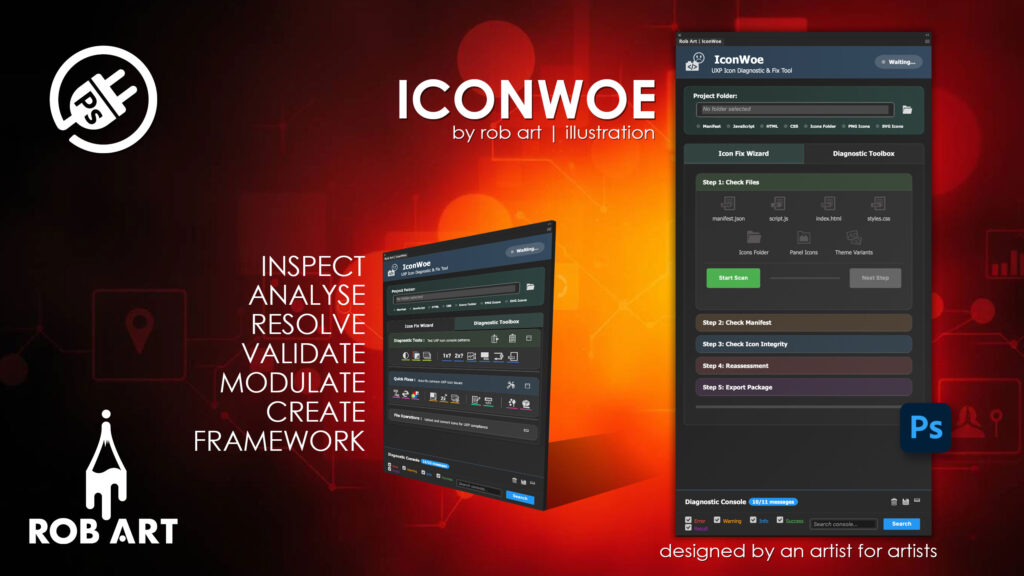
IconWoe
"Built by an artist for artists — IconWoe turns UXP icon chaos into certainty, ensuring your Photoshop plugins display clean, compliant icons without guesswork, silent failures, or wasted debugging time."
Stop UXP Icons From Failing Silently
IconWoe is a professional Photoshop UXP plugin that takes the pain, guesswork, and trial-and-error out of creating compliant icon assets. Built specifically for UXP developers, it validates, fixes, and generates complete icon sets that Photoshop accepts without warnings, errors, or silent failures.
Built for Adobe’s Strict UXP Rules
UXP icon handling is unforgiving: exact sizes, strict naming, explicit theme variants, and no automatic fallbacks. IconWoe encodes these rules directly into its engine. From validating your manifest to ensuring every required icon variant exists, it eliminates the most common reasons plugins fail to load icons correctly — even when Photoshop gives no feedback.
Guided Automation or Surgical Control
Use the IconWoe Wizard for a full end-to-end workflow that checks project structure, validates your manifest, verifies icon integrity, applies corrections, and confirms export readiness. Prefer hands-on control? The Toolbox gives you focused diagnostics, quick fixes, batch operations, and targeted repairs — all enforcing the same UXP rules, without forcing a linear workflow.
UXP-Ready Icon Generation, Done Properly
From a single base PNG, IconWoe generates the complete 8-file icon set required by Photoshop: light and dark themes, @1x and @2x resolutions, and both panel and menu sizes. Every file is square, RGB, alpha-safe, correctly named, and guaranteed to match what the manifest expects at runtime.
Designed for Real Plugin Development
IconWoe doesn’t just export images — it understands how UXP resolves icons, how manifests reference them, and where developers usually go wrong. Whether you’re migrating from CEP or building modern UXP plugins from scratch, IconWoe lets you focus on development instead of debugging invisible asset problems.
IconWoe is the missing link between Photoshop’s strict UXP expectations and a sane, repeatable icon workflow.
- Automated Wizard — full project validation and icon generation
- Toolbox diagnostics — identify silent UXP icon and manifest failures
- Complete icon sets — generates all 8 required PNG variants per icon
- Manifest validation — detects and fixes icon path and structure errors
- Theme handling — proper light and dark UI variants with correct overlays
- Resolution coverage — explicit @1x and @2x assets for HiDPI support
- Batch processing — fix and generate multiple icons in one pass
- Export readiness checks — prepare projects for CCX packaging
- Optional Photoshop scripts — educational and manual workflows included
- Built for UXP — no CEP assumptions, no hidden fallbacks
Requirements:
- Minimum PS Version: 23.3.0
- Internet Connection
- Valid accounts on Gumroad, Lemon Squeeze and Adobe Cloud
*Please note this plugin has the following built in languages: English
Plugin News
- There is a projected release date for V.1.0.0 for January 2026.
Changelog/Bugs
Changelog
IconWoe - Version History
Version 1.0.13 Major
2026-01-24- ### ✨ NEW FEATURES
- **Step 5 File Cleanup - WORKING**
- - Implemented working file deletion using UXP's fresh folder selection requirement
- - User prompted to select project folder for deletion permissions (UXP security requirement)
- - Cleanup warning overlay shows all files that will be removed before deletion
- - Deletes files immediately during traversal (not collected then deleted)
- - Bottom-up folder deletion (files first, then empty folders)
- - Removes: .md, .psd, .bmp, .gif, .tiff, .jpg, .jpeg, .bak, .tmp, .log, .map, dev folders, etc.
- **File Operations Panel - Icon Upload System**
- - Click-to-select interface for 8 required PNG icon files
- - Pattern validation: `*-dark@1x/2x.png`, `*-light@1x/2x.png`, `panel-*-dark@1x/2x.png`, `panel-*-light@2x.png`
- - File list display with validation status (✅ or ❌)
- - Upload confirmation button appears only when validation passes
- - User reviews selected files before uploading to icons folder
- - Clear error messages showing missing patterns
- ### 🐛 BUG FIXES
- **File Deletion Implementation**
- - Rewrote cleanup using ChatGPT research pattern for UXP file deletion
- - Key insight: UXP requires `fs.getFolder()` for deletion permissions (can't reuse read-only folder references)
- - Files deleted immediately during walk (not collected with stale references)
- - Folders tracked separately and deleted deepest-first after file deletion
- - Extension normalization with Set for consistent matching
- - Detailed logging with emoji indicators and success/error tracking
- **File Upload Validation**
- - Fixed validation to accept flexible base names (not hardcoded filenames)
- - Pattern matching: checks for correct structure, not exact names
- - Validates exactly 8 files with correct light/dark, @1x/@2x, panel/non-panel patterns
- - No duplicates allowed - each pattern must appear exactly once
- - Clear error messages: "Missing patterns: dark@1x, panel-light@2x"
- **Cleanup Warning Overlay**
- - Added note explaining folder selection prompt for deletion permissions
- - User understands they'll need to grant permission before cleanup runs
- ### 🔧 IMPROVEMENTS
- **Step 5 Export Validation**
- - Progress visualization with timed delays (500-600ms intervals)
- - Progress stops at 90% during validation, hits 100% only on success
- - Cleanup, structure validation, and export readiness checks with visual feedback
- - Success mode with "Export Ready" panel and deployment instructions
- **File Operations UI**
- - Updated text: "Click here to select the 8 required PNG icon files"
- - Pattern help text shows expected naming convention
- - File list container with flex layout for proper button placement
- - Green "Upload to Icons Folder" confirmation button
- - Success message after upload completes
- ### 📝 CODE CHANGES
- **New Patterns**
- ```javascript
- // UXP deletion requires fresh folder selection
- const folder = await fs.getFolder();
- // Delete files immediately during traversal
- for (const entry of entries) {
- if (shouldDelete(entry)) {
- await entry.delete(); // Fresh reference
- }
- }
- // Flexible icon pattern validation
- const patterns = {
- 'dark@1x': fileNames.filter(n => !n.startsWith('panel-') && n.includes('-dark@1x.png')),
- 'panel-dark@1x': fileNames.filter(n => n.startsWith('panel-') && n.includes('-dark@1x.png'))
- };
- ```
Version 1.0.12 Minor
2026-01-23- ### ✨ NEW FEATURES
- **Step 3 Auto Icon Generation**
- - Working auto-generation of all 8 icon variants (panel-{name}-light/dark @1x/@2x, {name}-light/dark @1x/@2x)
- - User opens base.png/base.svg in Photoshop, clicks Create button
- - Generates all variants with color overlays: #dddddd (221,221,221) for dark, #4d4d4d (77,77,77) for light
- - Progress bar with 100ms delays for visual feedback
- - Panel icons: 24x24 (@1x), 48x48 (@2x) - correct Adobe spec
- - Standard icons: 23x23 (@1x), 46x46 (@2x)
- **Smart Auto-Detection**
- - Automatically checks if all 8 icon variants already exist
- - If exist: skips auto-generation panel, shows validation panel directly
- - If missing: shows auto-generation panel with instructions
- - Detection runs when Step 3 becomes active
- ### 🐛 BUG FIXES
- **UXP File Token Issue - RESOLVED**
- - Switched from trying to open files with tokens to working on already-open documents
- - Simple approach: user opens file in Photoshop FIRST, then clicks Create
- - Uses `app.activeDocument` - no file tokens needed
- - Direct `doc.saveAs.png()` API calls - clean and reliable
- **Step 1 Panel Icon Validator**
- - Fixed to accept `panel-{name}-light@1x.png` format (not just `panel-light@1x.png`)
- - Changed from exact match to pattern match: `name.startsWith('panel-') && name.includes('light')`
- **Dimension Validator**
- - Now accepts BOTH 23x23/46x46 AND 24x24/48x48 for panel icons
- - Checks if filename contains "panel" OR manifest declares as plugin-panel type
- - Properly validates both naming conventions
- **Step 3 UI Layout**
- - Fixed buttons squashed to right side issue
- - Wrapped manual container in `step3-manual-wrapper` for proper flex column layout
- - Buttons now appear below validation icons correctly
- **Wizard Navigation**
- - Added null check for wizard-step parent element
- - Prevents "Cannot read properties of null (reading 'classList')" error
- ### 📄 FILES ADDED
- - `lib/wizard/step3-auto-generation-SIMPLE.js` - Working auto-generation using active document approach
- ### 📝 FILES MODIFIED
- - `lib/wizard/step1-file-structure.js` - Panel icon name pattern matching (lines 305-314)
- - `lib/toolkit/validators/icon-tests/test-wrong-size.js` - Dimension flexibility for panel icons
- - `index.html` - Step 3 wrapper structure, script tag for SIMPLE version
- - `styles.css` - Step 3 wrapper styling
- - `script.js` - Auto-detection logic, button wiring, null checks, wrapper references
- - `lib/core/version.js` - Updated VERSION to '1.0.12'
- - `_support/doc/CLAUDE.md` - Session 8 documentation
- - `_support/doc/CHANGELOG.md` - This file
Version 1.0.11 Minor
2026-01-23- ### ✨ NEW FEATURES
- **Step 2 Manifest Validation - Fix Panels**
- - Added professional fix panels for Host, Properties, and Permissions validators
- - All fix panels use checkbox-based UI for user configuration
- - Panels follow Read → Parse → Modify → Write pattern for safe file operations
- **Host Fix Panel** (`lib/wizard/repairs/fix-manifest-host.js`)
- - Automatically sets app to "PS" (Photoshop)
- - Sets minVersion to "23.3.0" (lowest supported version)
- - Optional checkbox to add maxVersion (uses current Photoshop version)
- - Auto-detects Photoshop version from `require('uxp').host.version`
- **Properties Fix Panel** (`lib/wizard/repairs/fix-manifest-properties.js`)
- - Validates and fixes: manifestVersion (5), id format (com.x.y), name, main (index.html)
- - Generates safe default ID from plugin name if invalid
- - Optional checkboxes for addon and featureFlags properties
- - Warnings for properties requiring additional configuration
- **Permissions Fix Panel** (`lib/wizard/repairs/fix-manifest-permissions.js`)
- - Network domains always added (set to ["all"] by default)
- - Optional checkboxes for: clipboard, localFileSystem, webview, launchProcess, ipc, allowCodeGenerationFromStrings
- - Creates stub structures for complex permissions
- - Warnings for permissions needing manual configuration
- **Manifest Order Validator** (`lib/toolkit/validators/manifest/manifest-order-validator.js`)
- - New validator checks if manifest keys are in Adobe's required order
- - Expected order: manifestVersion → id → name → version → main → host → type → entrypoints → icons → requiredPermissions
- - Auto-fix reorders keys using manifestUtils.writeManifest()
- ### 🔄 CHANGES
- **Step 2 Reorganization**
- - Removed field-formats validator (redundant with existing validators)
- - Added manifest-order validator at end of test sequence
- - Moved UI Legacy to end of Row 1 for 5x5 grid layout
- - New test order: Host → Properties → Permissions → EntryPoints → UI Legacy → Icon Structure → Version → Syntax → Typos → Key Order
- **UI Improvements**
- - Project panel field starts blank when plugin loads
- - Previous project path no longer auto-populated from localStorage
- - Fix panel checkboxes have proper white text styling (10px font)
- - Consistent panel behavior across all Step 2 validators
- ### 🐛 BUG FIXES
- **Properties Validator**
- - Removed host and entrypoints checks (handled by separate validators)
- - Now only validates core properties: manifestVersion, id, name, main
- ### 📝 TECHNICAL CHANGES
- **Updated Files:**
- - `index.html` - Added manifest-order-validator script, reorganized Step 2 UI (5x5 grid)
- - `step2-manifest-validation.js` - Updated tests array, added manifest-order to icon mapping
- - `properties-validator.js` - Removed redundant checks
- - `script.js` - Disabled localStorage auto-population for project path
- - `manifest.json` - Version bump to 1.0.11
Version 1.0.10 Major
2026-01-22- ### 🔄 MAJOR CHANGES
- **Wizard Step 1 - Complete Rewrite**
- - Completely rewrote `lib/wizard/step1-file-structure.js` (813 lines)
- - **REMOVED all fix functions** - validation only, no automatic fixes
- - Separated validation into two distinct stages
- - Much stricter validation requirements
- ### ✨ NEW FEATURES
- **Two-Stage Validation System**
- - **Stage 1: Name/Extension/Location**
- - Validates exact filenames (case-sensitive)
- - Checks file extensions match expected
- - Verifies files are in correct location (root)
- - Validates folder names are exactly correct
- - **Stage 2: File Type/Content**
- - Parses and validates file contents
- - Checks UXP compatibility
- - Validates file structures and formats
- - Binary validation for PNG files
- **Strict File Validation**
- - `manifest.json` - Must be EXACTLY this name
- - Rejects: manifest.jsn.json, manifest.txt, package.json, etc.
- - Stage 1: Name/location check
- - Stage 2: JSON parsing, UXP manifest structure, manifestVersion=5, required fields
- - `index.html` - Must be EXACTLY this name
- - Rejects: index.htm, main.html, plugin.html
- - Stage 2: HTML structure, no iframe elements
- - `script.js` - Must be EXACTLY this name
- - Rejects: script.jsx, main.js, index.js
- - Stage 2: JavaScript patterns, UXP import validation
- - `styles.css` - Must be EXACTLY this name (optional)
- - Rejects: style.css, main.css, style.ccs.css
- - Stage 2: CSS syntax, UXP compatibility warnings
- **Strict Icons Folder Validation**
- - Folder must be named exactly `icons`
- - Rejects: icon, images, ikon, Icons, ICONS, assets
- - Stage 1 failure if folder name is wrong
- - Helpful error: "Wrong folder name. Expected: 'icons', Found: icon"
- **Comprehensive PNG Validation**
- - **Required files (ALL must exist):**
- - `light@1x.png` or `panel-light@1x.png`
- - `light@2x.png` or `panel-light@2x.png`
- - `dark@1x.png` or `panel-dark@1x.png`
- - `dark@2x.png` or `panel-dark@2x.png`
- - **Filename requirements:**
- - Must include @1x or @2x scale indicator
- - Panel icons should use panel- prefix (optional)
- - **Binary validation:**
- - Checks PNG file signature (first 8 bytes)
- - Reads IHDR chunk for dimensions
- - @1x files MUST be 23x23 pixels
- - @2x files MUST be 46x46 pixels
- - Dimension errors show expected vs found
- **Enhanced Error Reporting**
- - Clear stage identification (Stage 1 vs Stage 2)
- - Specific error messages with helpful context
- - Shows similar files found when exact match missing
- - Lists all missing required files
- - Reports actual vs expected values (dimensions, versions)
- - Differentiates between missing (Stage 1) and broken (Stage 2) states
- **Validation Examples:**
- ```
- ✅ Stage 1 PASS: manifest.json has correct name, extension, and location
- ✅ Stage 2 PASS: manifest.json is valid
- ❌ Stage 1 FAIL: File "manifest.json" not found. Found similar: manifest.jsn.json
- ❌ Stage 1 FAIL: Wrong folder name. Expected: "icons", Found: icon
- ❌ Stage 2 FAIL: Missing light@1x.png or panel-light@1x.png
- ❌ Stage 2 FAIL: Wrong dimensions for @2x. Expected: 46x46, Found: 54x54
- ```
- ### 🔧 TECHNICAL IMPROVEMENTS
- **Code Architecture**
- - Clean separation of concerns (validation vs fixes)
- - Reusable validator functions for each file type
- - Consistent result objects with stage tracking
- - Better error propagation and reporting
- **Validation Functions**
- - `validateFileNameAndLocation()` - Generic file checker
- - `validateIconsFolderNameAndLocation()` - Folder name checker
- - `validateManifestJSON()` - UXP manifest validator
- - `validateHTML()` - HTML structure validator
- - `validateJavaScript()` - JS pattern validator
- - `validateCSS()` - CSS syntax validator
- - `validateIconsFolder()` - PNG naming validator
- - `validatePNGFile()` - Binary PNG validator with dimension check
- - `validateFile()` - Wrapper running both validation stages
- - `validateIconsStructure()` - Complete icons folder validation
- **UI Integration**
- - Updates icon states: valid (green), broken (orange), missing (greyed)
- - Shows/hides fix buttons based on validation state
- - Progress bar during scan
- - Summary with pass/fail counts
- - Next button only enabled when all required checks pass
- ### 🐛 FIXES
- - Fixed CSS file validation accepting wrong filenames
- - Fixed icons folder validation accepting "icon" instead of "icons"
- - Fixed PNG validation not checking for @1x/@2x in filenames
- - Fixed dimension validation not enforcing strict 23x23 / 46x46 requirements
- - Fixed validation passing with incomplete icon sets
- ### 📝 NOTES
- - All fix functions moved to separate files (to be wired to fix buttons later)
- - Validation now completely independent of fixes
- - Test project "IconWoe Wizard Run" created with intentional errors
- - Ready for fix button implementation in next session
Version 1.0.9 Major
2026-01-20- ### ✨ NEW FEATURES
- **First-Run Disclaimer**
- - Added disclaimer overlay on first launch with important information
- - Explains tool limitations and best-use scenarios
- - Provides link to test project folder download (https://robsnow.eu)
- - Test project section explains manual + automated fix workflows
- - localStorage flag prevents showing on subsequent launches
- - Hides project panel during disclaimer display
- **Fix JSON Syntax - COMPLETE**
- - Comprehensive manifest.json validation and auto-fixing
- - Scans for 8 categories of errors: formatting, ID, version, host config, entrypoints, paths, permissions, deprecated fields
- - Auto-fixes: manifestVersion, ID format (com. prefix), version format (preserves major number), app code (PSD→PS), minVersion format, entrypoint type (panels→panel), icon folder typos (icon/→icons/), backslashes
- - Manual warnings: invalid characters, missing fields, permission security risks, inconsistent structures
- - Photoshop version validation: detects versions < 23 or > 27 as invalid
- - Version dropdown selector when minVersion is invalid (PS 2022-2025)
- - Auto-selects current running PS version if nothing chosen
- - Smart folder path correction (detects icon/ vs icons/ typo)
- - Network domain validation (adds https:// protocol)
- - Report shows auto-fixable vs manual review sections
- - "Run Auto-Fix" button appears only when fixable issues exist
- - Re-scans after fix and updates report
- - Button disappears when all auto-fixes complete
- **Batch Process - COMPLETE**
- - Smart pre-scan of project to show only needed fixes
- - Scans for: SVG files, grayscale PNGs, missing alpha channels, wrong dimensions, 48x48 doc open, missing theme variants, manifest issues
- - Only displays fixes actually needed (saves screen space)
- - Shows count: "Fixes Needed (3)"
- - Sequential execution with 500ms delay between fixes
- - Checkboxes unchecked by default
- - "Run Fix(es)" button shows count and appears only when ≥1 selected
- - Report section with ✓/✗ status for each fix
- - Successfully completed fixes hidden from list on re-open
- - "All fixes completed!" message when list is empty
- - Excludes Batch Process and Export Package from list
- **Export Package - COMPLETE**
- - Full project validation before packaging
- - Scans for console/debugger/alert statements in JS files
- - Detects TODO/FIXME comments
- - Identifies junk files: .git, .DS_Store, node_modules, .vscode, README, etc.
- - Validates all manifest icon references exist
- - Recursive folder size calculation (accurate MB total)
- - 50MB package size warning
- - Optional backup checkbox (checked by default)
- - Creates timestamped backup folder: `PluginName_backup_2025-01-20_143022`
- - Full recursive folder copy for backup
- - "Prepare Package" button deletes junk files
- - Completion report with backup location and deleted file count
- - Next Steps instructions for UXP Developer Tool
- - Code validation issues flagged for manual review (not auto-fixed)
- ### 🐛 BUG FIXES
- **Batch Process Function Names**
- - Fixed mismatched function names causing "Fix function not found" errors
- - Corrected: showConvertGrayscaleRGBFix → showGrayscaleToRGBFix
- - Corrected: showAddAlphaFix → showAddAlphaChannelFix
- **Export Package File Size**
- - Fixed recursive folder scanning (was only checking root level)
- - Now accurately calculates total package size including all subfolders
- - Uses Blob size calculation for accurate file size detection
- ### 🎨 UI/UX IMPROVEMENTS
- **Tab Content Auto-sizing**
- - Changed from fixed height to dynamic sizing based on content
- - min-height: 300px, max-height: calc(100vh - 290px)
- - Added 10px bottom padding
- - Content now auto-sizes instead of always being 100% height
- **Fix Panel Consistency**
- - Fix JSON Syntax panel now uses standard styling (fix-header-section, fix-main-icon)
- - Close button changed to blue gradient (fix-ok-btn) to match other panels
- - Proper spacing between sections (20px margin-top)
- - Icon centered at 60px like other fix panels
- **Disclaimer Styling**
- - Green-themed test project section with border and background
- - Link styling with hover effect
- - Professional layout with icon and clear messaging
- - Scrollable content area for long text
Version 1.0.7 Major
2026-01-19- ### ✨ NEW FEATURES
- **Create Theme Variants Fix - COMPLETE**
- - Automatically creates light and dark theme variants from base icon files
- - Scans icons folder for all @1x and @2x PNG files
- - Applies color overlay: RGB(221, 221, 221) for dark theme, RGB(77, 77, 77) for light theme
- - Uses Photoshop batchPlay API for color overlay and rasterization
- - Creates new files with -dark and -light suffixes (e.g., icon-dark@2x.png)
- - Original files remain unchanged
- - Processes all base files automatically (4 base → 8 total with variants)
- - Button hides after completion (one-time action)
- **Inject Manifest Template - COMPLETE**
- - Quick fix to generate clean, Adobe-compliant manifest.json
- - Auto-scans icons folder to detect available icon files
- - Smart defaults from existing manifest (ID, name, version, permissions)
- - Normalizes plugin ID to proper format (com.company.pluginname)
- - Removes 'v' prefix from version numbers
- - Validates semantic versioning (x.y.z)
- - Auto-generates icon arrays with correct theme mappings
- - Preserves existing permissions and localization
- - Panel/Command plugin type selector
- - Uses Read→Parse→Modify→Write pattern for safe JSON handling
- - Removes `species` field (not required)
- - Shows reminder to use Wizard for full validation
- ### 🎨 UI/UX IMPROVEMENTS
- **Massive Interface Compaction**
- - Reduced all icons throughout app by 5px (then adjusted specific ones for usability)
- - Made project folder icon and panel toggle icons larger (32px and 26px)
- - Reduced diagnostic/quick fix test icons to 34px
- - Reduced wizard file-check icons to 36px
- - Panel paddings reduced by 3px across the board
- - Wizard step panel heights reduced by 20px
- - All text in File Operations panel reduced by 2px
- - Panel indicator text reduced by 2px (now 9px)
- - Wizard step content spacing reduced by 6px between rows
- **Fix Panel Size Optimization**
- - All fix panel icons reduced by 15px (75px → 60px main icon)
- - Header text: 18px → 14px
- - Body text: 13px → 11px (description, steps, notes)
- - Section titles: 20px → 16px (h2), 14px → 12px (h3)
- - Button text: 14px → 12px
- - All padding reduced by 2-4px throughout
- - Step number badges: 32px → 26px
- - Notes sections padding: 15px/20px → 13px/18px
- - Footer buttons: 8px/24px → 6px/20px padding
- - Much more compact and space-efficient panels
- **Layout Fixes**
- - Fixed File Operations panel toggle (now opens/closes properly with display: flex)
- - Tab content height now calc(100vh - 290px) to not go under console panel
- - Properly accounts for collapsed console height (50px)
- - Content scrollable within proper bounds
- - Wizard accordion height reduced to 560px
- **Icon Swapping**
- - Swapped Generate @2x and Theme Variants icons order
- - Now: Resize → Generate @2x → Theme Variants (logical workflow)
- ### 🔧 TECHNICAL IMPROVEMENTS
- **Theme Variants Implementation**
- - Uses batchPlay commands from user-recorded Photoshop action
- - Color overlay with solidFill layer effect
- - Rasterize layer style to flatten effect
- - Revert to original between dark/light variants
- - Close document without saving to preserve originals
- - Smart hasBeenRun flag prevents button showing after completion
- - Resets flag when panel reopens for reusability
- **Manifest Injection Architecture**
- - Smart icon file detection with pattern matching
- - Separates panel icons (panel-*) from root icons
- - Generates proper icon arrays for entrypoints and root
- - Auto-detects plugin type from existing manifest
- - Form validation with helpful format hints
- - Custom form HTML injected into fix panel body
- - Event listener on Generate button triggers manifest write
- **Multi-line Manifest Solution**
- - Documented safe pattern: Read → Parse → Modify → Write
- - Avoids cursor position issues and file token invalidation
- - Uses JSON.parse() and JSON.stringify() for structure manipulation
- - No raw text slicing/insertion fragility
- - Guarantees clean JSON output with proper formatting
- ### 📝 DOCUMENTATION
- **New Documents**
- - `_support/doc/multi_line_manifest.txt` - Safe pattern for JSON file manipulation in UXP
- - Explains Read→Parse→Modify→Write approach
- - Covers cursor position preservation in textareas
- - Best practices for JSON structure modification
Version 1.0.6 Major
2026-01-18- ### ✨ NEW FEATURES
- **SVG to PNG Converter - COMPLETE**
- - Interactive selection dialog with checkboxes for each SVG file found in icons folder
- - User selects which SVGs to convert (prevents converting UI SVGs meant for app interface)
- - Opens each selected SVG in Photoshop, saves as 24-bit transparent PNG, closes document
- - Original SVG files remain untouched
- - Custom SVGConverterPanel class with checkbox UI
- - File list scrollable (max 200px) for many files
- - Orange accent color matching app theme
- - Manual alternative instructions included
- **Add Alpha Channel Fix - COMPLETE**
- - Informational-only fix panel (no automation)
- - Explains that automation isn't possible without knowing design intent
- - Reassures users their files are probably already 24-bit
- - Provides step-by-step manual verification and fix process
- - Points users to SVG→PNG converter as better alternative
- - Clear instructions for checking RGB mode, transparency, and proper PNG export
- ### 🎨 UI ENHANCEMENTS
- **SVG Selection Dialog**
- - Light grey filenames (#cccccc) for better readability
- - Darker background (rgba(0,0,0,0.3)) for unchecked items
- - Unchecked items show at 40% opacity with darker grey text (#666666)
- - Checked items show at 100% opacity with full brightness
- - Smooth transitions when toggling checkboxes
- - Used `!important` to override inherited panel styles
- **Fix Panel Behavior**
- - X close button and Close button both clear selected state from fix icon
- - Tick removed from fix button when panel closes (via X or Close)
- - Form fields hidden when dialog opens
- - Consistent behavior across all fix panels
- ### 🔧 TECHNICAL IMPROVEMENTS
- **Code Architecture**
- - Custom panel class extends fix panel system with checkbox functionality
- - Reusable pattern for future multi-selection fixes
- - Event listeners properly wired in script.js
- - CSS scoped to avoid conflicts with parent panel styles
- ### 📝 FILES MODIFIED
- - `lib/toolkit/repairs/convert-svg-to-png.js` - Complete rewrite with selection UI
- - `lib/toolkit/repairs/add-alpha-channels.js` - Complete rewrite as informational panel
- - `lib/ui/fix-panel.js` - Added selected state clearing on hide
- - `script.js` - Added event listeners for SVG→PNG and Add Alpha fixes
- - `styles.css` - Added SVG selection container styles with proper color overrides
- - `lib/core/version.js` - Updated to 1.0.6
Version 1.0.5 Major
2026-01-18- **Generate All Icon Variants Fix - COMPLETE**
- - Auto-generates all 4 required UXP icon sizes from 48x48 base file
- - Creates: filename@2x.png (48x48), filename@1x.png (24x24), panel-filename@2x.png (46x46), panel-filename@1x.png (23x23)
- - Saves directly to icons folder (creates folder if needed)
- - Uses UXP file system API for reliable file operations
- - Automatic revert between each resize operation to maintain quality
- - Closes document after completion to trigger button hide
- - Button only appears when 48x48 document is open
- - Full console logging shows progress for each variant
- ### 🎨 UI ENHANCEMENTS
- **Quick Fixes Toolbar Reorganization**
- - Reordered fix icons for logical workflow:
- - Row 1: Format Conversion (SVG→PNG, Convert RGB, Add Alpha) - fix issues first
- - Row 2: Auto-Generation (Resize, Theme Variants, Generate @2x) - create variants second
- - SVG to PNG moved to first position in format conversion row
- **Fix Panel Instructions**
- - Added manual alternative instructions to Resize Icons fix
- - Added manual alternative instructions to Generate All Variants fix
- - Consistent instruction format across all fix panels
- ### 🔧 TECHNICAL IMPROVEMENTS
- **File Operations**
- - UXP file system integration for creating files in icons folder
- - Proper error handling with detailed error messages
- - Uses Photoshop doc.saveAs.png() instead of complex batchPlay save commands
- - Bicubic Sharper interpolation for high-quality downsampling
- - Document close operation ensures proper button state update
- **Code Quality**
- - Better error messages (handles undefined error objects)
- - Improved folder selection logic (project folder → icons subfolder)
- - Full console error logging for debugging
- ### 🐛 BUG FIXES
- **Generate @2x Fix**
- - Fixed "Run Fix" button not disappearing after completion (closes document)
- - Fixed folder.createFile error (switched to proper UXP API)
- - Fixed undefined error messages in catch blocks
- - Fixed files saving to wrong location (now saves to icons folder)
Version 1.0.4 Major
2026-01-18- ### ✨ NEW FEATURES
- **Report Panel System**
- - Comprehensive test results storage and display
- - Report overlay with pass/fail/warning counts
- - Save report to file functionality using UXP file system API
- - Empty state display when no tests run yet
- - Report accessible via report.svg icon next to Run Test button
- - Summary counts with status-based result grouping
- **Fix Panel System**
- - Reusable overlay panel for fix instructions and actions
- - Dynamic "Run Fix" button based on document conditions
- - Real-time monitoring (every 2 seconds) of document state
- - Smart button behavior (hideAfterRun property)
- - Close button as SVG icon
- **Automated Fix Tools**
- - Convert Grayscale to RGB mode
- - Converts grayscale PNG to RGB mode and saves
- - Button visible only when document open AND in grayscale mode
- - Supports batch workflow (convert multiple files)
- - Resize Icons to 48x48
- - Handles non-square images by centering on square canvas first
- - Resizes to 48x48 (largest icon size for quality)
- - Button visible only when document open AND NOT already 48x48
- ### 🎨 UI ENHANCEMENTS
- **Overlay Panels**
- - Fix/Report overlays hide form elements when open
- - Tooltips hide when overlays open, reappear when closed
- - Text sizes reduced: title 20px, description/steps 13px
- - Print icon enlarged to 40px
- - Report and fix panels z-index 2000 (above tooltips at 1001)
- **File Operations Panel**
- - Hidden by default (toggle to show)
- - Open panel icon indicates expandable state
- ### 🔧 TECHNICAL IMPROVEMENTS
- **Fix Integration**
- - Each fix in separate JS file in `lib/toolkit/repairs/`
- - Fixes wire up to Photoshop batchPlay API
- - executeAsModal pattern for Photoshop operations
- - Automatic tick removal after successful fix action
- **Report Integration**
- - All diagnostic tests store results in report panel
- - Test result parsing extracts pass/fail/warning counts
- - Formatted text report export
- ### 🐛 BUG FIXES
- **Report Panel**
- - Fixed tooltip persistence issue when overlays open
- - Fixed test result parsing showing incorrect pass/fail counts
- - Fixed report panel initialization location
- **Diagnostic Tests**
- - Better error handling for missing icons folder
- - Improved error messages with actionable suggestions
Version 1.0.3 Major
2026-01-17- ### ✨ NEW FEATURES
- **Complete Diagnostic Test Suite**
- - Icon dimension validation (entrypoint 23x23, panel 23/24x24)
- - SVG panel icon detection (UXP requires PNG for panels)
- - Manifest path validation with @1x/@2x variant checking
- - Comprehensive manifest validation (syntax + required fields + theme coverage)
- **Centralized Version Management**
- - Created `lib/core/version.js` as single source of truth
- - Wired version into splash screen display
- ### 🔧 TECHNICAL IMPROVEMENTS
- **Modular Test Architecture**
- - Converted all diagnostic tests from monolithic script.js to modular lib structure
- - All tests route through `lib/toolkit/diagnostic-tests.js`
- - Each test wrapped in IIFE to avoid scope conflicts
- - All tests use `currentProjectFolderEntry` for UXP file access
- **Enhanced Path Validation**
- - Manifest declares base name with scale array
- - Validates @1x/@2x variants based on scale array
- - Handles naming conventions correctly
- **Improved Dimension Validation**
- - Clarified entrypoint icons must be 23x23 (@1x)
- - Plugin panel icons accept both 23x23 and 24x24 (@1x)
- - Helpful notes when using alternate acceptable sizes
- ### 🎨 UI ENHANCEMENTS
- **Console Panel Improvements**
- - Fixed console showing during splash screen
- - Fixed console height (was only 50% of available space)
- - Changed to hide only form fields when console open
- - Auto-deselect test checkboxes after running
- ### ⚙️ MAINTENANCE
- **Code Cleanup**
- - Removed legacy test code from script.js
- - Replaced with comments pointing to lib files
Version 1.0.2 Major
2026-01-16- ### ✨ NEW FEATURES
- **Additional Diagnostic Tests**
- - @1x file pairing validation
- - @2x file pairing validation
- - Light/dark variant validation (filenames + manifest)
- ### 🔧 TECHNICAL IMPROVEMENTS
- **Test Pattern Standardization**
- - All tests provide clear RESULT summary lines
- - Consistent error messaging with solution suggestions
- - Unified IIFE pattern across all tests
- ### 🐛 BUG FIXES
- - Theme fallback test now skips SVG files (tested separately)
- - @1x/@2x tests check for file existence, not dimensions
Version 1.0.1 Minor
2026-01-15- ### ✨ NEW FEATURES
- **Alpha Channel Detection**
- - Three-stage detection: PNG header → tRNS chunk → pixel sampling
- - Detects "opaque alpha" problem (RGBA files that are 100% opaque)
- - Checks if alpha channel is actually used vs just present
- ### 🔧 TECHNICAL IMPROVEMENTS
- **Modular Test Structure**
- - Moved tests from script.js to `lib/toolkit/validators/icon-tests/`
- - Created diagnostic routing system through diagnostic-tests.js
- ### 🐛 BUG FIXES
- - IIFE scope isolation prevents variable redeclaration errors
- - Proper UXP file access using `currentProjectFolderEntry`
Version 1.0.0 Major
2025-12-29- ### 🎉 INITIAL RELEASE
- **Core Diagnostic Engine**
- - Project folder selection and scanning
- - File structure validation (manifest, JS, HTML, CSS, icons)
- - Console panel with filtering (info, warning, error, success, result)
- **Grayscale PNG Detection**
- - PNG header analysis (byte 25 color type detection)
- - Identifies Grayscale (0), RGB (2), Indexed (3), Grayscale+Alpha (4), RGBA (6)
- - Pixel-level fallback detection with compression tolerance
- **UI Components**
- - Splash screen with loading animation
- - Project panel with file status indicators
- - Diagnostic test panel with selectable tests
- - Console output panel with message filtering
- - Fix tools panel (placeholder)
- **Architecture**
- - Modular lib structure for core engines
- - Diagnostic engine for logging and status tracking
- - Console engine for message display and filtering
- - Splash engine for startup experience
- **Technical Details**
- - Built for Adobe Photoshop UXP (Manifest v5)
- - Minimum Photoshop version: 23.3.0
- - Uses UXP storage API for file operations
- - Implements PNG binary file header analysis
- ---
- ## Version Format
- Versions follow [Semantic Versioning](https://semver.org/):
- - MAJOR version for incompatible API changes
- - MINOR version for new functionality (backward-compatible)
- - PATCH version for bug fixes (backward-compatible)
- ## Categories
- - **✨ NEW FEATURES** - New functionality
- - **🎨 UI ENHANCEMENTS** - Visual improvements
- - **🔧 TECHNICAL IMPROVEMENTS** - Under-the-hood improvements
- - **🐛 BUG FIXES** - Bug fixes
- - **📋 DOCUMENTATION** - Documentation changes
- - **⚙️ MAINTENANCE** - Code cleanup, refactoring
- - **🔒 SECURITY** - Security improvements
Bugs
IconWoe - Known Issues
No known issues at this time.
Updates
IconWoe - Latest Update
Release Notes:
✨ NEW FEATURES
- **Step 5 File Cleanup - WORKING**
- Implemented working file deletion using UXP's fresh folder selection requirement
- User prompted to select project folder for deletion permissions (UXP security requirement)
- Cleanup warning overlay shows all files that will be removed before deletion
- Deletes files immediately during traversal (not collected then deleted)
- Bottom-up folder deletion (files first, then empty folders)
- Removes: .md, .psd, .bmp, .gif, .tiff, .jpg, .jpeg, .bak, .tmp, .log, .map, dev folders, etc.
- **File Operations Panel - Icon Upload System**
- Click-to-select interface for 8 required PNG icon files
- Pattern validation: `*-dark@1x/2x.png`, `*-light@1x/2x.png`, `panel-*-dark@1x/2x.png`, `panel-*-light@2x.png`
- File list display with validation status (✅ or ❌)
- Upload confirmation button appears only when validation passes
- User reviews selected files before uploading to icons folder
- Clear error messages showing missing patterns
🐛 BUG FIXES
- **File Deletion Implementation**
- Rewrote cleanup using ChatGPT research pattern for UXP file deletion
- Key insight: UXP requires `fs.getFolder()` for deletion permissions (can't reuse read-only folder references)
- Files deleted immediately during walk (not collected with stale references)
- Folders tracked separately and deleted deepest-first after file deletion
- Extension normalization with Set for consistent matching
- Detailed logging with emoji indicators and success/error tracking
- **File Upload Validation**
- Fixed validation to accept flexible base names (not hardcoded filenames)
- Pattern matching: checks for correct structure, not exact names
- Validates exactly 8 files with correct light/dark, @1x/@2x, panel/non-panel patterns
- No duplicates allowed - each pattern must appear exactly once
- Clear error messages: "Missing patterns: dark@1x, panel-light@2x"
- **Cleanup Warning Overlay**
- Added note explaining folder selection prompt for deletion permissions
- User understands they'll need to grant permission before cleanup runs
🔧 IMPROVEMENTS
- **Step 5 Export Validation**
- Progress visualization with timed delays (500-600ms intervals)
- Progress stops at 90% during validation, hits 100% only on success
- Cleanup, structure validation, and export readiness checks with visual feedback
- Success mode with "Export Ready" panel and deployment instructions
- **File Operations UI**
- Updated text: "Click here to select the 8 required PNG icon files"
- Pattern help text shows expected naming convention
- File list container with flex layout for proper button placement
- Green "Upload to Icons Folder" confirmation button
- Success message after upload completes
📝 CODE CHANGES
- **New Patterns**
- ```javascript
- // UXP deletion requires fresh folder selection
- const folder = await fs.getFolder();
- // Delete files immediately during traversal
- for (const entry of entries) {
- if (shouldDelete(entry)) {
- await entry.delete(); // Fresh reference
- }
- }
- // Flexible icon pattern validation
- const patterns = {
- 'dark@1x': fileNames.filter(n => !n.startsWith('panel-') && n.includes('-dark@1x.png')),
- 'panel-dark@1x': fileNames.filter(n => n.startsWith('panel-') && n.includes('-dark@1x.png'))
- };
- ```
Download:
Requires: Adobe Photoshop 23.3.0 or later
Documentation and Tutorials
Additional Learning Resources
A detailed PDF User Guide is available for download using the link provided below. This document explains all key features and functions of the plugin, helping you become familiar with its tools and workflow so you can make the most of your creative process.
For hands-on demonstrations and walkthroughs, visit our YouTube channel, where a full series of video tutorials cover everything you need to get started with the app. These videos provide visual guidance, practical examples, and helpful tips to ensure a smooth and productive learning experience.
To stay updated with new tutorials, feature overviews, and upcoming releases, subscribe to the channel here: RobArt Illustration
PDF User Manual Link(s): English (UK)